> ## Documentation Index
> Fetch the complete documentation index at: https://docs.t3planet.de/en/latest/llms.txt
> Use this file to discover all available pages before exploring further.
# Installation
# Installation
Just install this extension the usual way like any other TYPO3 extension.
## 1. Get the extension
In the TYPO3 backend you can use the extension manager (EM).
Step 1. Switch to the module “Extension Manager”.
Step 2. Get the extension.
Step 3. Get it from the Extension Manager: Press the “Retrieve/Update” button and search for the extension key ns\_cookies and import the extension from the repository.
Step 4. Get it from typo3.org: You can always get the current version from [https://extensions.typo3.org/extension/ns\_cookies](https://extensions.typo3.org/extension/ns_cookies) by downloading either the t3x or zip version. Upload the file afterwards in the Extension Manager.
 ## 2. Activate the TypoScript
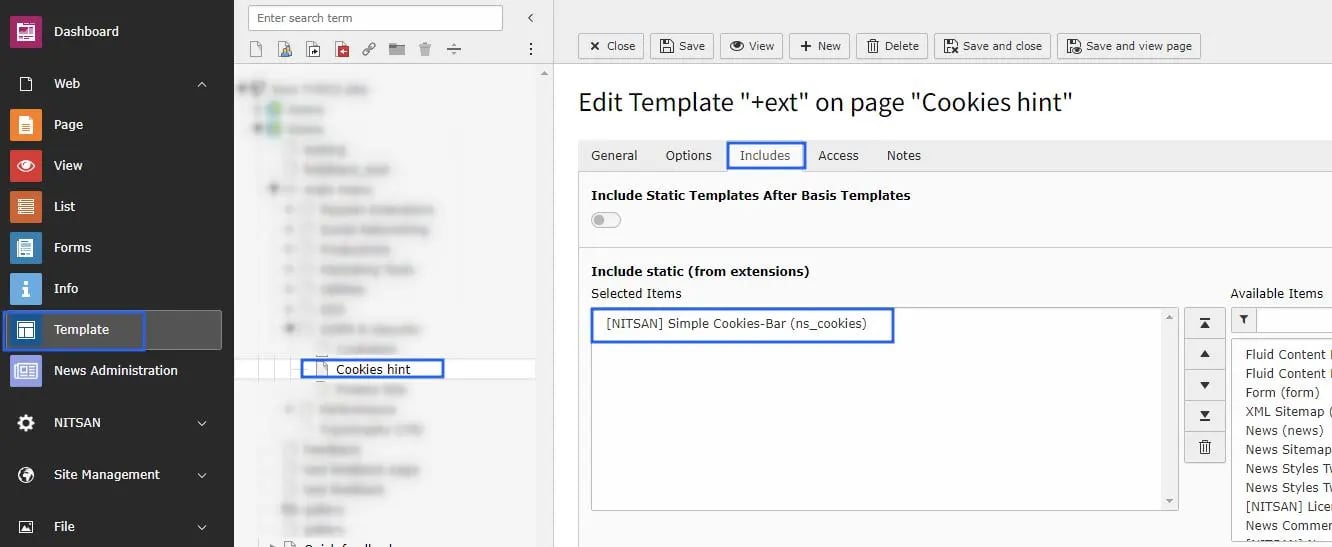
The extension ships some static TypoScript code which needs to be included.
Step 1. Switch to the root page of your site.
Step 2. Switch to the Template module and select Info/Modify.
Step 3. Click the link Edit the whole template record and switch to the tab Includes.
Step 4. Select \[NITSAN] cookies hint at the field Include static (from extensions):
Step 5. Include \[NITSAN] cookies the last place.
## 2. Activate the TypoScript
The extension ships some static TypoScript code which needs to be included.
Step 1. Switch to the root page of your site.
Step 2. Switch to the Template module and select Info/Modify.
Step 3. Click the link Edit the whole template record and switch to the tab Includes.
Step 4. Select \[NITSAN] cookies hint at the field Include static (from extensions):
Step 5. Include \[NITSAN] cookies the last place.
 ## How to Install TYPO3 Extension ns\_cookies\_hint
**Extension Installation Via without Composer mode**
[https://www.youtube.com/watch?v=SN5HoFQcDM4](https://www.youtube.com/watch?v=SN5HoFQcDM4)
**Extension Via Composer**
[https://www.youtube.com/watch?v=\_7ILu4lwU-k](https://www.youtube.com/watch?v=_7ILu4lwU-k)
## Figures
## How to Install TYPO3 Extension ns\_cookies\_hint
**Extension Installation Via without Composer mode**
[https://www.youtube.com/watch?v=SN5HoFQcDM4](https://www.youtube.com/watch?v=SN5HoFQcDM4)
**Extension Via Composer**
[https://www.youtube.com/watch?v=\_7ILu4lwU-k](https://www.youtube.com/watch?v=_7ILu4lwU-k)
## Figures

