> ## Documentation Index
> Fetch the complete documentation index at: https://docs.t3planet.de/en/latest/llms.txt
> Use this file to discover all available pages before exploring further.
# Comment Plugin Settings
## Adding the Comment Plugin
You can add the News Comment plugin from the "Add Element" wizard.
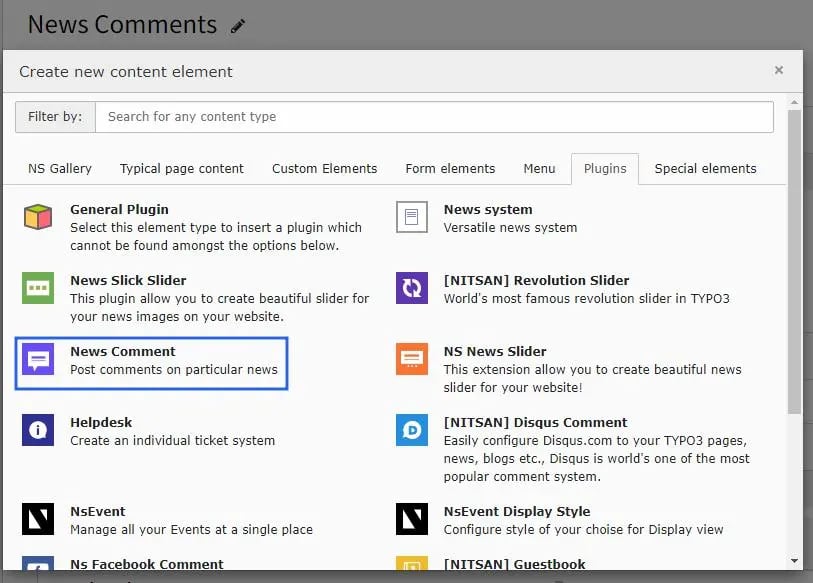 Once added, configure the settings for the Comment plugin as follows:
**Main Configuration**
Once added, configure the settings for the Comment plugin as follows:
**Main Configuration**
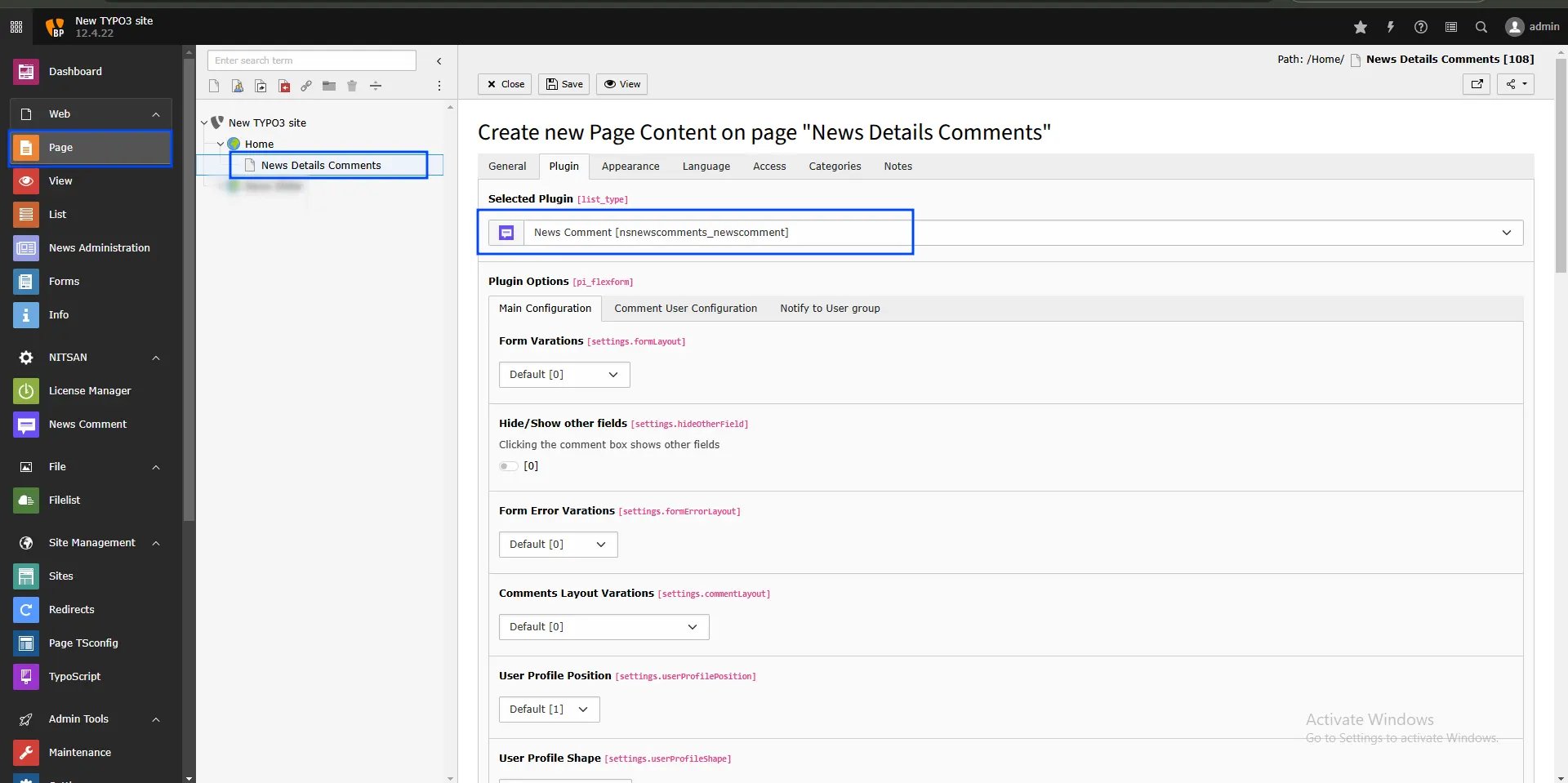 **Form Layout Variations:** Defines the overall layout style of the form.
**Hide/Show Other Fields:** Toggles additional fields when the comment box is clicked.
**Form Error Variations:** Sets the style for displaying form error messages.
**Comments Layout Variations:** Controls the layout style of the displayed comments.
**User Profile Position:** Determines the position of the user profile display.
**Form Layout Variations:** Defines the overall layout style of the form.
**Hide/Show Other Fields:** Toggles additional fields when the comment box is clicked.
**Form Error Variations:** Sets the style for displaying form error messages.
**Comments Layout Variations:** Controls the layout style of the displayed comments.
**User Profile Position:** Determines the position of the user profile display.
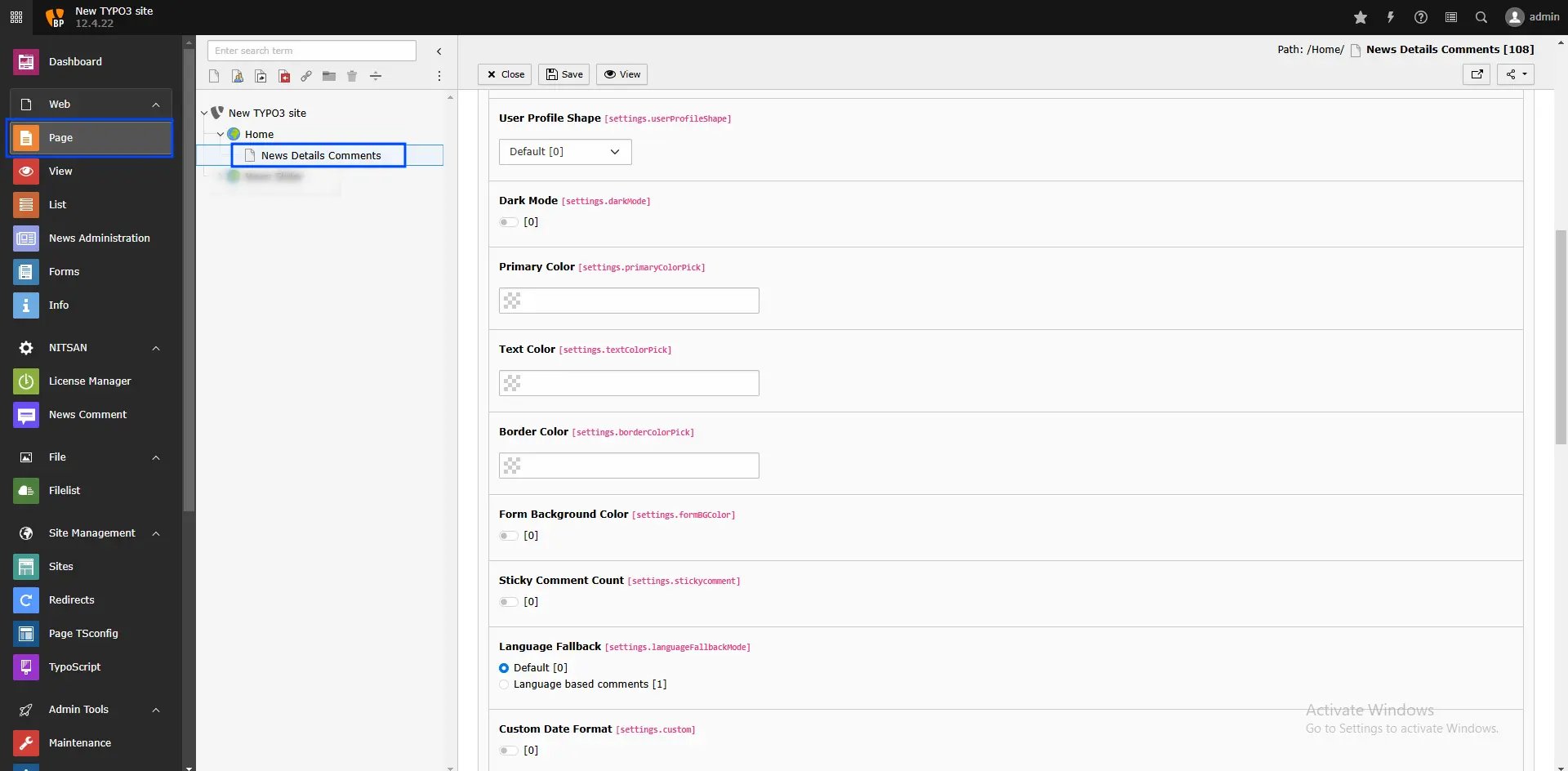 **User Profile Shape:** Specifies the shape of the user profile display.
**Dark Mode:** Enables dark mode for the form.
**Primary Color:** Sets the main color for form elements.
**Text Color:** Determines the color of the form’s text.
**Border Color:** Sets the border color of the form fields.
**Form Background Color:** Specifies the form's background color.
**Sticky Comment Count:** Shows the number of comments on the sticky comment icon.
**Language Fallback:** This option helps display comments in different site languages.
**Custom Date Format:** Enables custom date formatting for comments.
**User Profile Shape:** Specifies the shape of the user profile display.
**Dark Mode:** Enables dark mode for the form.
**Primary Color:** Sets the main color for form elements.
**Text Color:** Determines the color of the form’s text.
**Border Color:** Sets the border color of the form fields.
**Form Background Color:** Specifies the form's background color.
**Sticky Comment Count:** Shows the number of comments on the sticky comment icon.
**Language Fallback:** This option helps display comments in different site languages.
**Custom Date Format:** Enables custom date formatting for comments.
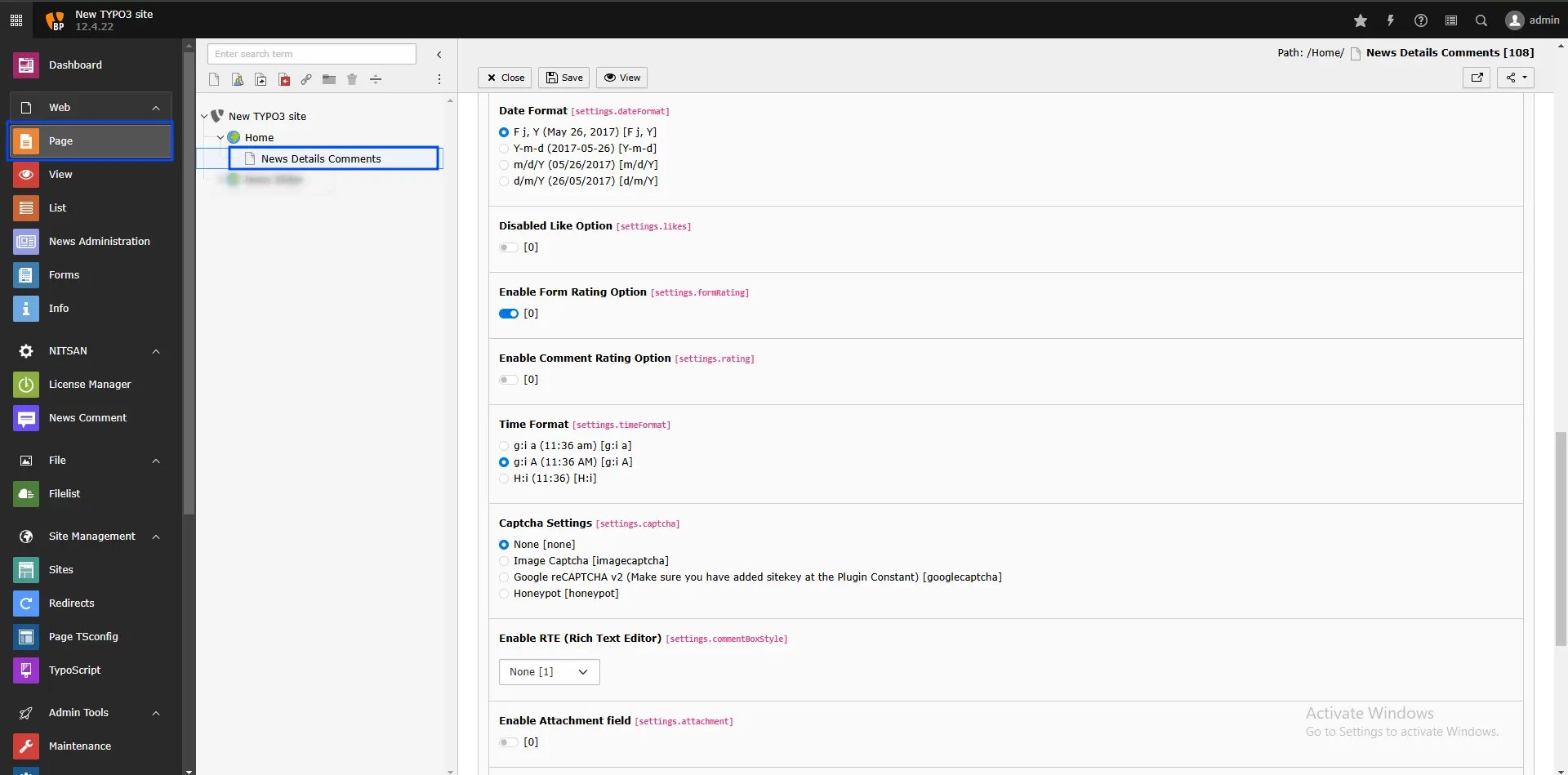 **Date Format:** Selects the format for displaying dates (e.g., F j, Y or Y-m-d).
**Disabled Like Option:** Hides the like/unlike buttons on comments.
**Enable Form Rating Option:** Allows users to rate the form itself.
**Enable Comment Rating Option:** Enables rating for individual comments.
**Time Format:** Sets the display format for time (e.g., ga or H).
**Captcha Settings:** Configures CAPTCHA to prevent spam, with options including:
* **None:** Disables CAPTCHA.
* **Image Captcha:** Displays an image-based CAPTCHA for users.
**Date Format:** Selects the format for displaying dates (e.g., F j, Y or Y-m-d).
**Disabled Like Option:** Hides the like/unlike buttons on comments.
**Enable Form Rating Option:** Allows users to rate the form itself.
**Enable Comment Rating Option:** Enables rating for individual comments.
**Time Format:** Sets the display format for time (e.g., ga or H).
**Captcha Settings:** Configures CAPTCHA to prevent spam, with options including:
* **None:** Disables CAPTCHA.
* **Image Captcha:** Displays an image-based CAPTCHA for users.
 If using the free version with CAPTCHA enabled, the image CAPTCHA will appear in the comment form.
If you select Image Captcha, you need to rename `_.htaccess` to `.htaccess` in the folder `/typo3conf/ext/ns_news_comments/Resources/Private/`.
If using the free version with CAPTCHA enabled, the image CAPTCHA will appear in the comment form.
If you select Image Captcha, you need to rename `_.htaccess` to `.htaccess` in the folder `/typo3conf/ext/ns_news_comments/Resources/Private/`.
 * **Google reCAPTCHA v2:** Shows Google reCAPTCHA v2. Ensure you add your site key in the plugin constants.
 **Enable RTE (Rich Text Editor):** Allows rich text editing in the comment box.
**Enable Attachment Field:** Adds an attachment upload option to the comment form.
**Enable RTE (Rich Text Editor):** Allows rich text editing in the comment box.
**Enable Attachment Field:** Adds an attachment upload option to the comment form.
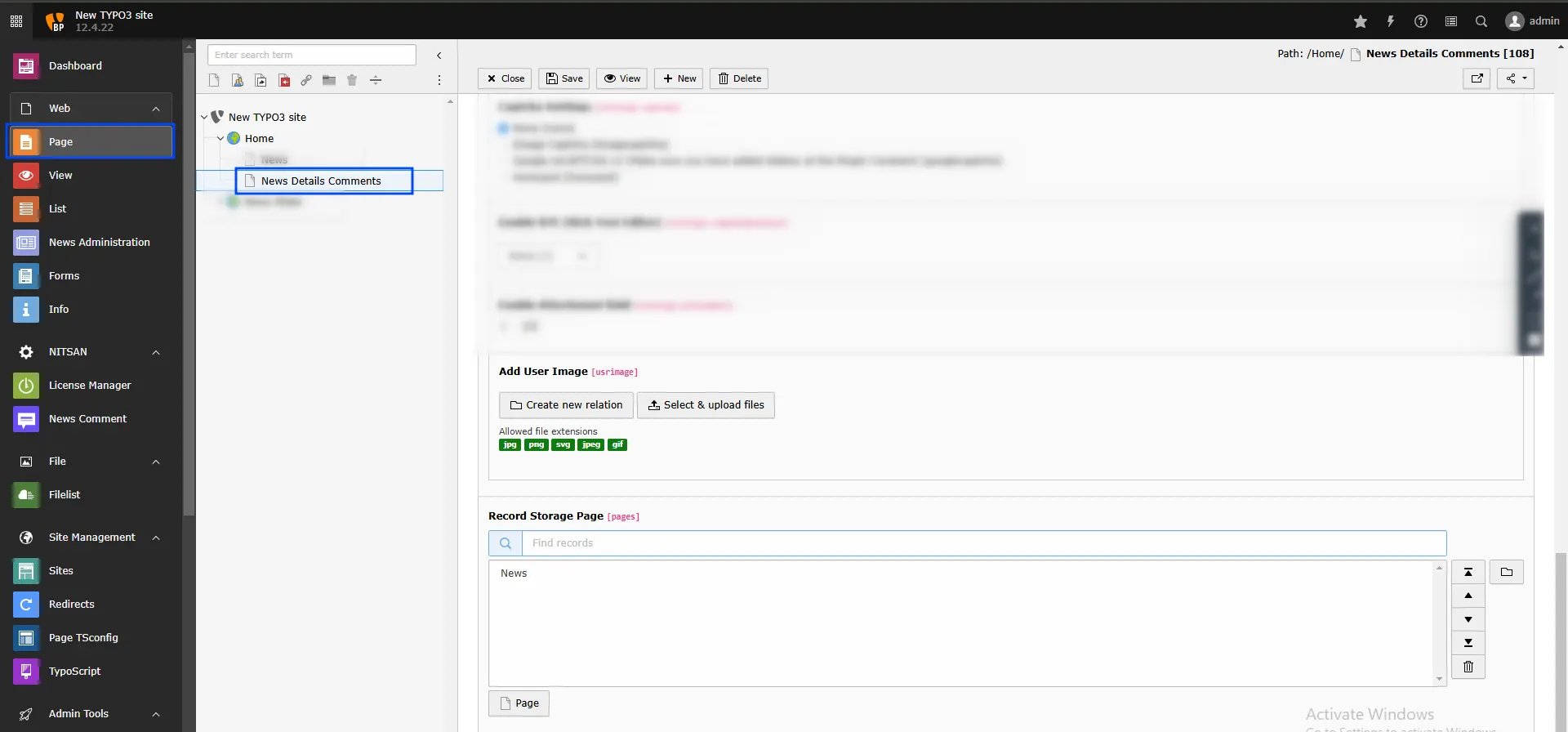 **Add User Image:** Allows users to upload a profile image with their comments.
**Record Storage Page:** Defines the page where form records will be stored.
**Add User Image:** Allows users to upload a profile image with their comments.
**Record Storage Page:** Defines the page where form records will be stored.