> ## Documentation Index
> Fetch the complete documentation index at: https://docs.t3planet.de/en/latest/llms.txt
> Use this file to discover all available pages before exploring further.
# Fix Hub
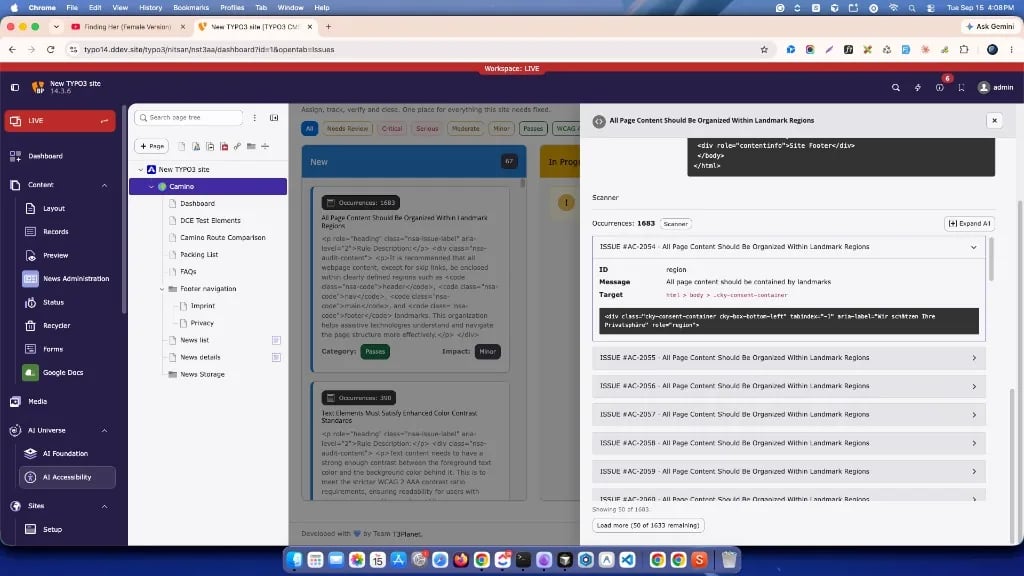
> **Fix Hub** is where you **assign, track, verify, and close** accessibility work for the selected page path.
**Fix Hub** is where you **assign, track, verify, and close** accessibility
work for the selected page path.
**A scan reports findings. Fix Hub is where the work happens.**
Findings on the board come from:
* **Scanner** runs (HTML / WCAG-oriented checks)
* **Lighthouse** runs (PageSpeed accessibility audits)
Both sources appear as cards/rows you can filter, open, and move through status
until completed. Fix Hub does **not** run the scan itself.
## Fix Hub board
 ## How to open Fix Hub
1. Open **AI Accessibility**.
2. Select a page in the page tree.
3. Open the **Fix Hub** tab.
If the board is empty, run a **Scanner** check first, then return here. Use
**Go to Scans** when the empty state offers it.
Findings from **Scanner** and **Lighthouse** both appear on this board after a
completed run (see above).
## Board view
| Column | Meaning |
| ----------- | ------------------------- |
| New | Not started |
| In Progress | Work has started |
| Completed | Fixed / verified / closed |
## Filters
Use the toolbar to show only what you need:
* All, Needs Review
* Critical / Serious / Moderate / Minor
* Passes
* WCAG A / AA / AAA, Best Practice, WCAG 4.1.2
## Issue detail
Click a card to open the detail panel. Typical content:
* Description, WCAG / guideline tags, impact
* Source label (**Scanner** or **Lighthouse**)
* **How to fix** and related guidance
* Occurrences with target selectors and HTML snippets
* **Status** (**New** / **In Progress** / **Completed**) with **Update**
Use occurrences to move from the rule to the specific markup that needs fixing.
## Color contrast checker
The toolbar (and empty state) can open a **color contrast checker**.
* Check a foreground / background pair against WCAG 1.4.3 (AA) and 1.4.6 (AAA)
* No AI provider, no key, and no scan required
## How to open Fix Hub
1. Open **AI Accessibility**.
2. Select a page in the page tree.
3. Open the **Fix Hub** tab.
If the board is empty, run a **Scanner** check first, then return here. Use
**Go to Scans** when the empty state offers it.
Findings from **Scanner** and **Lighthouse** both appear on this board after a
completed run (see above).
## Board view
| Column | Meaning |
| ----------- | ------------------------- |
| New | Not started |
| In Progress | Work has started |
| Completed | Fixed / verified / closed |
## Filters
Use the toolbar to show only what you need:
* All, Needs Review
* Critical / Serious / Moderate / Minor
* Passes
* WCAG A / AA / AAA, Best Practice, WCAG 4.1.2
## Issue detail
Click a card to open the detail panel. Typical content:
* Description, WCAG / guideline tags, impact
* Source label (**Scanner** or **Lighthouse**)
* **How to fix** and related guidance
* Occurrences with target selectors and HTML snippets
* **Status** (**New** / **In Progress** / **Completed**) with **Update**
Use occurrences to move from the rule to the specific markup that needs fixing.
## Color contrast checker
The toolbar (and empty state) can open a **color contrast checker**.
* Check a foreground / background pair against WCAG 1.4.3 (AA) and 1.4.6 (AAA)
* No AI provider, no key, and no scan required