> ## Documentation Index
> Fetch the complete documentation index at: https://docs.t3planet.de/en/latest/llms.txt
> Use this file to discover all available pages before exploring further.
# Scanner
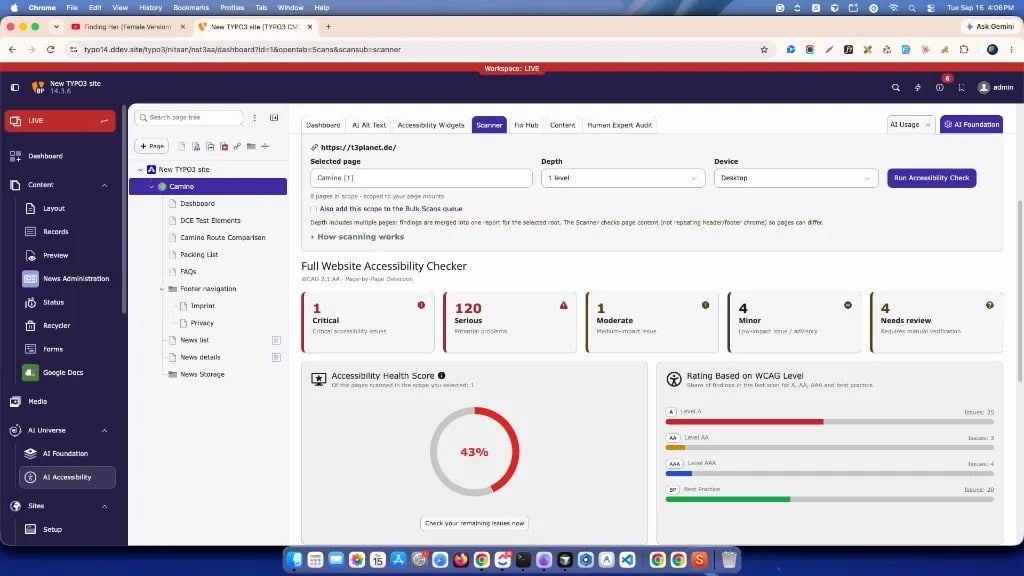
> **Scanner** is the AI Accessibility area where you **check pages** for accessibility problems for the page selected in the TYPO3 page tree.
**Scanner** is the AI Accessibility area where you **check pages** for
accessibility problems for the page selected in the TYPO3 page tree.
**A scan reports findings.** [Fix Hub](/en/latest/en/latest/FixHub/Index) is where you
**track and close** the remediation work.
The main tab is labelled **Scanner**. Inside it you will find:
* **Scanner** — interactive accessibility check (this is the primary engine)
* **Lighthouse** — Google PageSpeed Insights for one public URL
* **Bulk Scans** — queue pages for scheduled / repeated Scanner runs
(not a separate scan engine)
## Scanner overview
 ## How it works
1. Open **AI Accessibility**.
2. Select the page (or site root) to use as the scan root.
3. Open the **Scanner** tab.
4. Stay on the **Scanner** sub-tab.
5. Confirm the site URL, set **Depth** and **Device**, then click
**Run Accessibility Check**.
6. When the run finishes, review the summary cards and issue list.
7. Open a finding to continue in **Fix Hub**.
## What the Scanner checks
The Scanner checks the **HTML content** of pages in your selected scope
(page + depth) against WCAG-oriented rules.
* It focuses on **page content** (not repeating header/footer chrome), so
sibling pages can differ.
* When depth includes multiple pages, findings are **merged into one report**
for the selected root.
* There is **no separate URL list** to maintain — pick a page in the tree,
choose depth, run (similar to TYPO3 LinkValidator).
* The Scanner needs **no AI provider and no API key**.
**A scan reports findings. Fix Hub is where work happens.**
License **scan page quota** applies: each page scanned in the run counts
against **Pages remaining**. See [Dashboard](/en/latest/en/latest/ExtNsT3AA/FeatureGuide/Dashboard/Index) for how
quota works.
## Scanner vs other Scanner-tab tools
| Area | Role |
| -------------- | ----------------------------------------------------------------------------------------------------------------------------------------------------------------------------- |
| **Scanner** | Interactive WCAG-oriented HTML check. Primary button: **Run Accessibility Check**. This is the main scan engine. |
| **Lighthouse** | Calls Google PageSpeed Insights for **one public URL**. Separate tool; needs a PageSpeed API key. See [Lighthouse](/en/latest/en/latest/ExtNsT3AA/FeatureGuide/Scans/Lighthouse/Index). |
| **Bulk Scans** | **Queue / schedule** for repeated **Scanner** runs — not a third scan engine. See [Bulk Scans](/en/latest/en/latest/ExtNsT3AA/FeatureGuide/Scans/BulkScans/Index). |
## Common controls
* **Selected page** — from the page tree
* **Depth** — this page only, 1–3 levels, or infinite
* **Device** — Desktop, Mobile, or Both (where offered)
* **Scan page quota** — pages scanned / remaining / license limit
* Optional: add the current scope to the Bulk Scans queue
## After a scan
* Findings appear on the **Fix Hub** board for the same scope
* Dashboard tiles update from completed results
* Re-run after publishing fixes to verify improvements
Detailed guides:
## Important notes
* Scanner needs a valid T3AA license for accessibility scans; it does **not**
need an AI provider.
* For licensed remote audits, the site URL must be a **publicly reachable**
absolute URL (for example `https://example.com/`). Relative bases such as
`/finance/` can break URL building.
* **Lighthouse** always needs a Google PageSpeed API key and a URL Google can
reach (`.ddev.site` / `localhost` will not work).
* Bulk Scans depends on Scheduler configuration for automated processing.
## Scanner areas
## How it works
1. Open **AI Accessibility**.
2. Select the page (or site root) to use as the scan root.
3. Open the **Scanner** tab.
4. Stay on the **Scanner** sub-tab.
5. Confirm the site URL, set **Depth** and **Device**, then click
**Run Accessibility Check**.
6. When the run finishes, review the summary cards and issue list.
7. Open a finding to continue in **Fix Hub**.
## What the Scanner checks
The Scanner checks the **HTML content** of pages in your selected scope
(page + depth) against WCAG-oriented rules.
* It focuses on **page content** (not repeating header/footer chrome), so
sibling pages can differ.
* When depth includes multiple pages, findings are **merged into one report**
for the selected root.
* There is **no separate URL list** to maintain — pick a page in the tree,
choose depth, run (similar to TYPO3 LinkValidator).
* The Scanner needs **no AI provider and no API key**.
**A scan reports findings. Fix Hub is where work happens.**
License **scan page quota** applies: each page scanned in the run counts
against **Pages remaining**. See [Dashboard](/en/latest/en/latest/ExtNsT3AA/FeatureGuide/Dashboard/Index) for how
quota works.
## Scanner vs other Scanner-tab tools
| Area | Role |
| -------------- | ----------------------------------------------------------------------------------------------------------------------------------------------------------------------------- |
| **Scanner** | Interactive WCAG-oriented HTML check. Primary button: **Run Accessibility Check**. This is the main scan engine. |
| **Lighthouse** | Calls Google PageSpeed Insights for **one public URL**. Separate tool; needs a PageSpeed API key. See [Lighthouse](/en/latest/en/latest/ExtNsT3AA/FeatureGuide/Scans/Lighthouse/Index). |
| **Bulk Scans** | **Queue / schedule** for repeated **Scanner** runs — not a third scan engine. See [Bulk Scans](/en/latest/en/latest/ExtNsT3AA/FeatureGuide/Scans/BulkScans/Index). |
## Common controls
* **Selected page** — from the page tree
* **Depth** — this page only, 1–3 levels, or infinite
* **Device** — Desktop, Mobile, or Both (where offered)
* **Scan page quota** — pages scanned / remaining / license limit
* Optional: add the current scope to the Bulk Scans queue
## After a scan
* Findings appear on the **Fix Hub** board for the same scope
* Dashboard tiles update from completed results
* Re-run after publishing fixes to verify improvements
Detailed guides:
## Important notes
* Scanner needs a valid T3AA license for accessibility scans; it does **not**
need an AI provider.
* For licensed remote audits, the site URL must be a **publicly reachable**
absolute URL (for example `https://example.com/`). Relative bases such as
`/finance/` can break URL building.
* **Lighthouse** always needs a Google PageSpeed API key and a URL Google can
reach (`.ddev.site` / `localhost` will not work).
* Bulk Scans depends on Scheduler configuration for automated processing.
## Scanner areas