> ## Documentation Index
> Fetch the complete documentation index at: https://docs.t3planet.de/en/latest/llms.txt
> Use this file to discover all available pages before exploring further.
# How it works
> How the AI agent of AI Foundation uses the page you are editing as its context, and the four steps every request follows: open, ask, review and approve, check.
The AI agent works on **the page you are editing**. When you open it, it takes that page as its context. It reads the page and its content when needed, and every change it prepares applies to that page. Every request follows the same four steps. The AI agent never skips step 3 for a change.
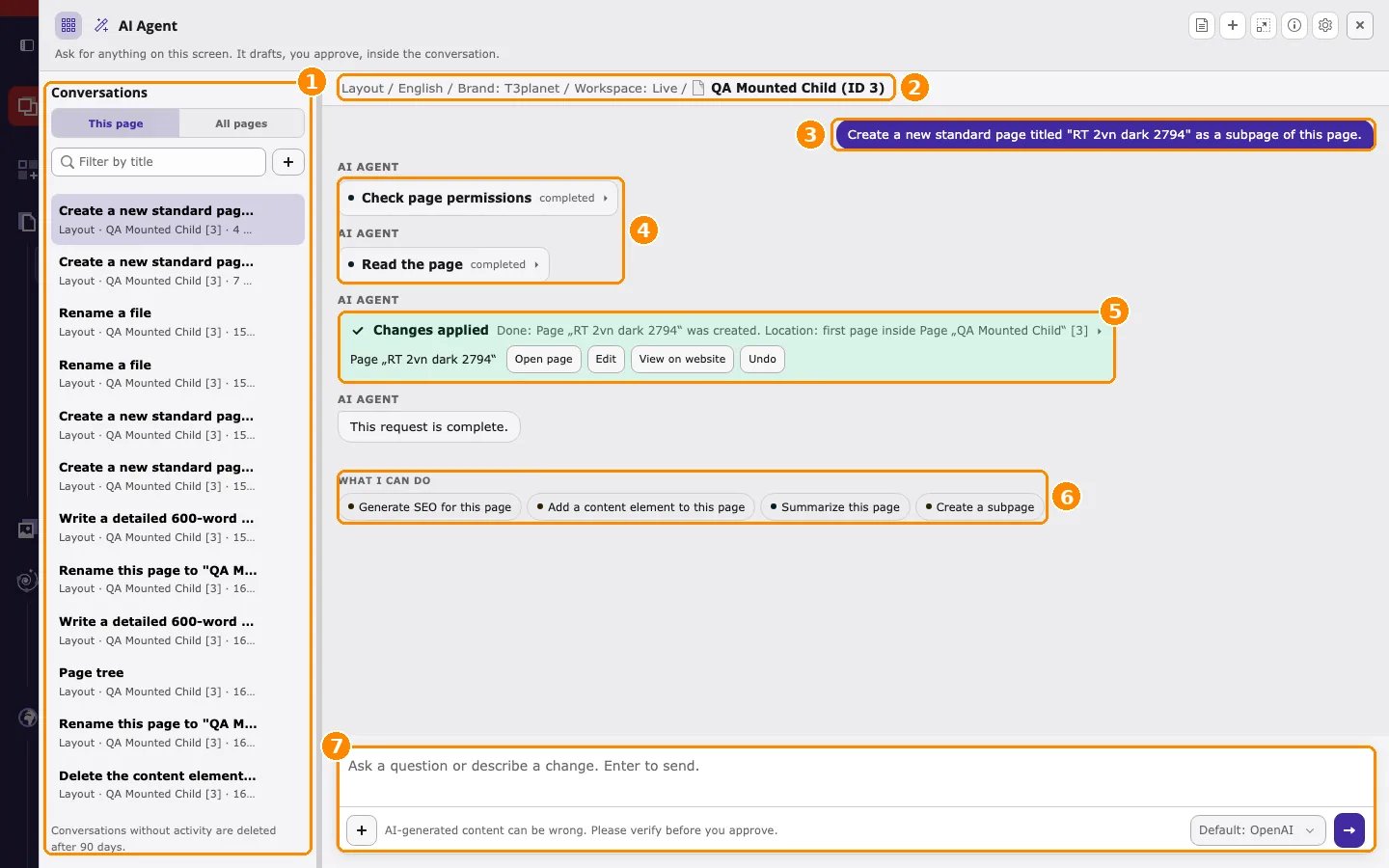 *A completed request in the AI agent window.*
The numbers in the screenshot mark:
1. **Conversations**, filtered by **This page** or **All pages**.
2. The **context line**: the page the AI agent works on, with its site, language, and workspace.
3. Your request.
4. Read steps the AI agent ran, each marked **completed**.
5. The applied change with **Open page**, **Edit**, **View on website**, and **Undo**.
6. **What I can do**: suggested next requests for this page.
7. The **message field** and the AI provider used for the conversation. Choose the provider in the dropdown below the message field (for example **Default: OpenAI**) before you send the first message. See [Change the AI provider](/en/latest/en/latest/ExtNsT3AF/AskAiAgent/WhereOpens/Index#ask-ai-agent-where-provider).
The four steps of every request:
1. **Open on a page** — Select the page you are editing, then click **Ask AI Agent**. The context line shows that page with its language and workspace. "This page" in your request always means the page shown there.
2. **Ask** — Type your request and press Enter. The AI agent selects the tools it needs. **Read tools** (for example `pages_get`) run immediately and return an answer.
3. **Review and approve** — If the request needs a change, the AI agent prepares a **change card** for the page, marked **Preview — nothing changed yet**. Click **Apply** to write it, or **Cancel** to discard it.
4. **Check the result** — After **Apply**, the card shows **Changes applied** with links to the record and an **Undo** button.
The AI agent works with **your** backend permissions. It cannot read or change anything that your backend account cannot access.
This documentation is built and hosted on [Mintlify](https://mintlify.com), a developer documentation platform.
*A completed request in the AI agent window.*
The numbers in the screenshot mark:
1. **Conversations**, filtered by **This page** or **All pages**.
2. The **context line**: the page the AI agent works on, with its site, language, and workspace.
3. Your request.
4. Read steps the AI agent ran, each marked **completed**.
5. The applied change with **Open page**, **Edit**, **View on website**, and **Undo**.
6. **What I can do**: suggested next requests for this page.
7. The **message field** and the AI provider used for the conversation. Choose the provider in the dropdown below the message field (for example **Default: OpenAI**) before you send the first message. See [Change the AI provider](/en/latest/en/latest/ExtNsT3AF/AskAiAgent/WhereOpens/Index#ask-ai-agent-where-provider).
The four steps of every request:
1. **Open on a page** — Select the page you are editing, then click **Ask AI Agent**. The context line shows that page with its language and workspace. "This page" in your request always means the page shown there.
2. **Ask** — Type your request and press Enter. The AI agent selects the tools it needs. **Read tools** (for example `pages_get`) run immediately and return an answer.
3. **Review and approve** — If the request needs a change, the AI agent prepares a **change card** for the page, marked **Preview — nothing changed yet**. Click **Apply** to write it, or **Cancel** to discard it.
4. **Check the result** — After **Apply**, the card shows **Changes applied** with links to the record and an **Undo** button.
The AI agent works with **your** backend permissions. It cannot read or change anything that your backend account cannot access.
This documentation is built and hosted on [Mintlify](https://mintlify.com), a developer documentation platform.