> ## Documentation Index
> Fetch the complete documentation index at: https://docs.t3planet.de/en/latest/llms.txt
> Use this file to discover all available pages before exploring further.
# AI Context
> AI Context for EXT:ns_t3af (T3AF).
## Purpose
Store your **brand profile** once. T3AF injects it into prompts for consistent, on-brand results across all connected extensions.
\*\*Path:\*\*T3AF > AI Context
Follow this interactive walkthrough, then continue with the details below.
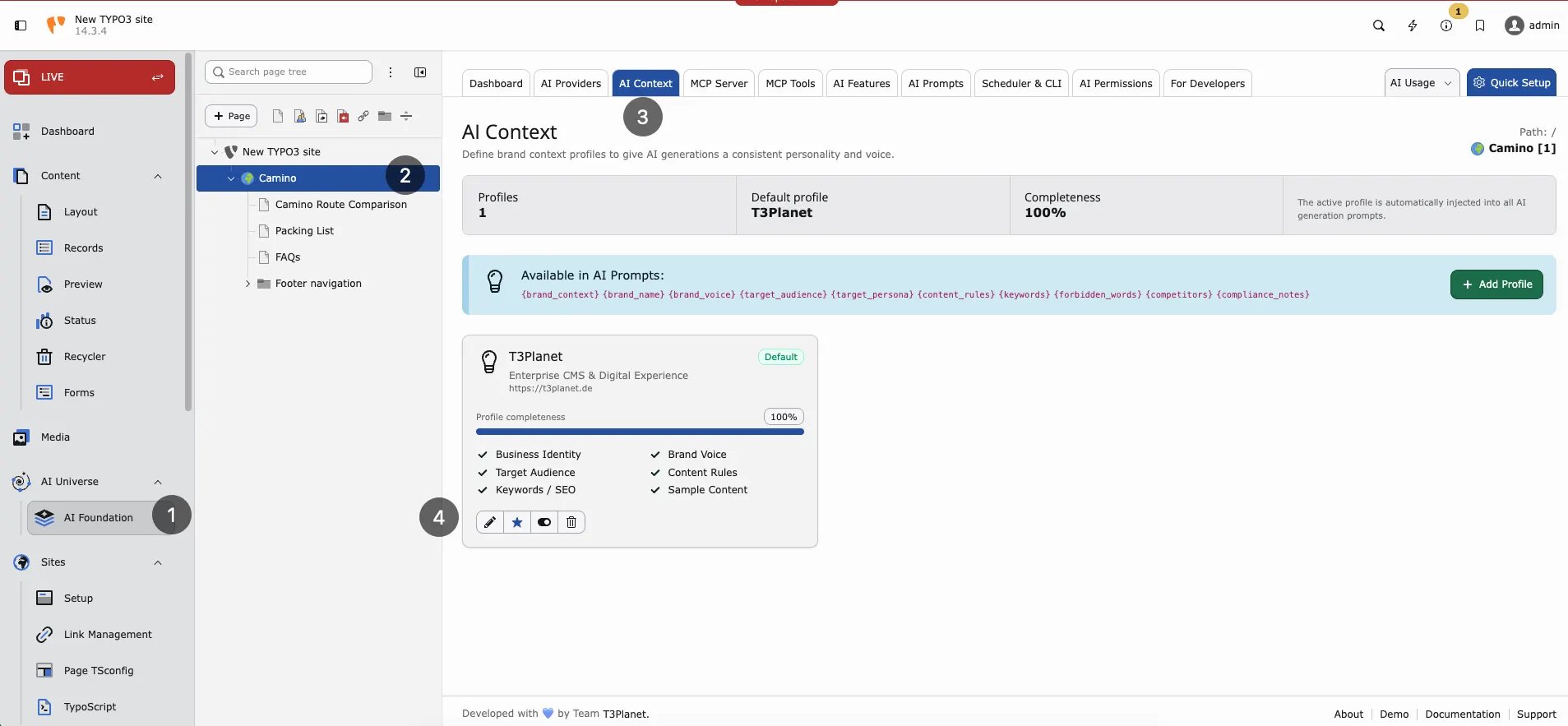 AI Context — brand profiles, completeness, and prompt variables.
## What to store
* **Company name** — For example Finance Company GmbH
* **Industry** — For example financial services
* **Audience** — For example SME owners in Germany
* **Brand voice** — Professional, clear, trustworthy
* **Key messages** — Digital-first, personal service
* **SEO keywords** — finance, banking, loans
* **Language style** — German formal (Sie) or simple English
## Why it matters
Without context, AI output sounds generic. With context, text matches your brand and market. Every editor benefits without retyping instructions.
## Setup (3 steps)
1. Open T3AF > AI Context
2. Fill business identity fields
3. Save — extensions use it automatically on the next AI request
AI Context — brand profiles, completeness, and prompt variables.
## What to store
* **Company name** — For example Finance Company GmbH
* **Industry** — For example financial services
* **Audience** — For example SME owners in Germany
* **Brand voice** — Professional, clear, trustworthy
* **Key messages** — Digital-first, personal service
* **SEO keywords** — finance, banking, loans
* **Language style** — German formal (Sie) or simple English
## Why it matters
Without context, AI output sounds generic. With context, text matches your brand and market. Every editor benefits without retyping instructions.
## Setup (3 steps)
1. Open T3AF > AI Context
2. Fill business identity fields
3. Save — extensions use it automatically on the next AI request
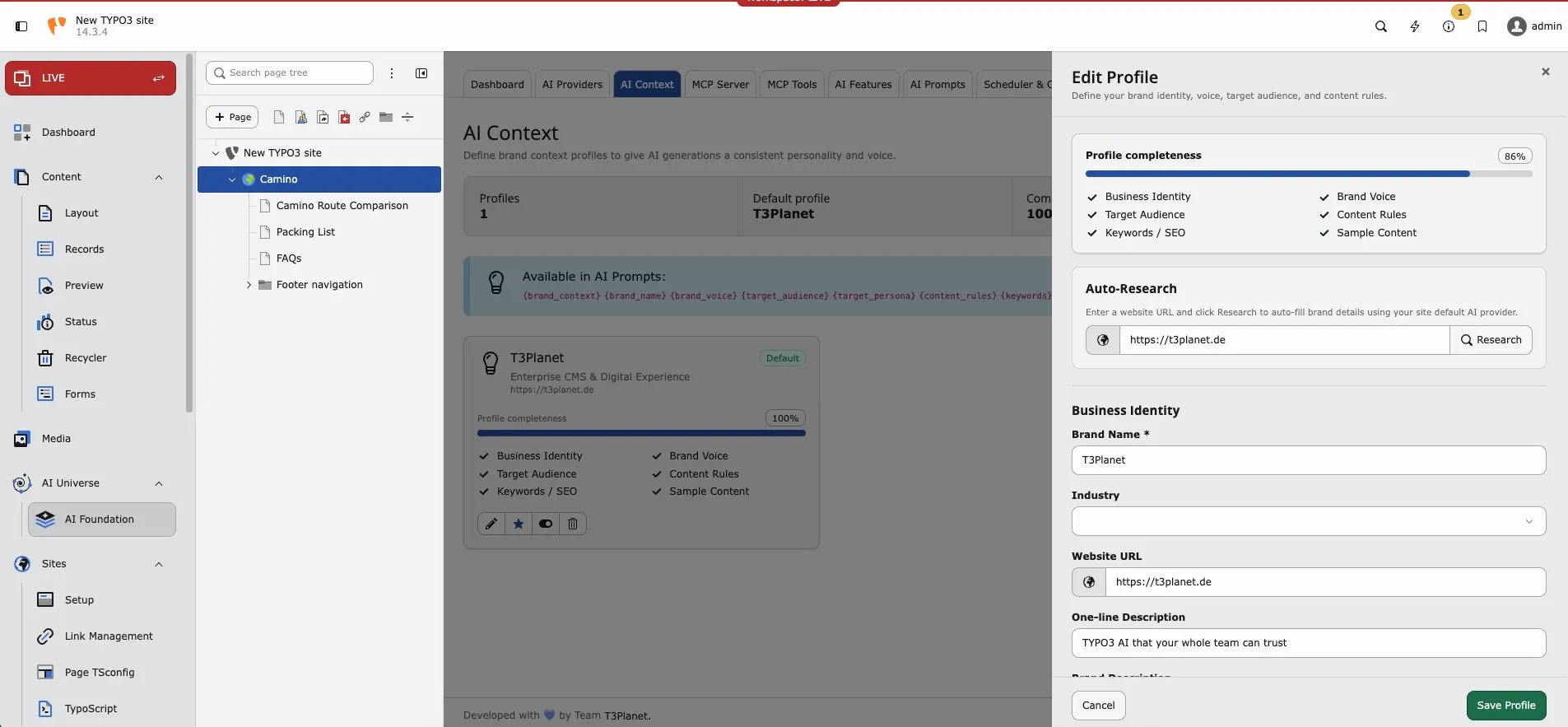 Edit profile — auto-research and business identity fields.
## When to update AI Context
* Rebrand or new product line
* New target market (for example expand from DE to EN)
* Compliance change (formal Sie required everywhere)
* After [AI Prompts](/en/latest/en/latest/ExtNsT3AF/Configuration/AIPrompts/Index) changes still produce off-brand text
## Scenario: multi-language site
Set language style to “German formal (Sie) for DE; simple English for EN”. Add brand terms that must stay untranslated. Connected translation features will respect this context.
See also [AI Prompts](/en/latest/en/latest/ExtNsT3AF/Configuration/AIPrompts/Index) for task-specific instructions.
Edit profile — auto-research and business identity fields.
## When to update AI Context
* Rebrand or new product line
* New target market (for example expand from DE to EN)
* Compliance change (formal Sie required everywhere)
* After [AI Prompts](/en/latest/en/latest/ExtNsT3AF/Configuration/AIPrompts/Index) changes still produce off-brand text
## Scenario: multi-language site
Set language style to “German formal (Sie) for DE; simple English for EN”. Add brand terms that must stay untranslated. Connected translation features will respect this context.
See also [AI Prompts](/en/latest/en/latest/ExtNsT3AF/Configuration/AIPrompts/Index) for task-specific instructions.