> ## Documentation Index
> Fetch the complete documentation index at: https://docs.t3planet.de/en/latest/llms.txt
> Use this file to discover all available pages before exploring further.
# AI Usage & Logs
> AI Usage & Logs for EXT:ns_t3af (T3AF).
## Purpose
**Transparency** for every AI request on your TYPO3 instance. Use these screens for budget control, debugging, and compliance.
## AI Usage
\*\*Path:\*\*T3AF > AI Usage
Follow this interactive walkthrough, then continue with the details below.
Shows:
* **Request count** — Total AI calls in the selected period
* **Tokens** — Input and output volume
* **By extension** — Which extension called AI (AI Assistant, AI Chatbot, and others)
* **By feature** — For example `seo.meta_description`
* **Time range** — Day, week, or month
**Use for:** budget control, team planning, anomaly detection.
Compare usage trends on the [Dashboard](/en/latest/en/latest/ExtNsT3AF/Configuration/Dashboard/Index).
## AI Logs
\*\*Path:\*\*T3AF > AI Logs
Follow this interactive walkthrough, then continue with the details below.
Per-request detail includes:
* Timestamp, user, extension, feature
* Provider, model, tokens
* Success or failure
**Use for:** debugging failed requests and compliance audits.
## Scheduler & CLI
\*\*Path:\*\*T3AF > Scheduler & CLI
Follow this interactive walkthrough, then continue with the details below.
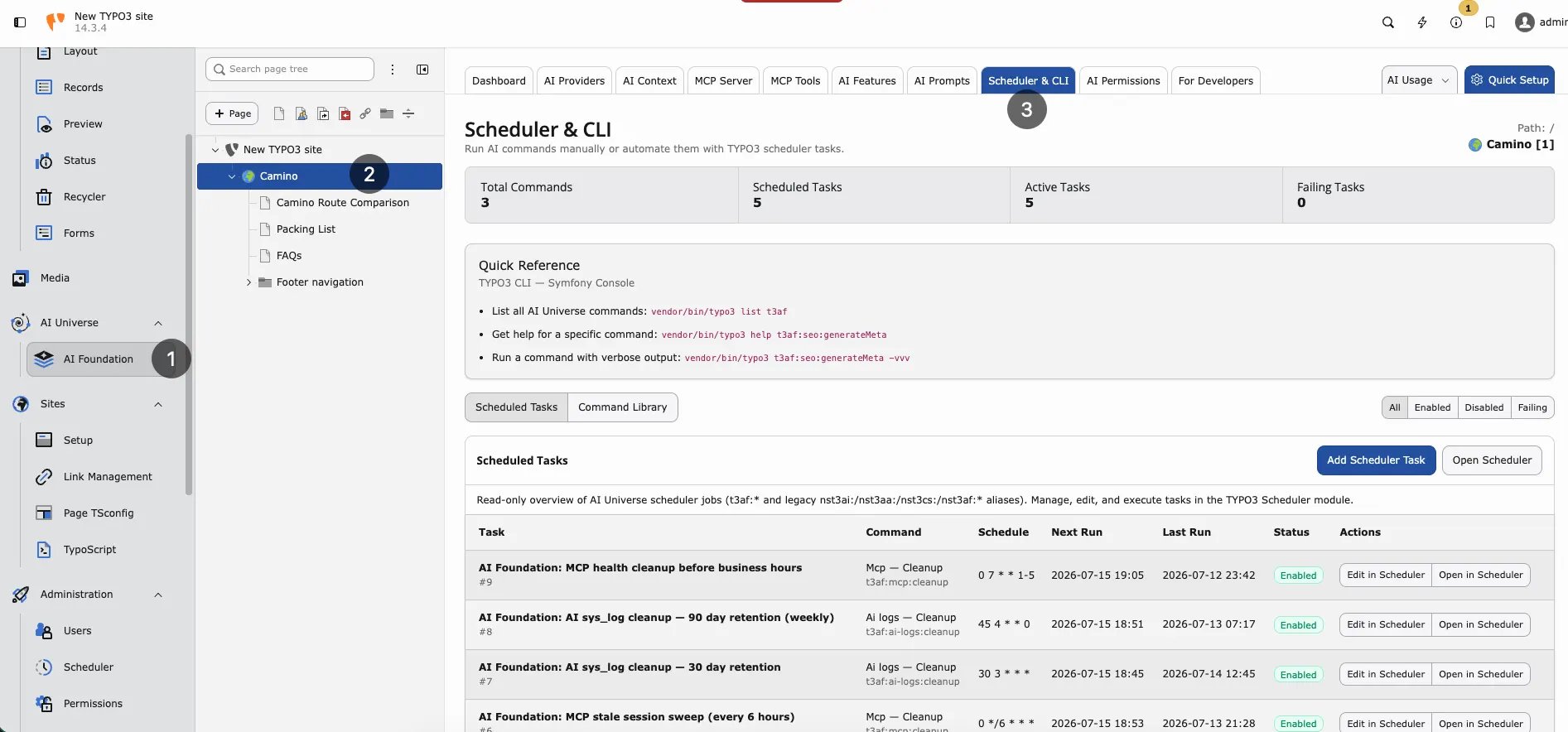 Scheduler & CLI — background tasks and TYPO3 console commands for T3AF.
Background jobs and CLI commands. Example:
Flush T3AF caches
```
vendor/bin/typo3 ns_t3af:cache:flush
```
Ensure **scheduler cron** runs every minute on production.
## OpenAI org statistics (optional)
Set `openai_admin_api_key` in Extension Configuration for organization-level usage charts. This is **not** the chat API key. See [Configuration](/en/latest/en/latest/ExtNsT3AF/Configuration/Index).
## Privacy
Log detail depends on provider privacy settings and group audit limits from [AI Permissions](/en/latest/en/latest/ExtNsT3AF/Configuration/AIPermissions/Index). Configure carefully before enabling full prompt/response storage.
## Weekly admin habit
1. Open T3AF > AI Usage and compare the trend with last week
2. Scan T3AF > AI Logs for repeated failures (same user, same feature)
3. Escalate persistent errors to [Support](/en/latest/en/latest/ExtNsT3AF/Support/Index) with log details
## When logs show high usage
* Check [AI Features](/en/latest/en/latest/ExtNsT3AF/Configuration/AIFeatures/Index) — bulk tasks may need a cheaper model
* Review group limits in [AI Permissions](/en/latest/en/latest/ExtNsT3AF/Configuration/AIPermissions/Index)
* Ask editors if a script or loop triggered many requests
## When logs show failures
* Run Test connection in [AI Providers](/en/latest/en/latest/ExtNsT3AF/Configuration/AIProviders/Index)
* Check vendor status and rate limits
* See [Known Problems](/en/latest/en/latest/ExtNsT3AF/Troubleshooting/KnownProblems/Index) and [FAQ](/en/latest/en/latest/ExtNsT3AF/Troubleshooting/FAQ/Index)
Scheduler & CLI — background tasks and TYPO3 console commands for T3AF.
Background jobs and CLI commands. Example:
Flush T3AF caches
```
vendor/bin/typo3 ns_t3af:cache:flush
```
Ensure **scheduler cron** runs every minute on production.
## OpenAI org statistics (optional)
Set `openai_admin_api_key` in Extension Configuration for organization-level usage charts. This is **not** the chat API key. See [Configuration](/en/latest/en/latest/ExtNsT3AF/Configuration/Index).
## Privacy
Log detail depends on provider privacy settings and group audit limits from [AI Permissions](/en/latest/en/latest/ExtNsT3AF/Configuration/AIPermissions/Index). Configure carefully before enabling full prompt/response storage.
## Weekly admin habit
1. Open T3AF > AI Usage and compare the trend with last week
2. Scan T3AF > AI Logs for repeated failures (same user, same feature)
3. Escalate persistent errors to [Support](/en/latest/en/latest/ExtNsT3AF/Support/Index) with log details
## When logs show high usage
* Check [AI Features](/en/latest/en/latest/ExtNsT3AF/Configuration/AIFeatures/Index) — bulk tasks may need a cheaper model
* Review group limits in [AI Permissions](/en/latest/en/latest/ExtNsT3AF/Configuration/AIPermissions/Index)
* Ask editors if a script or loop triggered many requests
## When logs show failures
* Run Test connection in [AI Providers](/en/latest/en/latest/ExtNsT3AF/Configuration/AIProviders/Index)
* Check vendor status and rate limits
* See [Known Problems](/en/latest/en/latest/ExtNsT3AF/Troubleshooting/KnownProblems/Index) and [FAQ](/en/latest/en/latest/ExtNsT3AF/Troubleshooting/FAQ/Index)