> ## Documentation Index
> Fetch the complete documentation index at: https://docs.t3planet.de/en/latest/llms.txt
> Use this file to discover all available pages before exploring further.
# Configuration
> Configuration for EXT:ns_t3af (T3AF).
Configure **T3AF** after installation. You need a minimum working setup before connected extensions can use AI.
This section also covers the T3AF backend modules used day to day: providers, context, prompts, features, AI Label, usage, and access control.
## Two configuration areas
**AI Providers** — \*\*Path:\*\*T3AF > AI Providers. API keys, models, and defaults.
**AI Features** — \*\*Path:\*\*T3AF > AI Features. Per-site cards for connected extensions. AI Foundation's own card is **Access & Notifications** (Basic Auth and quota email alerts). MCP options are on T3AF > MCP Server > Advanced.
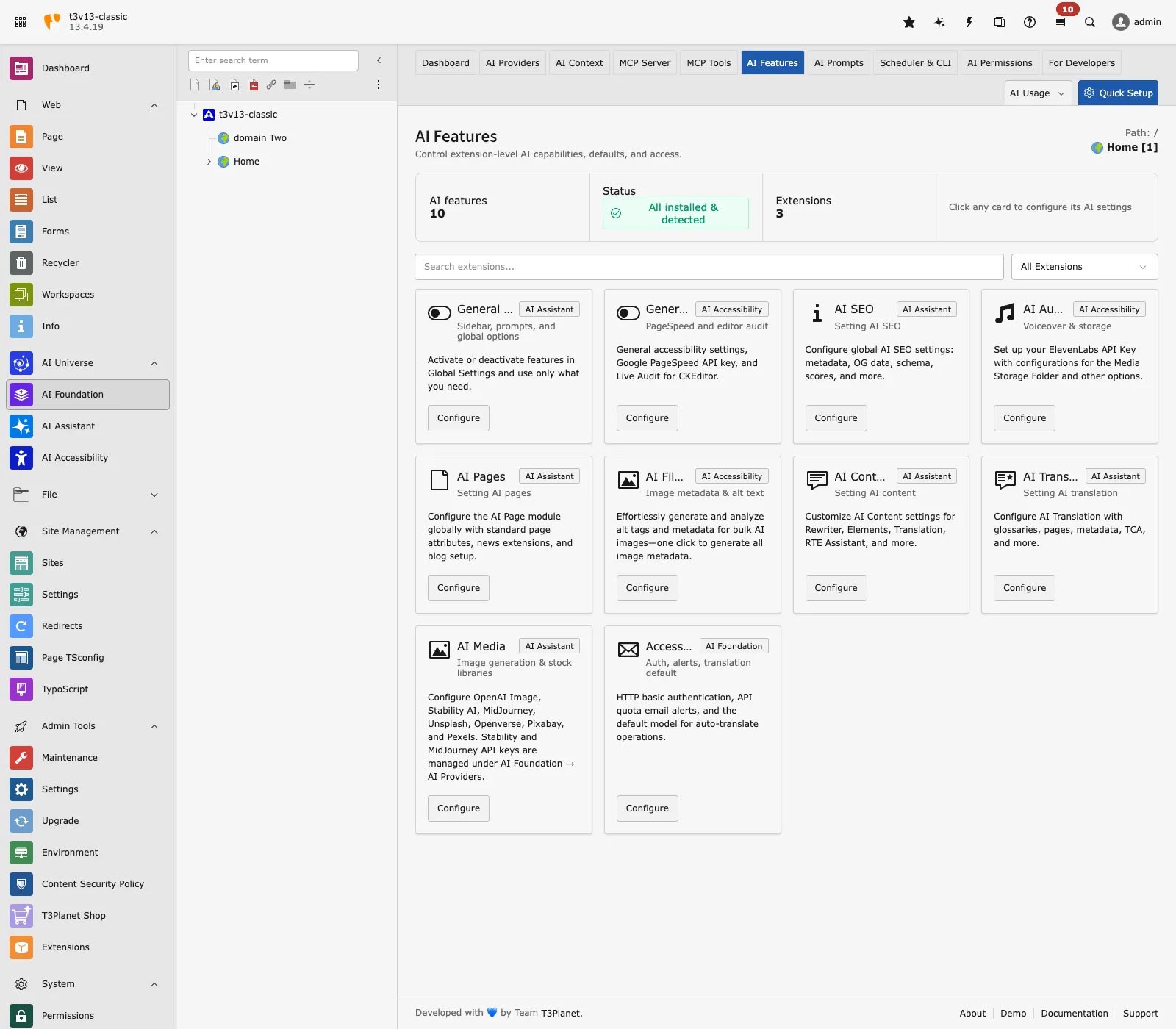 **Extension settings** — Translation APIs, Basic Auth, notifications, and MCP switches (including `enableMcpServer`). Prefer T3AF > MCP Server > Advanced for MCP options. These keys live in T3AF settings, not the classic TYPO3 Admin Tools > Settings > Extension Configuration form.
## Minimum working setup
1. One AI provider with a valid key and model
2. Test connection passes
3. Provider marked **Default**
4. (Optional) DeepL or Google keys for translation APIs
5. (Optional) MCP enabled if you use AI agents
## AI Providers (primary)
\*\*Path:\*\*T3AF > AI Providers
Connect at least one provider, set a model, run Test connection, and mark exactly one row as Default.
Full field reference: [Provider fields](/en/latest/en/latest/ExtNsT3AF/Configuration/AIProviders/Index). Guide: [AI Providers](/en/latest/en/latest/ExtNsT3AF/Configuration/AIProviders/Index)
## Extension settings
T3AF stores translation helpers, Basic Auth, notifications, and MCP switches in extension settings (including `enableMcpServer`). Prefer T3AF > MCP Server > Advanced for MCP options.
Where a classic Extension Configuration form is still used for optional keys, open Admin Tools > Settings > Extension Configuration and select `ns_t3af`.
### Translation (optional)
* `deepl_api_key` — DeepL translation
* `google_api_key` — Google translation
* `defaultModelForTranslation` — Default translation model
### OpenAI usage statistics (optional)
* `openai_admin_api_key` — Organization usage charts (not the chat API key)
### HTTP Basic Auth (optional)
**Extension settings** — Translation APIs, Basic Auth, notifications, and MCP switches (including `enableMcpServer`). Prefer T3AF > MCP Server > Advanced for MCP options. These keys live in T3AF settings, not the classic TYPO3 Admin Tools > Settings > Extension Configuration form.
## Minimum working setup
1. One AI provider with a valid key and model
2. Test connection passes
3. Provider marked **Default**
4. (Optional) DeepL or Google keys for translation APIs
5. (Optional) MCP enabled if you use AI agents
## AI Providers (primary)
\*\*Path:\*\*T3AF > AI Providers
Connect at least one provider, set a model, run Test connection, and mark exactly one row as Default.
Full field reference: [Provider fields](/en/latest/en/latest/ExtNsT3AF/Configuration/AIProviders/Index). Guide: [AI Providers](/en/latest/en/latest/ExtNsT3AF/Configuration/AIProviders/Index)
## Extension settings
T3AF stores translation helpers, Basic Auth, notifications, and MCP switches in extension settings (including `enableMcpServer`). Prefer T3AF > MCP Server > Advanced for MCP options.
Where a classic Extension Configuration form is still used for optional keys, open Admin Tools > Settings > Extension Configuration and select `ns_t3af`.
### Translation (optional)
* `deepl_api_key` — DeepL translation
* `google_api_key` — Google translation
* `defaultModelForTranslation` — Default translation model
### OpenAI usage statistics (optional)
* `openai_admin_api_key` — Organization usage charts (not the chat API key)
### HTTP Basic Auth (optional)
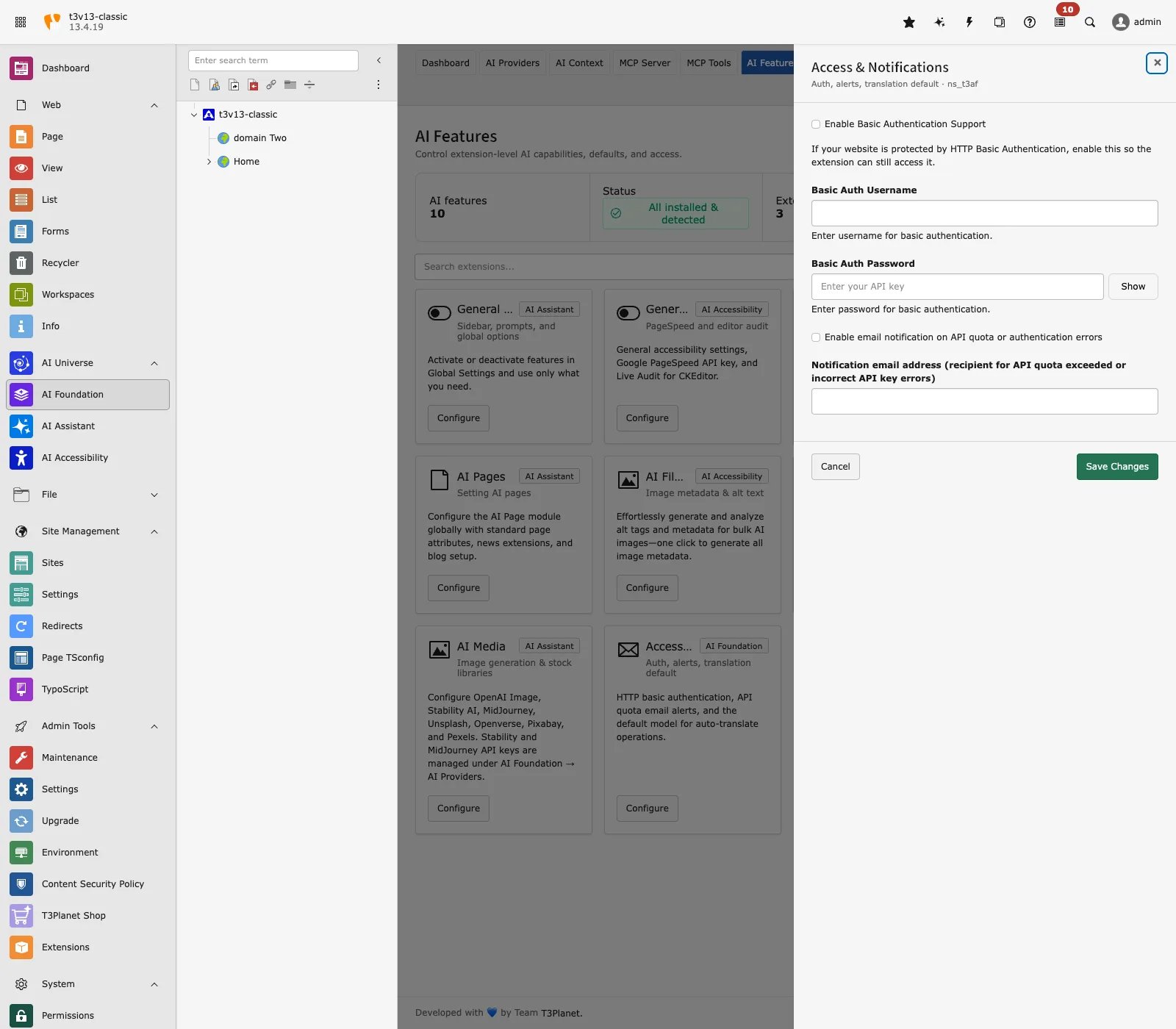 * `basicAuthEnabled` — Enable helper
* `basicAuthUsername` — Username
* `basicAuthPassword` — Password
### MCP Server
* `enableMcpServer` — Master switch (default: on)
* `mcpBasePath` — HTTP endpoint (default: `/mcp`)
* `requireAuth` — Require login (default: on)
* `accessTokenLifetime` — OAuth token TTL
Full guide: [MCP Server](/en/latest/en/latest/ExtNsT3AF/Integrations/MCPServer/Index)
## Per-feature providers
\*\*Path:\*\*T3AF > AI Features
Override the default provider per task: SEO, Pages, Content, Translation.
See [AI Features](/en/latest/en/latest/ExtNsT3AF/Configuration/AIFeatures/Index).
## AI Label
**Path:** T3AF > AI Label
Record, confirm, and disclose AI-generated or AI-modified content for EU AI Act Article 50 workflows. Covers module tabs, settings, visitor labels, bulk actions, and evidence export.
Full guide: [AI Label](/en/latest/en/latest/ExtNsT3AF/Configuration/AILabel/Index)
## Security checklist
* Limit backend admin access
* Use HTTPS in production
* Rotate API keys every 90 days
* Enable [AI Permissions](/en/latest/en/latest/ExtNsT3AF/Configuration/AIPermissions/Index) for large teams
* Never store keys in Git or email
## When to reconfigure
* After key rotation — run **Test connection** again
* When adding a new child extension — check [AI Features](/en/latest/en/latest/ExtNsT3AF/Configuration/AIFeatures/Index)
* Before enabling MCP in production — read [MCP Server](/en/latest/en/latest/ExtNsT3AF/Integrations/MCPServer/Index) security section
* After license renewal — confirm the extension license is still valid
* `basicAuthEnabled` — Enable helper
* `basicAuthUsername` — Username
* `basicAuthPassword` — Password
### MCP Server
* `enableMcpServer` — Master switch (default: on)
* `mcpBasePath` — HTTP endpoint (default: `/mcp`)
* `requireAuth` — Require login (default: on)
* `accessTokenLifetime` — OAuth token TTL
Full guide: [MCP Server](/en/latest/en/latest/ExtNsT3AF/Integrations/MCPServer/Index)
## Per-feature providers
\*\*Path:\*\*T3AF > AI Features
Override the default provider per task: SEO, Pages, Content, Translation.
See [AI Features](/en/latest/en/latest/ExtNsT3AF/Configuration/AIFeatures/Index).
## AI Label
**Path:** T3AF > AI Label
Record, confirm, and disclose AI-generated or AI-modified content for EU AI Act Article 50 workflows. Covers module tabs, settings, visitor labels, bulk actions, and evidence export.
Full guide: [AI Label](/en/latest/en/latest/ExtNsT3AF/Configuration/AILabel/Index)
## Security checklist
* Limit backend admin access
* Use HTTPS in production
* Rotate API keys every 90 days
* Enable [AI Permissions](/en/latest/en/latest/ExtNsT3AF/Configuration/AIPermissions/Index) for large teams
* Never store keys in Git or email
## When to reconfigure
* After key rotation — run **Test connection** again
* When adding a new child extension — check [AI Features](/en/latest/en/latest/ExtNsT3AF/Configuration/AIFeatures/Index)
* Before enabling MCP in production — read [MCP Server](/en/latest/en/latest/ExtNsT3AF/Integrations/MCPServer/Index) security section
* After license renewal — confirm the extension license is still valid