> ## Documentation Index
> Fetch the complete documentation index at: https://docs.t3planet.de/en/latest/llms.txt
> Use this file to discover all available pages before exploring further.
# MCP Server
> MCP Server for EXT:ns_t3af (T3AF).
## Purpose
Connect external AI agents to TYPO3 through the **Model Context Protocol (MCP)**. Tools like **Cursor**, **Claude Desktop**, and **n8n** can read pages, inspect schema, and update records (with permissions).
\*\*Path:\*\*T3AF > MCP Server
Follow this interactive walkthrough, then continue with the details below.
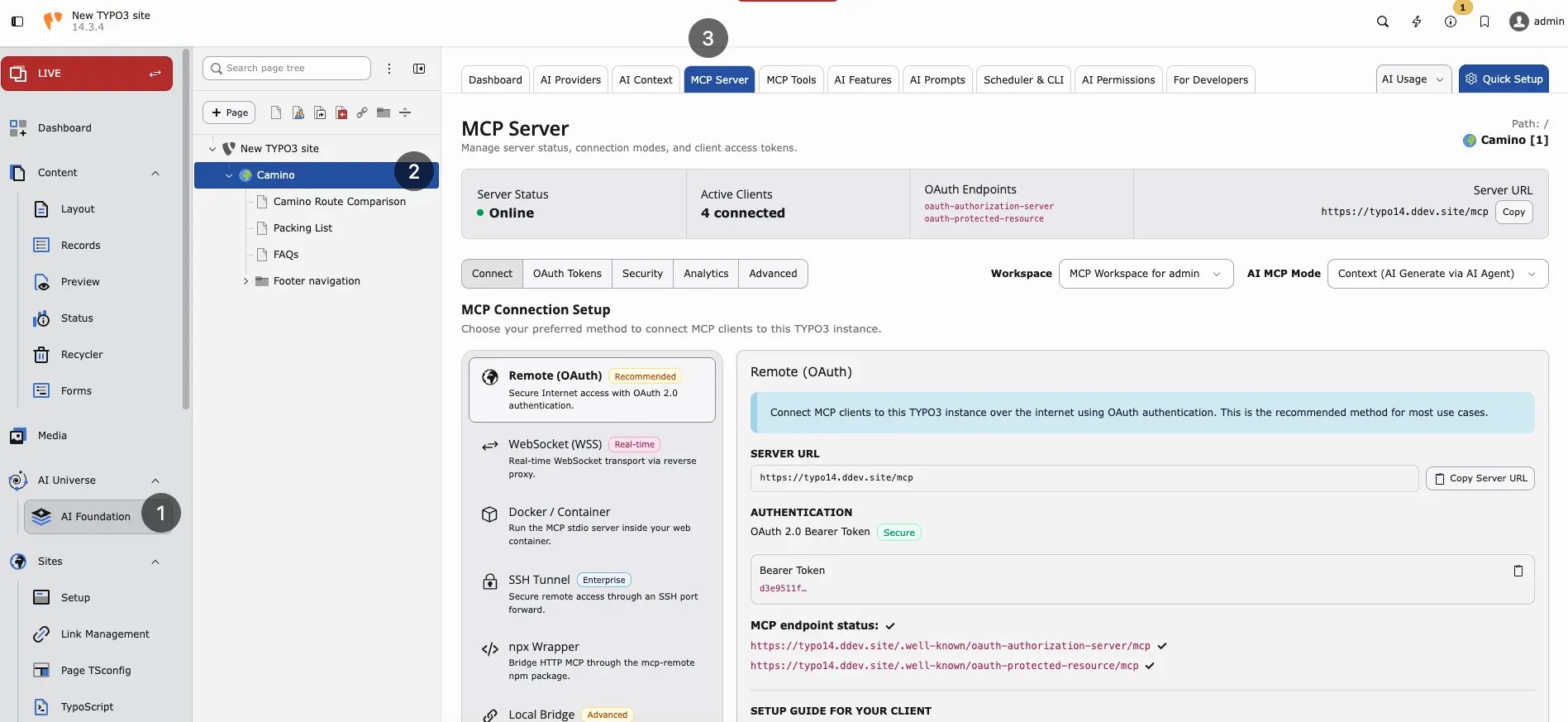 MCP Server — online status, connection methods, and Remote OAuth endpoint details.
## What MCP does
* Read TYPO3 pages and content
* Inspect database schema
* Create or update records (with permissions)
* Call extension-registered tools (see [MCP Tools](/en/latest/en/latest/ExtNsT3AF/Integrations/MCPTools/Index))
## Enable MCP
1. Open T3AF > MCP Server > Advanced.
2. Enable the MCP server checkbox (`enableMcpServer`).
3. Flush caches → status should show **Online**.
The setting is also available in T3AF extension settings under the **MCP Server** group. It is not part of the classic TYPO3 Admin Tools > Settings > Extension Configuration form.
## Health check
MCP endpoint health check
```
curl -sS -o /dev/null -w "%{http_code}" https://your-site.com/mcp
# Expect: 401 (auth required = good)
```
OAuth discovery endpoint
```
curl -sS https://your-site.com/.well-known/oauth-authorization-server/mcp
# Expect: JSON 200
```
## Connection methods
* **Remote OAuth** — Production and Cursor. Uses OAuth 2.1 with PKCE.
* **mcp-remote** — Simple HTTP clients. Uses URL token.
* **Local CLI** — DDEV and local development. Uses backend user and workspace.
## MCP modes
Set the mode in the **MCP Server** top bar (stored as `mcpMode` in the T3AF MCP settings).
**Context (AI Generate via AI Agent)** — Default for Cursor, Claude Desktop, and similar clients.
* The external AI agent generates content outside TYPO3.
* MCP tools apply and save that content into TYPO3 (pages, records, files).
* Use this when the model and reasoning run in the client, and TYPO3 is the CMS tool layer.
**Native (AI Generate via TYPO3)** — Server-side generation.
* TYPO3 runs AI generation on the server through your configured [AI Providers](/en/latest/en/latest/ExtNsT3AF/Configuration/AIProviders/Index).
* MCP tools receive instructions and generate or process content inside TYPO3.
* Use this when generation must stay on your instance (provider keys, brand context, and governance already configured in T3AF).
Some dual-mode content tools change their argument requirements and descriptions based on the active mode. After switching mode, reconnect or refresh your MCP client so the tool list updates.
## Core tools
T3AF ships a large **TYPO3 Core** tool catalog (pages, content, records, files, workspaces, scheduler, permissions, redirects, cache, and more). Browse the full list in T3AF > MCP Tools.
Starter examples for first checks:
* `table_schema` — Field metadata for any table
* `pages_get` — Read one page
* `content_list` — List content on a page
* `write_table` — Create, update, or delete records
Child extensions can register additional tools — also visible in the **MCP Tools** tab.
## Workspaces
* **0** — Live workspace
* **1+** — Draft workspace
MCP edits respect the active workspace. Test writes in workspace `1` before live.
## Cursor example (stdio / DDEV)
```
{
"mcpServers": {
"typo3": {
"command": "bash",
"args": ["-lc", "cd /path/to/project && ddev exec php vendor/bin/typo3 ns_t3af:mcp:serve --no-startup-message -u admin -w 0"]
}
}
}
```
## Security
* Use **HTTPS** in production
* Treat URL tokens like passwords
* Limit which backend users can authorize OAuth
* Test in draft workspace before live writes
* Enable [AI Permissions](/en/latest/en/latest/ExtNsT3AF/Configuration/AIPermissions/Index) for multi-user sites
## When to enable MCP
* Developers use Cursor or Claude Desktop with TYPO3 daily
* Automation workflows via n8n need CMS access
* Staging environment for safe agent testing
## When not to enable yet
* Production site without HTTPS
* No clear policy for which admins may authorize agents
* Team has not completed [AI Providers](/en/latest/en/latest/ExtNsT3AF/Configuration/AIProviders/Index) setup
- Model Context Protocol: [https://modelcontextprotocol.io/](https://modelcontextprotocol.io/)
MCP Server — online status, connection methods, and Remote OAuth endpoint details.
## What MCP does
* Read TYPO3 pages and content
* Inspect database schema
* Create or update records (with permissions)
* Call extension-registered tools (see [MCP Tools](/en/latest/en/latest/ExtNsT3AF/Integrations/MCPTools/Index))
## Enable MCP
1. Open T3AF > MCP Server > Advanced.
2. Enable the MCP server checkbox (`enableMcpServer`).
3. Flush caches → status should show **Online**.
The setting is also available in T3AF extension settings under the **MCP Server** group. It is not part of the classic TYPO3 Admin Tools > Settings > Extension Configuration form.
## Health check
MCP endpoint health check
```
curl -sS -o /dev/null -w "%{http_code}" https://your-site.com/mcp
# Expect: 401 (auth required = good)
```
OAuth discovery endpoint
```
curl -sS https://your-site.com/.well-known/oauth-authorization-server/mcp
# Expect: JSON 200
```
## Connection methods
* **Remote OAuth** — Production and Cursor. Uses OAuth 2.1 with PKCE.
* **mcp-remote** — Simple HTTP clients. Uses URL token.
* **Local CLI** — DDEV and local development. Uses backend user and workspace.
## MCP modes
Set the mode in the **MCP Server** top bar (stored as `mcpMode` in the T3AF MCP settings).
**Context (AI Generate via AI Agent)** — Default for Cursor, Claude Desktop, and similar clients.
* The external AI agent generates content outside TYPO3.
* MCP tools apply and save that content into TYPO3 (pages, records, files).
* Use this when the model and reasoning run in the client, and TYPO3 is the CMS tool layer.
**Native (AI Generate via TYPO3)** — Server-side generation.
* TYPO3 runs AI generation on the server through your configured [AI Providers](/en/latest/en/latest/ExtNsT3AF/Configuration/AIProviders/Index).
* MCP tools receive instructions and generate or process content inside TYPO3.
* Use this when generation must stay on your instance (provider keys, brand context, and governance already configured in T3AF).
Some dual-mode content tools change their argument requirements and descriptions based on the active mode. After switching mode, reconnect or refresh your MCP client so the tool list updates.
## Core tools
T3AF ships a large **TYPO3 Core** tool catalog (pages, content, records, files, workspaces, scheduler, permissions, redirects, cache, and more). Browse the full list in T3AF > MCP Tools.
Starter examples for first checks:
* `table_schema` — Field metadata for any table
* `pages_get` — Read one page
* `content_list` — List content on a page
* `write_table` — Create, update, or delete records
Child extensions can register additional tools — also visible in the **MCP Tools** tab.
## Workspaces
* **0** — Live workspace
* **1+** — Draft workspace
MCP edits respect the active workspace. Test writes in workspace `1` before live.
## Cursor example (stdio / DDEV)
```
{
"mcpServers": {
"typo3": {
"command": "bash",
"args": ["-lc", "cd /path/to/project && ddev exec php vendor/bin/typo3 ns_t3af:mcp:serve --no-startup-message -u admin -w 0"]
}
}
}
```
## Security
* Use **HTTPS** in production
* Treat URL tokens like passwords
* Limit which backend users can authorize OAuth
* Test in draft workspace before live writes
* Enable [AI Permissions](/en/latest/en/latest/ExtNsT3AF/Configuration/AIPermissions/Index) for multi-user sites
## When to enable MCP
* Developers use Cursor or Claude Desktop with TYPO3 daily
* Automation workflows via n8n need CMS access
* Staging environment for safe agent testing
## When not to enable yet
* Production site without HTTPS
* No clear policy for which admins may authorize agents
* Team has not completed [AI Providers](/en/latest/en/latest/ExtNsT3AF/Configuration/AIProviders/Index) setup
- Model Context Protocol: [https://modelcontextprotocol.io/](https://modelcontextprotocol.io/)