> ## Documentation Index
> Fetch the complete documentation index at: https://docs.t3planet.de/en/latest/llms.txt
> Use this file to discover all available pages before exploring further.

# AI Settings

You can also customize your preferences with any model or feature directly from Settings

<div className="t3-embed">
  <iframe src="https://app.supademo.com/embed/cmfp1kwdp23xb1d3nf2y9woib?embed_v=2&utm_source=embed" loading="lazy" title="AI Co pilot" allow="clipboard-write; fullscreen" frameBorder="0" webkitallowfullscreen="true" mozallowfullscreen="true" allowfullscreen />
</div>

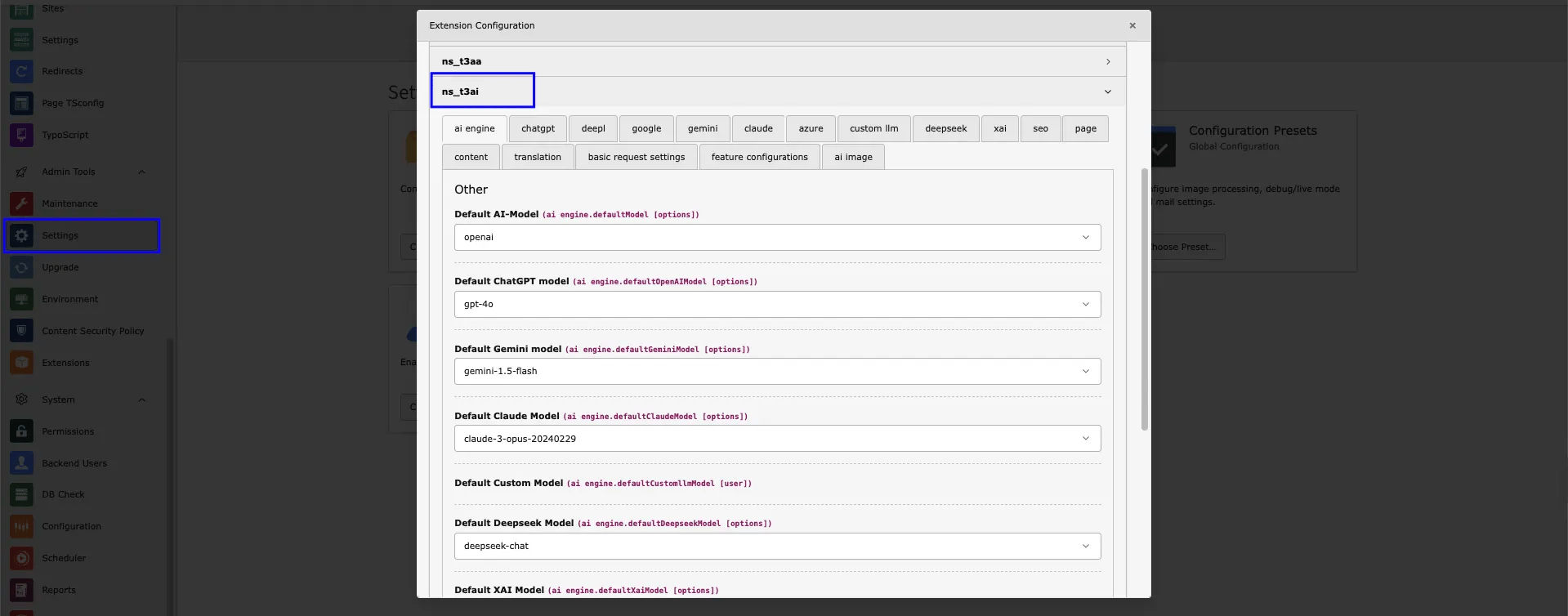
* Navigate to the “Extension Settings” tab.
* Verify your settings.
* Click on “NS\_AI Setting.”
* Choose the the desired AI model and features.
* Click on “Save Settings.”
<img src="https://mintcdn.com/t3planet/ELJrooPLT46NhdbM/en/latest/ExtNsT3AI/AISettings/images/Settingss.webp?fit=max&auto=format&n=ELJrooPLT46NhdbM&q=85&s=78390578f1115a2db8bb86833262df8d" alt="AIpage" width="1919" height="754" data-path="en/latest/ExtNsT3AI/AISettings/images/Settingss.webp" />

## AI Logs

<div className="t3-embed">
  <iframe src="https://app.supademo.com/embed/cmrbpsdl20frlqmo521y5if8m?utm_source=link" loading="lazy" title="T3AI AI Logs Demo" allow="clipboard-write; fullscreen" frameBorder="0" webkitallowfullscreen="true" mozallowfullscreen="true" allowfullscreen />
</div>

<div className="t3-embed">
  <iframe src="https://app.supademo.com/embed/cmfnzbytm19xg1d3nv60rq329?embed_v=2&utm_source=embed" loading="lazy" title="TYPO3 AI Setup wizard" allow="clipboard-write; fullscreen" frameBorder="0" webkitallowfullscreen="true" mozallowfullscreen="true" allowfullscreen />
</div>

Track all AI system activities and monitor how your backend users interact with the AI models,follow below steps to check AI log.

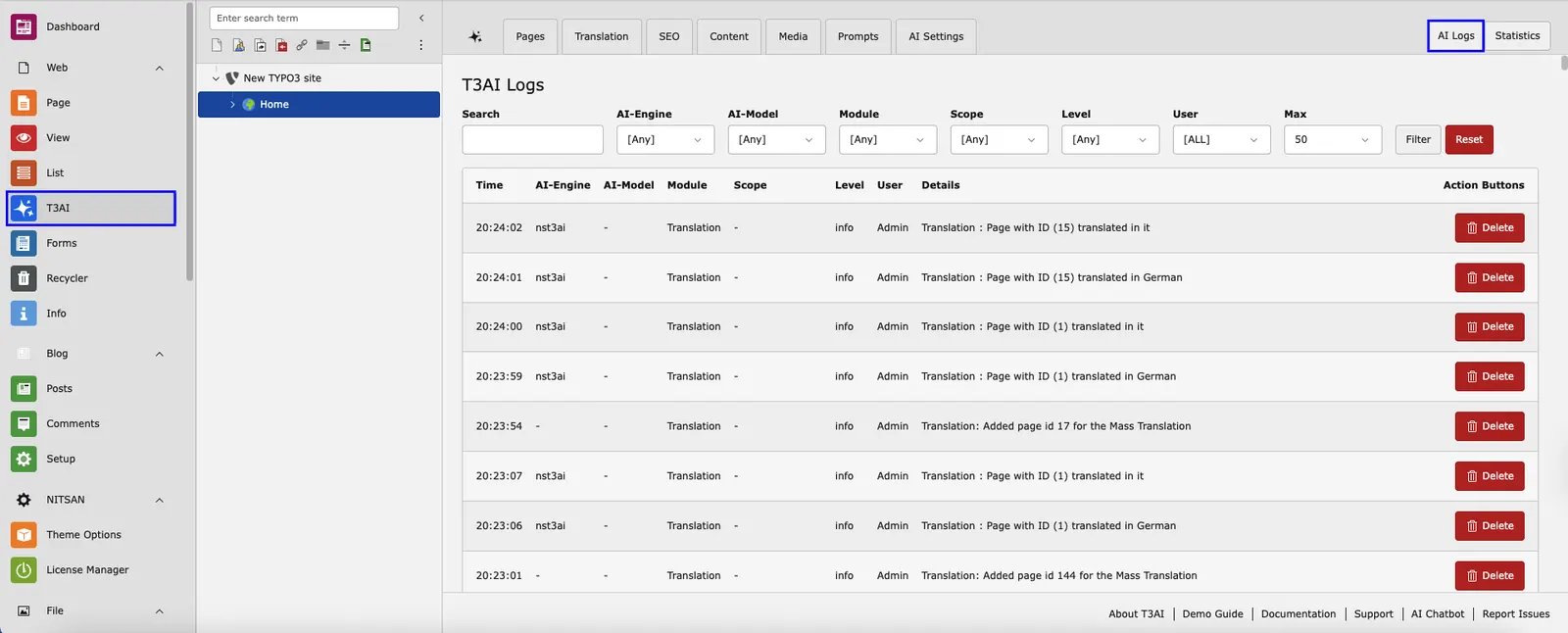
* **Step 1** - Log in to your TYPO3 backend and navigate to the T3AI Module.
* **Step 2** - Select the **‘AI Log’** Button showing in Corner of the T3AI Module.
<img src="https://mintcdn.com/t3planet/ELJrooPLT46NhdbM/en/latest/ExtNsT3AI/AISettings/images/AI_log.webp?fit=max&auto=format&n=ELJrooPLT46NhdbM&q=85&s=6d655c970decc7ab028bd50212d425e8" alt="AI log" width="1600" height="646" data-path="en/latest/ExtNsT3AI/AISettings/images/AI_log.webp" />

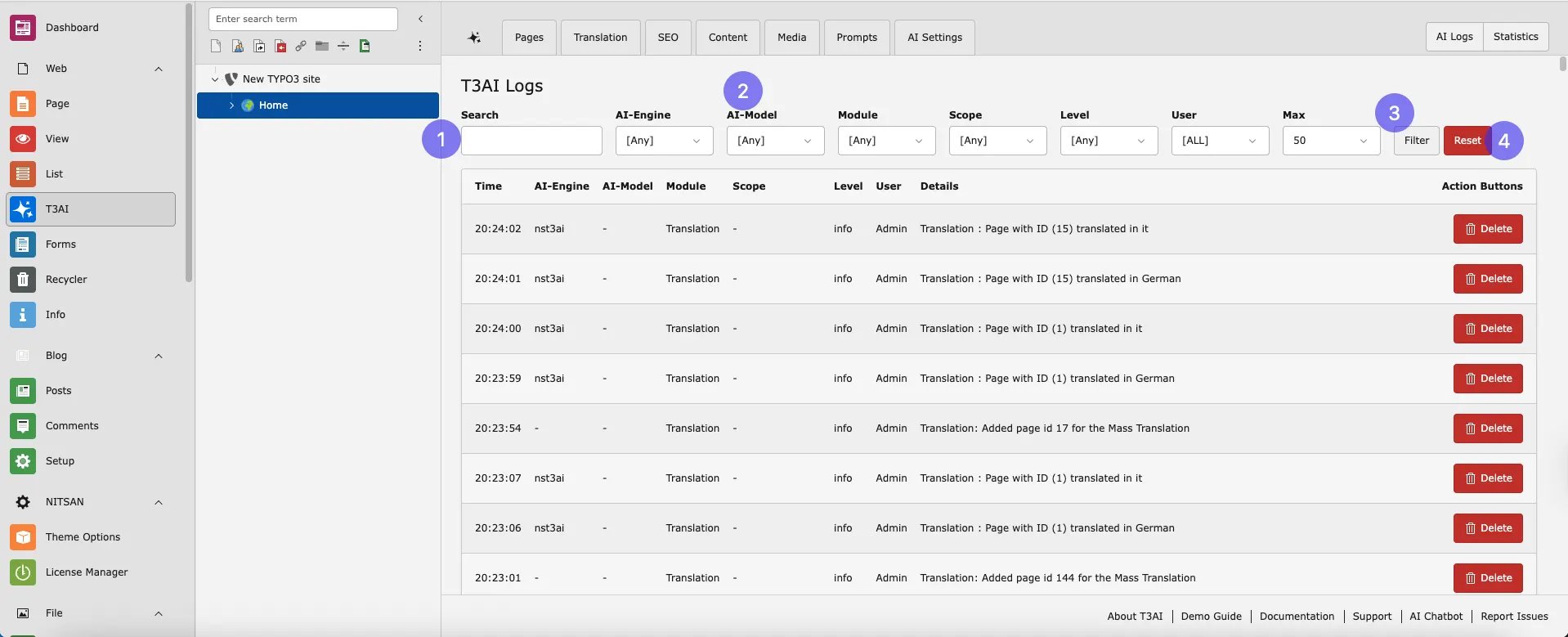
* **Step 3** - Simply search for the page and select all the required fields from the dropdown menu. **AI Engine** - It displays the types of AI engine logs you want to view.
  **AI Models** - Select AI Engine Model types. For i.e GPT 4.0
  **Module** - This Indicates T3AI module Logs. For SEO, Translation.
  After Selecting Your Required field Click on Filter and your AI model Logs are generated.
<img src="https://mintcdn.com/t3planet/ELJrooPLT46NhdbM/en/latest/ExtNsT3AI/AISettings/images/New_log.webp?fit=max&auto=format&n=ELJrooPLT46NhdbM&q=85&s=e0b620f85d51b38039382e8d57da41f0" alt="AI log" width="1918" height="779" data-path="en/latest/ExtNsT3AI/AISettings/images/New_log.webp" />

* **Step 4** - You can reset your AI model logs by clicking on the ‘Reset’ button.

## Statastics

<div className="t3-embed">
  <iframe src="https://app.supademo.com/embed/cmfnzchrg19yk1d3nfyx5nru0?embed_v=2&utm_source=embed" loading="lazy" title="TYPO3 AI Setup wizard" allow="clipboard-write; fullscreen" frameBorder="0" webkitallowfullscreen="true" mozallowfullscreen="true" allowfullscreen />
</div>

Access all your AI model analytics in one place with predefined AI model statistics.

## Persona

<div className="t3-embed">
  <iframe src="https://app.supademo.com/embed/cmfo1ibx61e271d3ndexk4qdw?embed_v=2&utm_source=embed" loading="lazy" title="TYPO3 AI Setup wizard" allow="clipboard-write; fullscreen" frameBorder="0" webkitallowfullscreen="true" mozallowfullscreen="true" allowfullscreen />
</div>

Get started with T3AI quickly and easily using our Persona ! Follow simple steps to set up T3AI on your TYPO3 site, so you can start enjoying AI-powered features in no time. The wizard guides you through the process, making installation smooth!

This features help you during installtion of T3AI TYPO3 AI Extension.

## Feature Toggles

<div className="t3-embed">
  <iframe src="https://app.supademo.com/embed/cmfp0kk7e23451d3nu1ohify7?embed_v=2&utm_source=embed" loading="lazy" title="AI Co pilot" allow="clipboard-write; fullscreen" frameBorder="0" webkitallowfullscreen="true" mozallowfullscreen="true" allowfullscreen />
</div>

Activate or deactivate features in Global Settings and use only what you need.

## System AI Log

Track all AI system activities and monitor how your backend users interact with the AI models.

* Go to T3AI Module, now navigate to AISetting tab.
* Open Feature Toggle Modue
* Navigate to feature toggle tab and find “ Enable System Log Solution “ options.
* Check the option and save changes
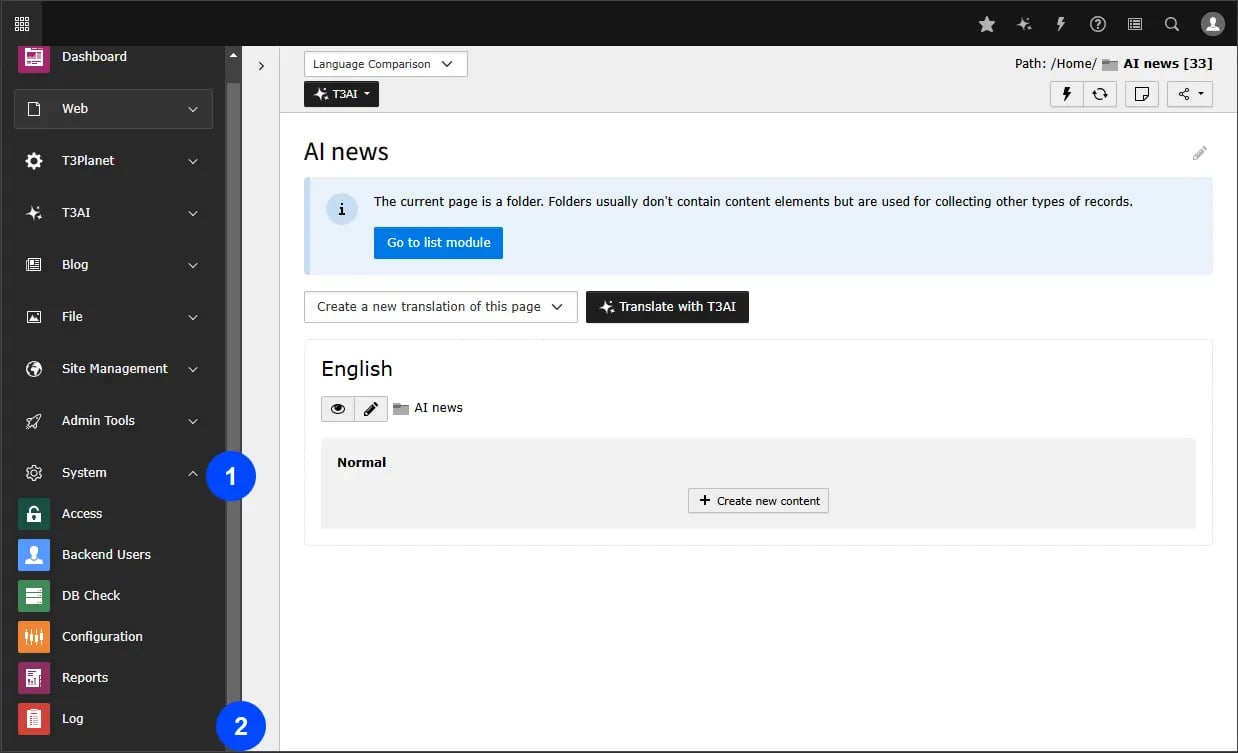
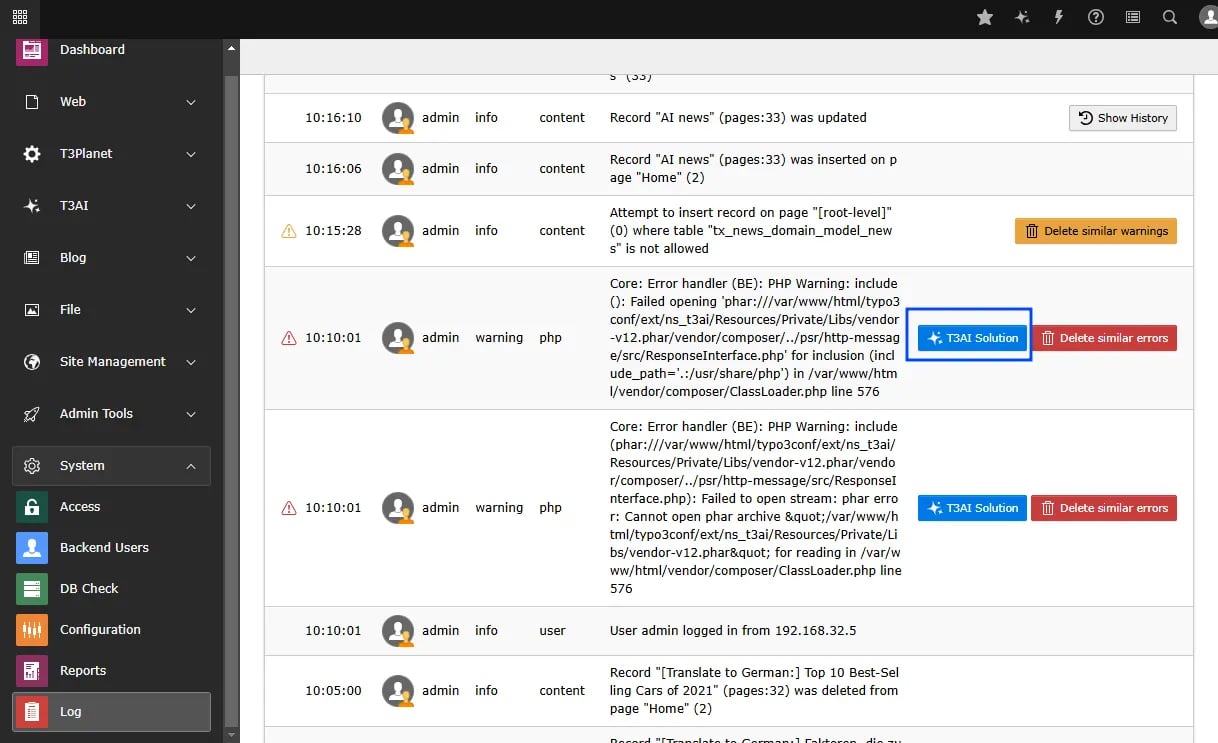
* **Step 2** - Now move to System module and navigate to log tab.
<img src="https://mintcdn.com/t3planet/ELJrooPLT46NhdbM/en/latest/ExtNsT3AI/AISettings/images/Log_2.webp?fit=max&auto=format&n=ELJrooPLT46NhdbM&q=85&s=41eccb67b4fa8ac29a8a637509d650d9" alt="AI log" width="1238" height="753" data-path="en/latest/ExtNsT3AI/AISettings/images/Log_2.webp" />

* **Step 3** - Go to your System log and click on AI suggestion.
<img src="https://mintcdn.com/t3planet/ELJrooPLT46NhdbM/en/latest/ExtNsT3AI/AISettings/images/Log_3.webp?fit=max&auto=format&n=ELJrooPLT46NhdbM&q=85&s=bf188721cbf88c755248af4be307a06f" alt="AI log" width="1218" height="743" data-path="en/latest/ExtNsT3AI/AISettings/images/Log_3.webp" />

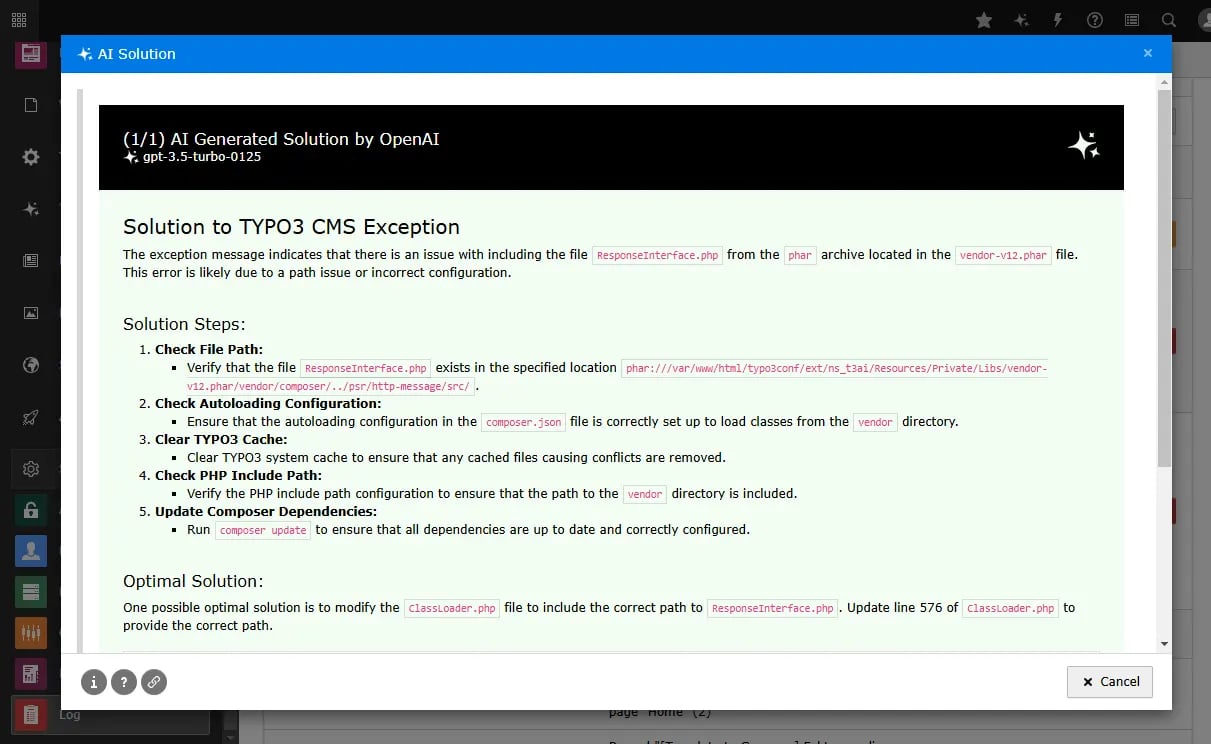
* **Step 4** - Click the button to have the AI suggest solutions for your system log errors.
<img src="https://mintcdn.com/t3planet/ELJrooPLT46NhdbM/en/latest/ExtNsT3AI/AISettings/images/Log_4.webp?fit=max&auto=format&n=ELJrooPLT46NhdbM&q=85&s=9f67eb5ec82845675977a9cee4c2b8dc" alt="AI log" width="1211" height="744" data-path="en/latest/ExtNsT3AI/AISettings/images/Log_4.webp" />

## Setting AI SEO

<div className="t3-embed">
  <iframe src="https://app.supademo.com/embed/cmfp29si124pg1d3nfiuqj3mj?embed_v=2&utm_source=embed" loading="lazy" title="AI Co pilot" allow="clipboard-write; fullscreen" frameBorder="0" webkitallowfullscreen="true" mozallowfullscreen="true" allowfullscreen />
</div>

Configure global AI SEO settings: metadata, OG data, schema, scores, and more.

## Pages

<div className="t3-embed">
  <iframe src="https://app.supademo.com/embed/cmfp2btj324qa1d3ncufn5gb3?embed_v=2&utm_source=embed" loading="lazy" title="AI Co pilot" allow="clipboard-write; fullscreen" frameBorder="0" webkitallowfullscreen="true" mozallowfullscreen="true" allowfullscreen />
</div>

Configure the AI Page module globally with standard page attributes, news extensions, and blog setup.

## Content

<div className="t3-embed">
  <iframe src="https://app.supademo.com/embed/cmfp2e2yy24rw1d3nu6pr8z3r?embed_v=2&utm_source=embed" loading="lazy" title="AI Co pilot" allow="clipboard-write; fullscreen" frameBorder="0" webkitallowfullscreen="true" mozallowfullscreen="true" allowfullscreen />
</div>

Customize AI Content settings for Rewriter, Elements, Translation, RTE Assistant, and more.

## T3AI Co-Pilot

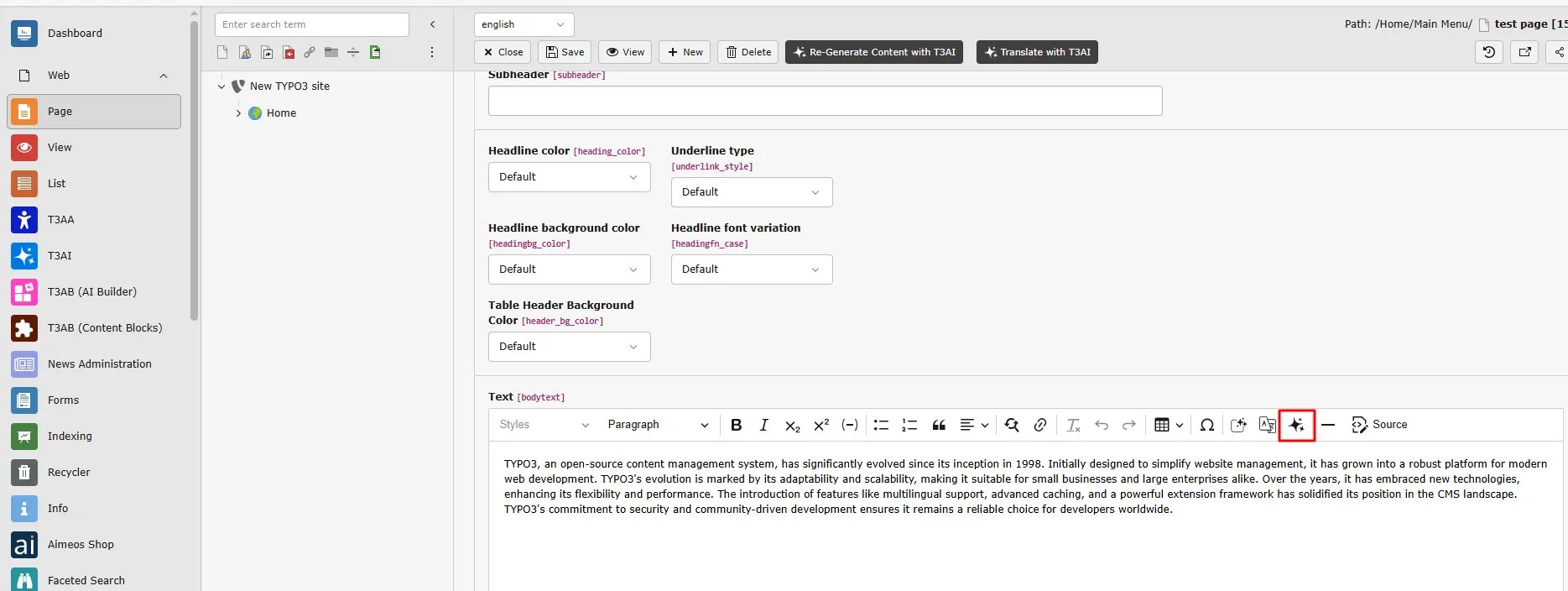
The **T3AI Co-Pilot** is your easy-to-use AI assistant in TYPO3. It helps you write, improve, translate, and optimize content quickly - all directly in the backend with just a few clicks.

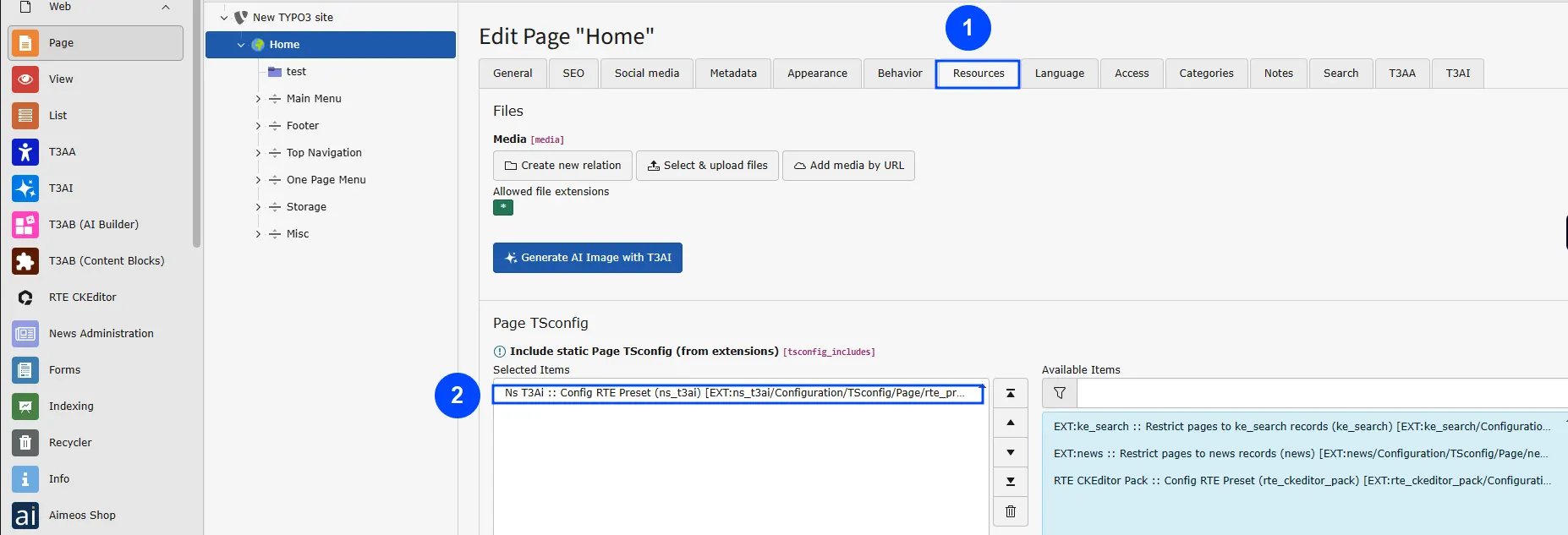
**Step 1:** Click on Edit Page property

**Step 2:** Go to tab **“Resources”**

**Step 3:** Include **NS t3ai :: Config RTE Preset (ns\_t3ai)** in **Include static Page TSconfig (from extensions)** and Save this.
<img src="https://mintcdn.com/t3planet/ELJrooPLT46NhdbM/en/latest/ExtNsT3AI/AISettings/images/Co-pilot_image.webp?fit=max&auto=format&n=ELJrooPLT46NhdbM&q=85&s=f00860b605293cf732121da087ebca95" alt="Co-Pilot configurations" width="1854" height="633" data-path="en/latest/ExtNsT3AI/AISettings/images/Co-pilot_image.webp" />

<img src="https://mintcdn.com/t3planet/ELJrooPLT46NhdbM/en/latest/ExtNsT3AI/AISettings/images/t3ai-co-pilot.webp?fit=max&auto=format&n=ELJrooPLT46NhdbM&q=85&s=bc999784be8655c8ed440ac55f83e696" alt="RTE Co-Pilot" width="1869" height="704" data-path="en/latest/ExtNsT3AI/AISettings/images/t3ai-co-pilot.webp" />

## Translation

<div className="t3-embed">
  <iframe src="https://app.supademo.com/embed/cmfp2fsgn24us1d3ny6e506rn?embed_v=2&utm_source=embed" loading="lazy" title="AI Co pilot" allow="clipboard-write; fullscreen" frameBorder="0" webkitallowfullscreen="true" mozallowfullscreen="true" allowfullscreen />
</div>

Configure AI Translation with glossaries, pages, metadata, TCA, XLF, and more.

## Custom LLM

<div className="t3-embed">
  <iframe src="https://app.supademo.com/embed/cmfp2h7n524xu1d3nmcapna1t?embed_v=2&utm_source=embed" loading="lazy" title="AI Co pilot" allow="clipboard-write; fullscreen" frameBorder="0" webkitallowfullscreen="true" mozallowfullscreen="true" allowfullscreen />
</div>

Manage LLM settings, enable features, and adjust preferences in one place.

## OpenAI ChatGPT

<div className="t3-embed">
  <iframe src="https://app.supademo.com/embed/cmfp2jszv251o1d3nsktdojhf?embed_v=2&utm_source=embed" loading="lazy" title="AI Co pilot" allow="clipboard-write; fullscreen" frameBorder="0" webkitallowfullscreen="true" mozallowfullscreen="true" allowfullscreen />
</div>

Set up OpenAI ChatGPT API with key, model, tokens, temperature, and more.

## Gemini

<div className="t3-embed">
  <iframe src="https://app.supademo.com/embed/cmfp2l9eh25461d3n5wsiqwrj?embed_v=2&utm_source=embed" loading="lazy" title="AI Co pilot" allow="clipboard-write; fullscreen" frameBorder="0" webkitallowfullscreen="true" mozallowfullscreen="true" allowfullscreen />
</div>

Configure access to Gemini’s API, including API key, model selection, and more.

## DeepL

<div className="t3-embed">
  <iframe src="https://app.supademo.com/embed/cmfp2mar0257c1d3nytqfa9h8?embed_v=2&utm_source=embed" loading="lazy" title="AI Co pilot" allow="clipboard-write; fullscreen" frameBorder="0" webkitallowfullscreen="true" mozallowfullscreen="true" allowfullscreen />
</div>

Configure access to DeepL’s API, including API key, API URL, and more.

## Google Translate

<div className="t3-embed">
  <iframe src="https://app.supademo.com/embed/cmfp2nftg259o1d3n80siqcmb?embed_v=2&utm_source=embed" loading="lazy" title="AI Co pilot" allow="clipboard-write; fullscreen" frameBorder="0" webkitallowfullscreen="true" mozallowfullscreen="true" allowfullscreen />
</div>

Set up your connection to Google Translator’s API, including the API URL and other parameters.

## Claude

<div className="t3-embed">
  <iframe src="https://app.supademo.com/embed/cmfp2oh9225b01d3ne9yfqa7t?embed_v=2&utm_source=embed" loading="lazy" title="AI Co pilot" allow="clipboard-write; fullscreen" frameBorder="0" webkitallowfullscreen="true" mozallowfullscreen="true" allowfullscreen />
</div>

Configure access to Claude’s API, including API key, model selection, and additional options.

## DALL-E

<div className="t3-embed">
  <iframe src="https://app.supademo.com/embed/cmfp2pimb25cw1d3nr6une6df?embed_v=2&utm_source=embed" loading="lazy" title="AI Co pilot" allow="clipboard-write; fullscreen" frameBorder="0" webkitallowfullscreen="true" mozallowfullscreen="true" allowfullscreen />
</div>

Configure access to DALL-E’s API, including API key, endpoint, model selection, and more.

## Stability

<div className="t3-embed">
  <iframe src="https://app.supademo.com/embed/cmfp2r1fq25e21d3nfjczu8x8?embed_v=2&utm_source=embed" loading="lazy" title="AI Co pilot" allow="clipboard-write; fullscreen" frameBorder="0" webkitallowfullscreen="true" mozallowfullscreen="true" allowfullscreen />
</div>

Configure access to Stability’s API, including API key, endpoint, model selection, and other options.

## MidJourney

<div className="t3-embed">
  <iframe src="https://app.supademo.com/embed/cmfp2sb3925f01d3njcz0t29r?embed_v=2&utm_source=embed" loading="lazy" title="AI Co pilot" allow="clipboard-write; fullscreen" frameBorder="0" webkitallowfullscreen="true" mozallowfullscreen="true" allowfullscreen />
</div>

Set up access to MidJourney’s API, including API key, endpoint, model selection, and more.

## Unsplash

<div className="t3-embed">
  <iframe src="https://app.supademo.com/embed/cmfp2t9dp25fw1d3nmcnes1fh?embed_v=2&utm_source=embed" loading="lazy" title="AI Co pilot" allow="clipboard-write; fullscreen" frameBorder="0" webkitallowfullscreen="true" mozallowfullscreen="true" allowfullscreen />
</div>

Set up Unsplash API access by configuring the access key and other settings.

## Openverse

<div className="t3-embed">
  <iframe src="https://app.supademo.com/embed/cmfp2u9jt25go1d3nvp7c6nej?embed_v=2&utm_source=embed" loading="lazy" title="AI Co pilot" allow="clipboard-write; fullscreen" frameBorder="0" webkitallowfullscreen="true" mozallowfullscreen="true" allowfullscreen />
</div>

Configure Openverse API access, including Client ID, Client Secret, and other key parameters.

## Pixabay

<div className="t3-embed">
  <iframe src="https://app.supademo.com/embed/cmfp2ve1025hm1d3nl8zkprxo?embed_v=2&utm_source=embed" loading="lazy" title="AI Co pilot" allow="clipboard-write; fullscreen" frameBorder="0" webkitallowfullscreen="true" mozallowfullscreen="true" allowfullscreen />
</div>

Configure Pixabay API access by setting the API key, access key, and additional options.

## Pexels

<div className="t3-embed">
  <iframe src="https://app.supademo.com/embed/cmfp2wh2t25ii1d3nrduadpef?embed_v=2&utm_source=embed" loading="lazy" title="AI Co pilot" allow="clipboard-write; fullscreen" frameBorder="0" webkitallowfullscreen="true" mozallowfullscreen="true" allowfullscreen />
</div>

Set up Pexels API access by configuring the access key and other customizable options.

## For Integrators

Are you a TYPO3 integrator looking to boost the functionality of the T3AI TYPO3 Extension? Enhance your TYPO3 integration skills with T3AI resources tailored for TYPO3 Integrators. Discover how T3AI can elevate your TYPO3 integration capabilities.

## TYPO3 AI Chatbot

Are you seeking help with TYPO3 code as a developer or integrator? Try our custom-made TYPO3 AI Chatbot for assistance.

Explore T3AI - TYPO3 AI Chatbot
[https://chatgpt.com/g/g-MDKrvyZk5-t3ai](https://chatgpt.com/g/g-MDKrvyZk5-t3ai)

## Report an Issue

<div className="t3-embed">
  <iframe src="https://app.supademo.com/embed/cmfpg5l59022j130uk8ek60xr?embed_v=2&utm_source=embed" loading="lazy" title="AI Co pilot" allow="clipboard-write; fullscreen" frameBorder="0" webkitallowfullscreen="true" mozallowfullscreen="true" allowfullscreen />
</div>

## Suggest Features

<div className="t3-embed">
  <iframe src="https://app.supademo.com/embed/cmfpgljut032r130uobcgvex7?embed_v=2&utm_source=embed" loading="lazy" title="AI Co pilot" allow="clipboard-write; fullscreen" frameBorder="0" webkitallowfullscreen="true" mozallowfullscreen="true" allowfullscreen />
</div>

If you find any issues or want to add any custom feature contact us at [Contact](https://t3planet.de/contact)

## Restrict Prompts

As an integrator, If you want to restrict the prompts managers add/edit/delete data (like SEO prompts, Page prompts, etc) to editors. You can simply exclude all prompts management while configuring your editor’s users or user groups..

Using your integrator-level access, You can easily manage prompts with this “Manage Prompts” guidance - [View Prompts](/en/latest/en/latest/ExtNsT3AI/Prompts/Index)

If you find any issues or want to add any custom feature contact us at [Contact](https://t3planet.de/contact)

## Block AI Scrapping

<div className="t3-embed">
  <iframe src="https://app.supademo.com/embed/cmfph5l5q03ea130uj100dsfm?embed_v=2&utm_source=embed" loading="lazy" title="Block AI Scrapping" allow="clipboard-write; fullscreen" frameBorder="0" webkitallowfullscreen="true" mozallowfullscreen="true" allowfullscreen />
</div>

Protect your website’s content from unwanted AI bots with our Block AI Scraping feature. Keep your content safe and secure with just one click!

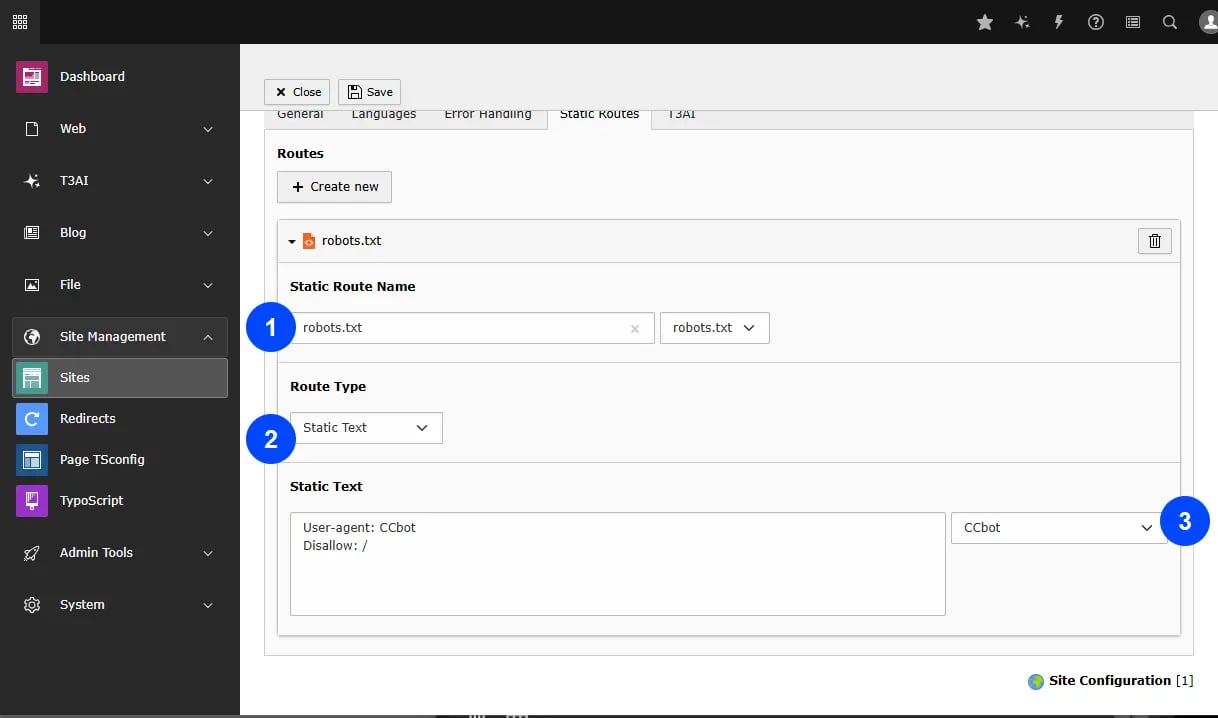
* **Step 1** - Go to site management module in your TYPO3 Backend.

> Select Site tab from list
> Navigate to tab and Edit your site configurations.
> Go to static routes in Site configurations.

<img src="https://mintlify.s3.us-west-1.amazonaws.com/t3planet/en/latest/ExtNsT3AI/AISettings/images/Scrappng.webp" alt="AI log" />

**Step 2** - Prevent bots for scraping your content with customizing required confugurqationns.

> Select type of files & Route Type i.e robots .txt
> Select type of bot to prevent from AI Content scraping.
<img src="https://mintcdn.com/t3planet/ELJrooPLT46NhdbM/en/latest/ExtNsT3AI/AISettings/images/Scrapping.webp?fit=max&auto=format&n=ELJrooPLT46NhdbM&q=85&s=f5bc9a2de34f7bd2dd01ada6fe9723aa" alt="AI log" width="1218" height="718" data-path="en/latest/ExtNsT3AI/AISettings/images/Scrapping.webp" />

Then, click on ‘Generate AI Scraping File,’ and your web content will now be protected from AI bots.

## Auto-translate-prefix

Tagging for automatically translated pages is now supported with a new control option, allowing users to manage and apply tags easily, improving the organization of translated content on the website.

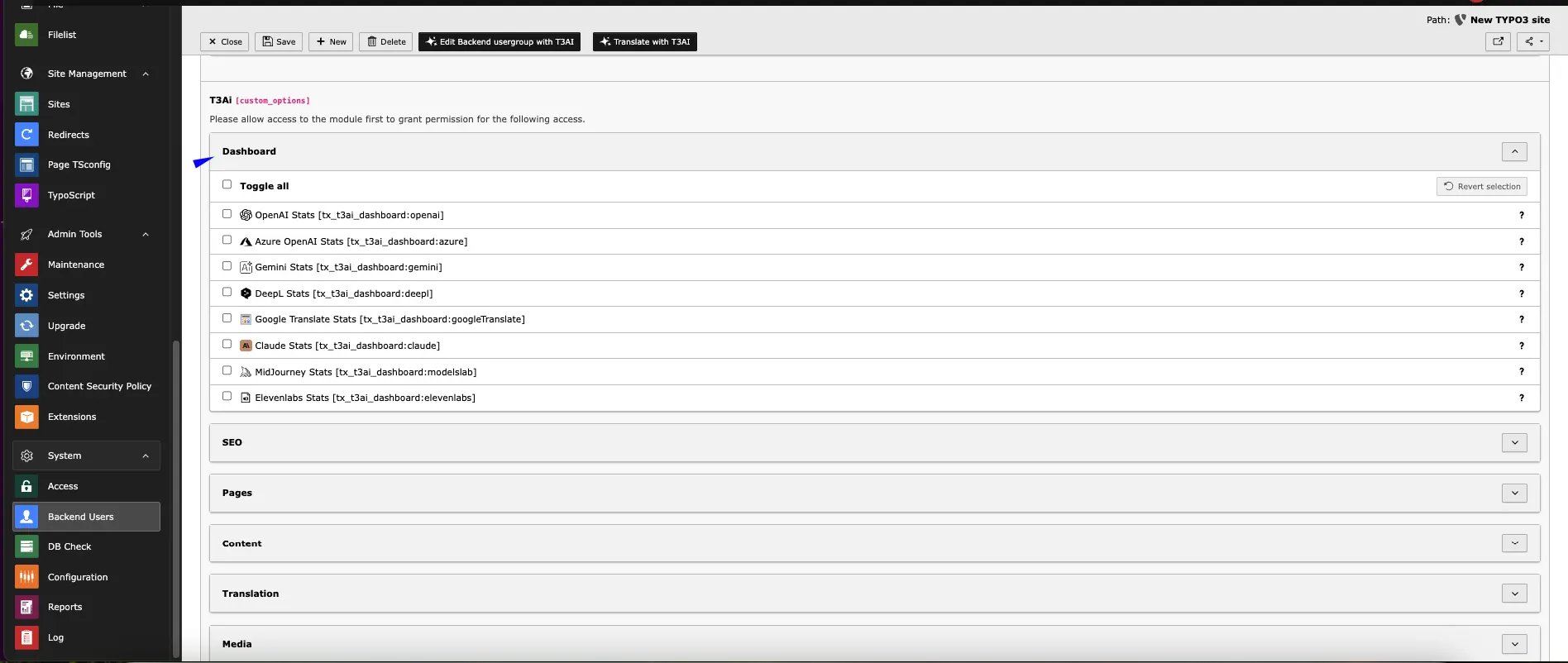
## User Permissions

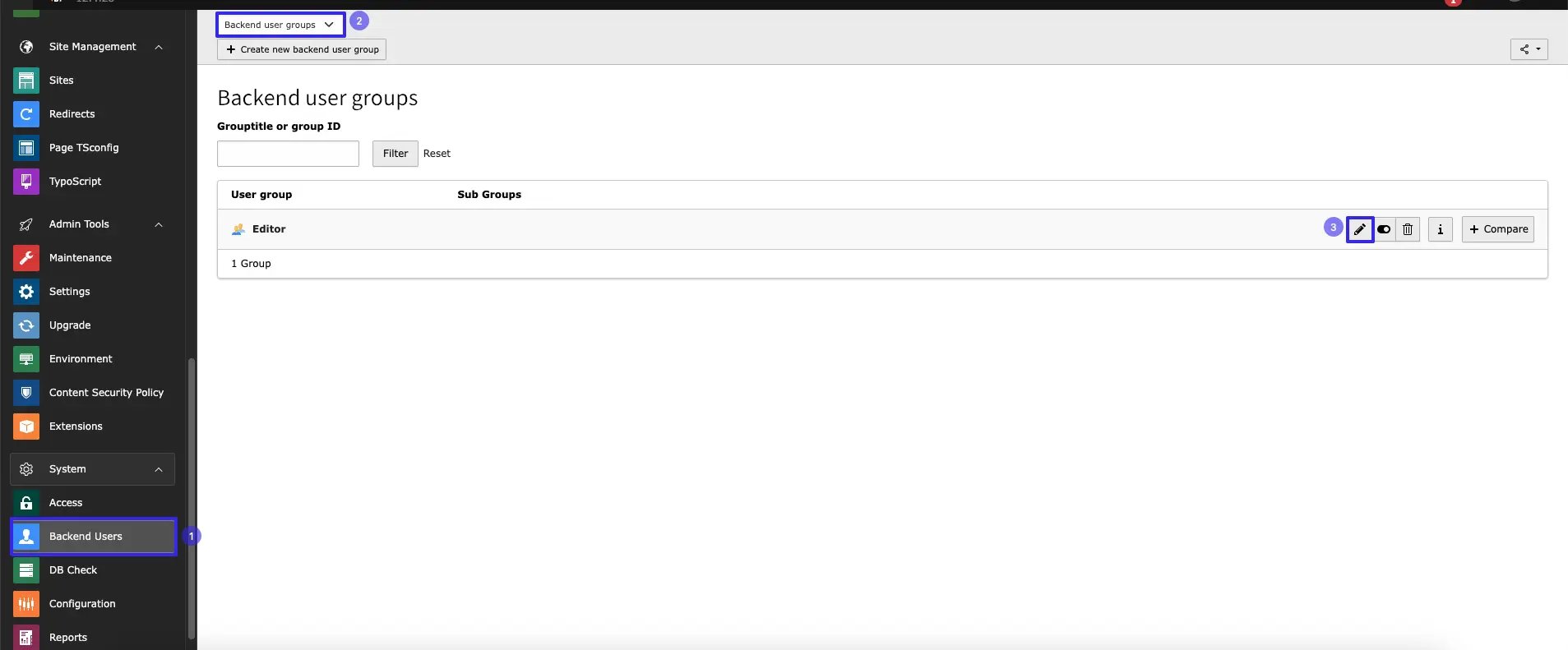
You can grant editors or users access to specific features of T3ai using our custom permission settings.follow below steps to configure it.
<img src="https://mintcdn.com/t3planet/ELJrooPLT46NhdbM/en/latest/ExtNsT3AI/AISettings/images/per1.webp?fit=max&auto=format&n=ELJrooPLT46NhdbM&q=85&s=7f9b8553b40ce564770a51181e3be82a" alt="Frontend image without preview" width="1907" height="791" data-path="en/latest/ExtNsT3AI/AISettings/images/per1.webp" />

* **Step 1:** Navigate to the Backend Users module in the TYPO3 backend.
* **Step 2** Select the Backend User Group
* **Step 3** Edit the User group
<img src="https://mintcdn.com/t3planet/ELJrooPLT46NhdbM/en/latest/ExtNsT3AI/AISettings/images/per2.webp?fit=max&auto=format&n=ELJrooPLT46NhdbM&q=85&s=5ca28de5e768195e7a977c75a83bdbfd" alt="Frontend image without preview" width="1600" height="707" data-path="en/latest/ExtNsT3AI/AISettings/images/per2.webp" />

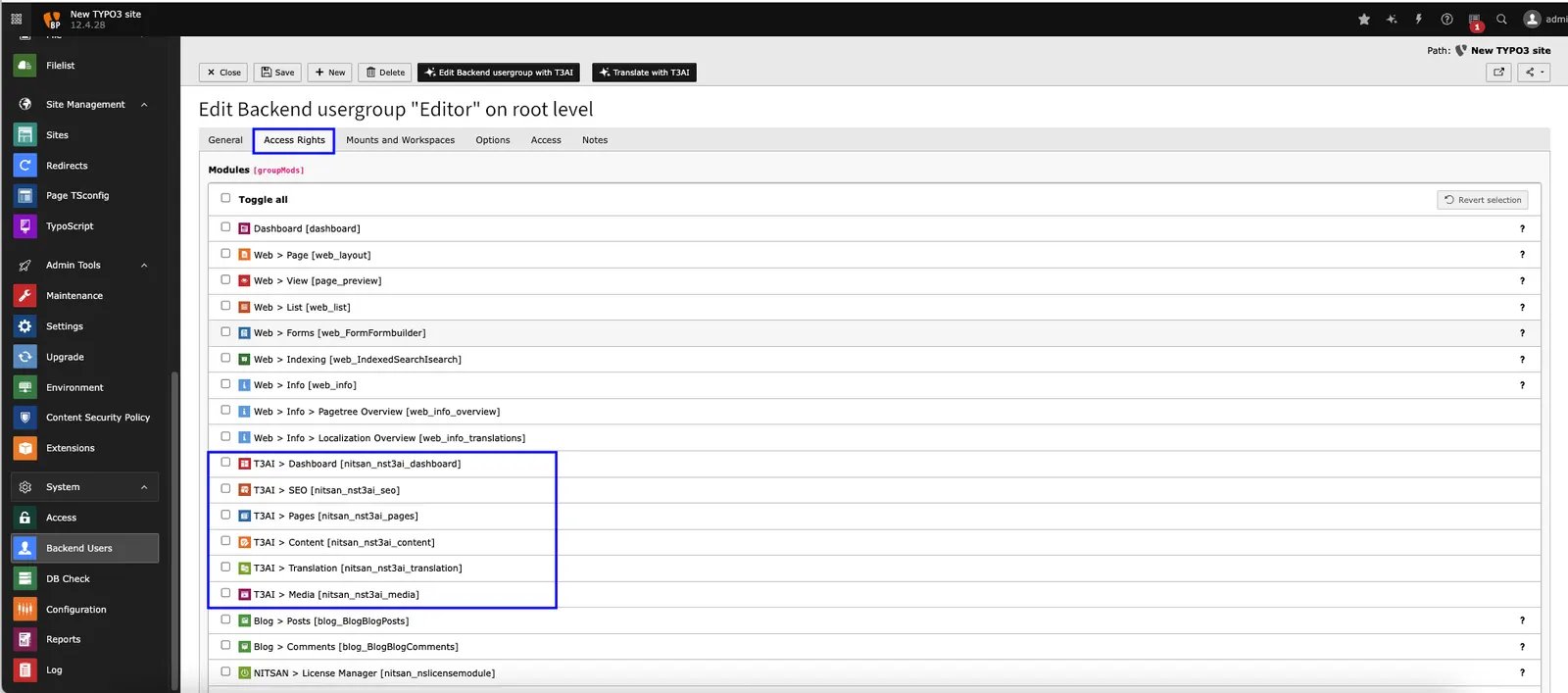
* **Step 4** Go to tab  **Access Rights**

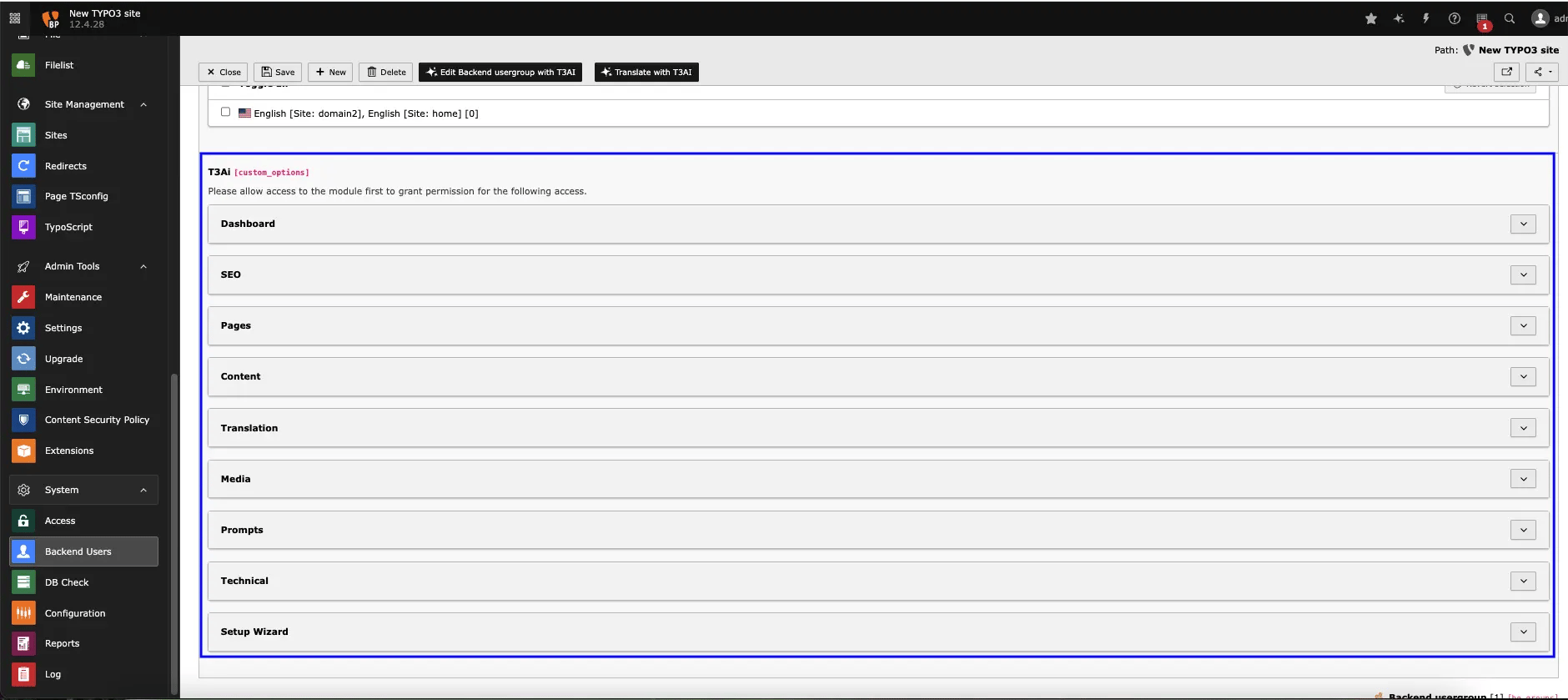
You can enable or restrict access to specific modules for editor users.

To grant more granular control, you can also allow specific features within a particular module for editor users
<img src="https://mintcdn.com/t3planet/ELJrooPLT46NhdbM/en/latest/ExtNsT3AI/AISettings/images/per3.webp?fit=max&auto=format&n=ELJrooPLT46NhdbM&q=85&s=df294ca003e3aed79aef22db6905b960" alt="Frontend image without preview" width="1880" height="839" data-path="en/latest/ExtNsT3AI/AISettings/images/per3.webp" />

<img src="https://mintcdn.com/t3planet/ELJrooPLT46NhdbM/en/latest/ExtNsT3AI/AISettings/images/per4.webp?fit=max&auto=format&n=ELJrooPLT46NhdbM&q=85&s=75d548931edf558704c5cc0cfadc3404" alt="Frontend image without preview" width="1896" height="802" data-path="en/latest/ExtNsT3AI/AISettings/images/per4.webp" />

## Interactive demos

<div className="t3-embed">
  <iframe src="https://app.supademo.com/embed/cmrabnhz30bh0qmhx012m66o5?utm_source=link" loading="lazy" title="AI Co pilot" allow="clipboard-write; fullscreen" frameBorder="0" webkitallowfullscreen="true" mozallowfullscreen="true" allowfullscreen />
</div>

***

## Additional content from live docs

## Overview

Use this area to confirm which T3AI features are available in your project and whether the shared AI Foundation setup is ready.
For provider selection, model setup, and shared AI rules, also review [AI Foundation Configuration](/en/latest/en/latest/ExtNsT3AF/Configuration/Index), [AI Foundation Providers](/en/latest/en/latest/ExtNsT3AF/Configuration/AIProviders/Index), and [AI Foundation AI Features](/en/latest/en/latest/ExtNsT3AF/Configuration/AIFeatures/Index).

## Key capabilities

* Review enabled T3AI feature groups
* Confirm the project is connected to the right provider and model setup
* Check whether editors can use the expected modules before rollout

## Basic workflow

T3AI feature settings are managed in AI Foundation — not under **Admin Tools > Settings > Configure Extensions**.

1. Go to the **TYPO3 backend**.
2. Open **AI Foundation** → **AI Features**.
3. Open the **T3AI** (`ns_t3ai`) feature card.
4. Review the available feature settings and defaults.
5. Confirm the required feature options are enabled.
6. Click **Save**, then test the related T3AI modules.

For the shared module overview, see [AI Foundation AI Features](/en/latest/en/latest/ExtNsT3AF/Configuration/AIFeatures/Index).
