> ## Documentation Index
> Fetch the complete documentation index at: https://docs.t3planet.de/en/latest/llms.txt
> Use this file to discover all available pages before exploring further.
# Localization
> You can add multiple Languages to your TYPO3 Template and create your website with multiple languages.
You can add multiple Languages to your TYPO3 Template and create your website with multiple languages. To create multi-language site, please perform following steps:
## Add Language to Pages
Once Language is configured, you need to translate pages & content to new language.
* Go to Page Module, select root page and switch to Language option in drop-down at top.
 * Click on Make new Translation of this page drop-down and select language
 * It will create a page in selected language. Click on Save & Close button.
Once it is saved there will be 2 sections in backend, one for each language.
* It will create a page in selected language. Click on Save & Close button.
Once it is saved there will be 2 sections in backend, one for each language.
 You can Translate/Copy content elements of existing language to new language using Translate button in New Language.
## How to change and add another language labels?
* 1. All Labels which are managed at file level are stored at this language file
: extension\_key/Resources/Private/Language/locallang.xlf
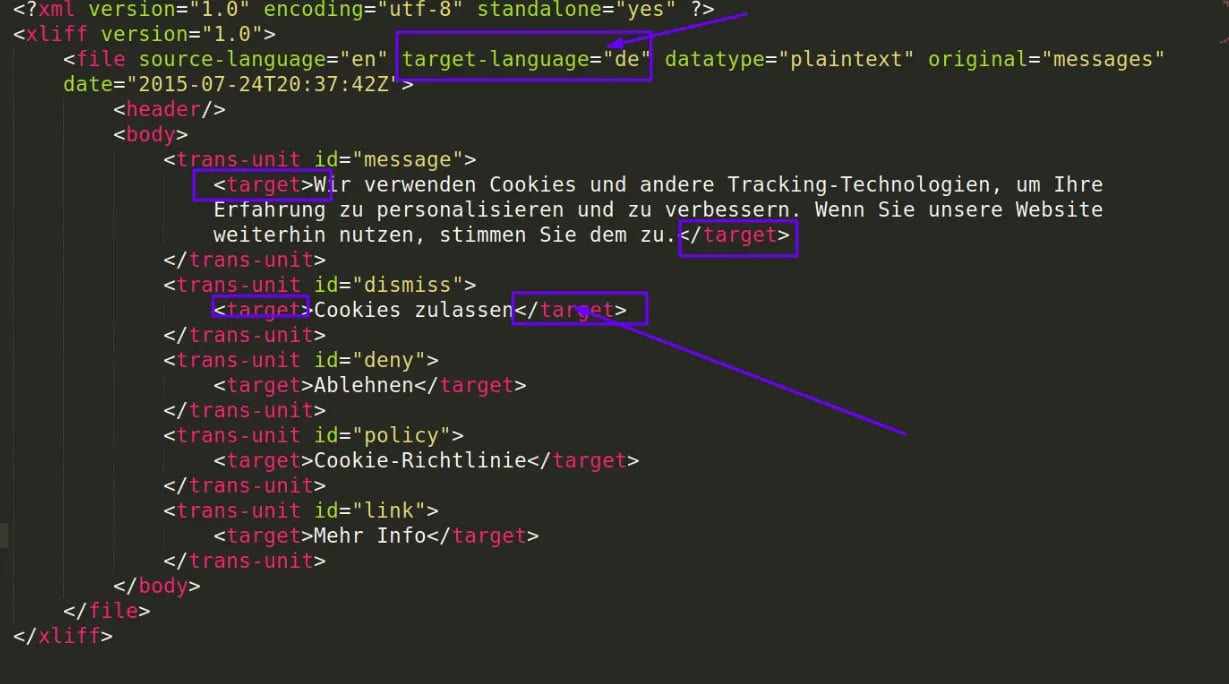
* 2. To make translation in another language, create the second language file by creating a copy of locallang.xlf at same folder. For example, de.locallang.xlf
* 3. Now you can change labels and text as per new language as highlighted in below screenshot:
You can Translate/Copy content elements of existing language to new language using Translate button in New Language.
## How to change and add another language labels?
* 1. All Labels which are managed at file level are stored at this language file
: extension\_key/Resources/Private/Language/locallang.xlf
* 2. To make translation in another language, create the second language file by creating a copy of locallang.xlf at same folder. For example, de.locallang.xlf
* 3. Now you can change labels and text as per new language as highlighted in below screenshot: