> ## Documentation Index
> Fetch the complete documentation index at: https://docs.t3planet.de/en/latest/llms.txt
> Use this file to discover all available pages before exploring further.
# Upgrade Guide TYPO3 v10 to v12
> Upgrade Guide TYPO3 v10 to v12.
**Step 1.** Setup TYPO3 v11 with your existing database & files
**Step 2.** Now you need to migrate gridelements to container for this you need to follow this step
## Migrate from EXT.gridelements to EXT.container
Latest version of TYPO3 templates products have major breaking changes to migrate from outdated EXT.gridelements to modern EXT.container. Please take a look at the step-by-step migration guide below.
**Step 1.** Go to NITSAN > License Manager > Update to latest version of EXT.ns\_theme\_name
**Step 2.** Update EXT.ns\_basetheme atleast version
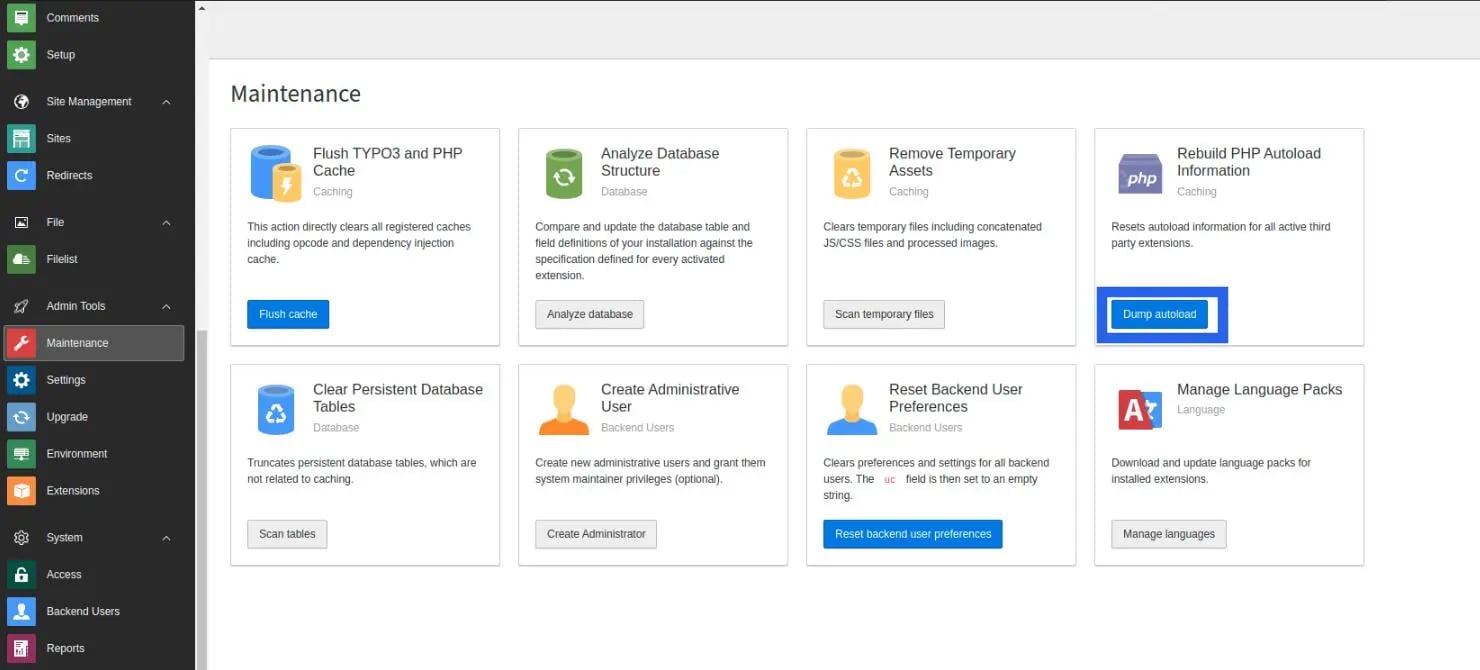
**Step 3.** Go to Admin Tools > Maintenance module > Clear cache. Also, click on the “Dump Autoload” button. Or run the below command for the composer-based TYPO3 instance.
```bash theme={"theme":{"light":"github-light","dark":"github-dark"}}
composer dump-autoload
```
**Step 4.** Install EXT.container extension
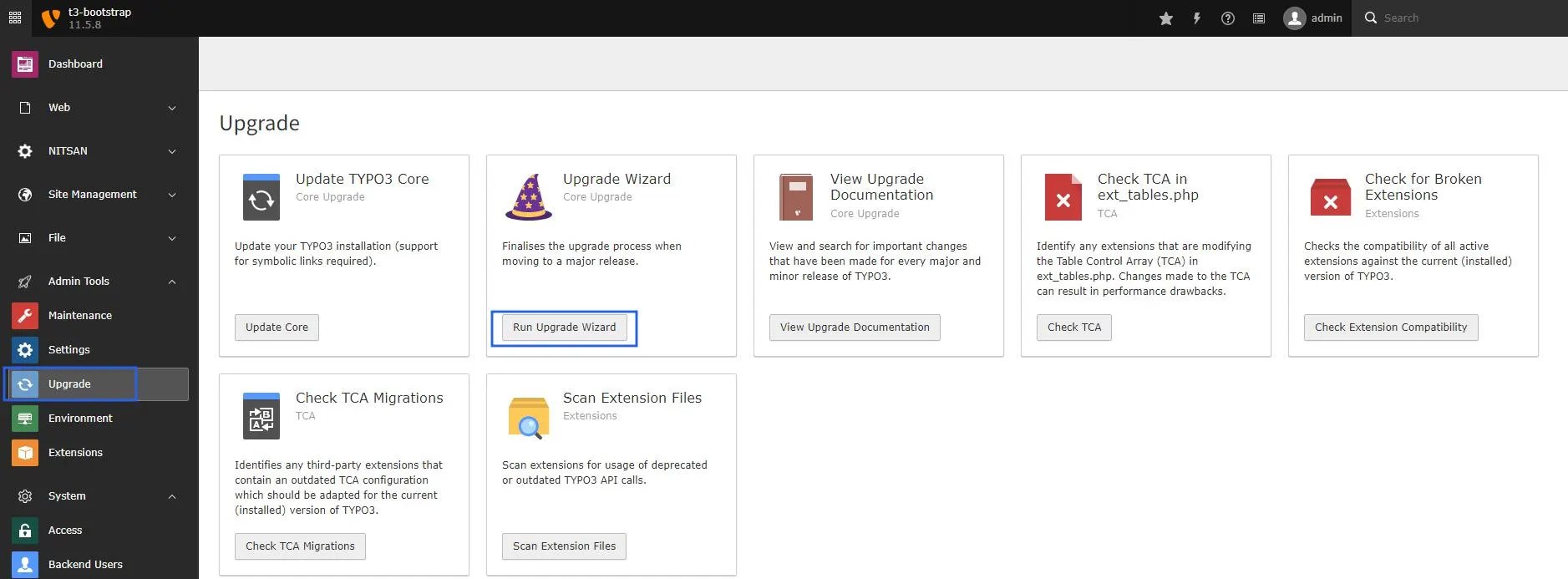
**Step 5.** Go to Admin Tools > Upgrade > Click on “Run Upgrade Wizard”
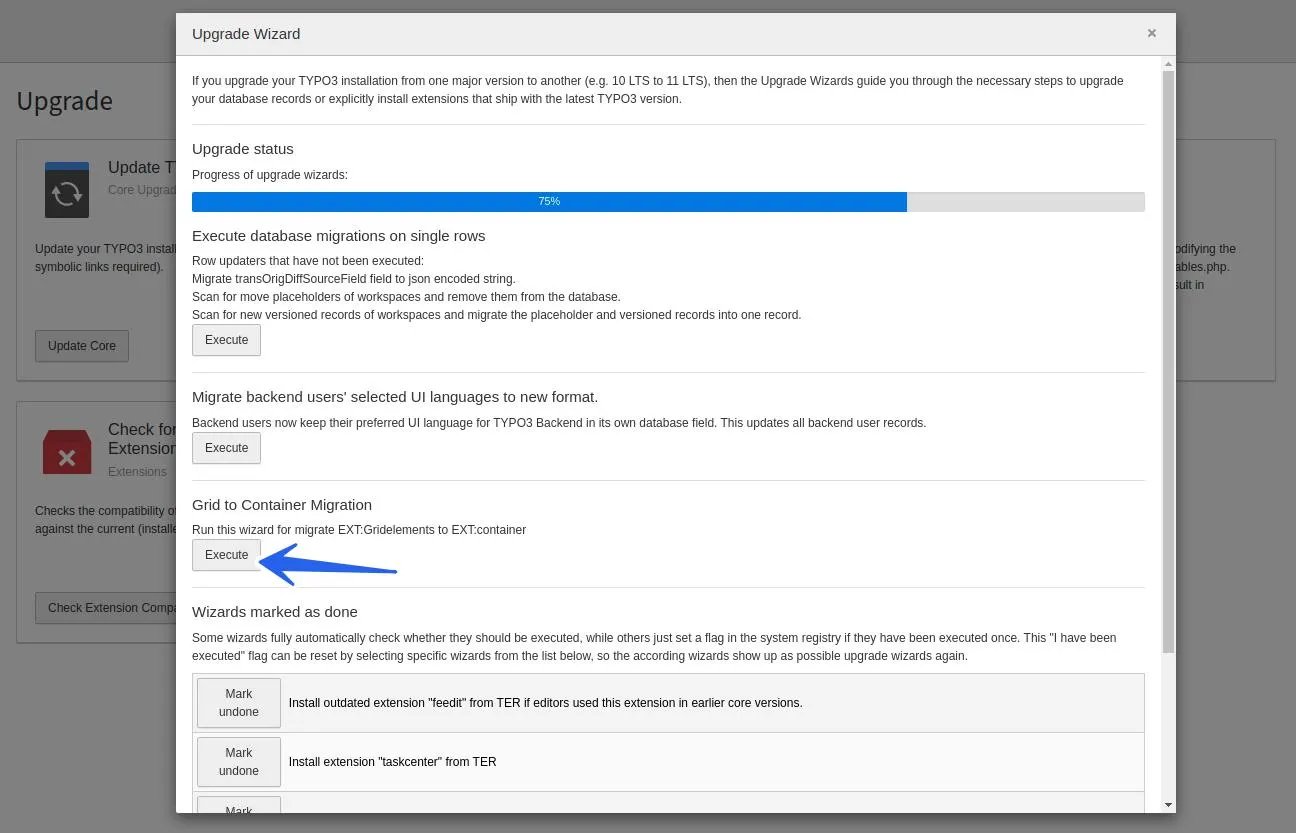
**Step 6.** Click on the “Execute” button of “Grid to Container Migration”
 **Step 7.** Go to Admin Tools > Extensions > De-activate & Delete EXT.gridelements
**Step 8.** Go to Admin Tools > Maintenance > Clear Cache.
That’s it! All the grids are migrated (structure and data) from EXT.gridelements to EXT.container TYPO3 extension.
## After Migration follow below step for Upgrade v12
**Step 1.** Export the full database after the migration.
**Step 2.** Set up fresh TYPO3 v12 and import the database.
**Step 3.** Activate the template using a license key.
## Upgrade Product ≥ v13.1.0 (Migration from FlexForm Elements to Content Blocks)
**Step 7.** Go to Admin Tools > Extensions > De-activate & Delete EXT.gridelements
**Step 8.** Go to Admin Tools > Maintenance > Clear Cache.
That’s it! All the grids are migrated (structure and data) from EXT.gridelements to EXT.container TYPO3 extension.
## After Migration follow below step for Upgrade v12
**Step 1.** Export the full database after the migration.
**Step 2.** Set up fresh TYPO3 v12 and import the database.
**Step 3.** Activate the template using a license key.
## Upgrade Product ≥ v13.1.0 (Migration from FlexForm Elements to Content Blocks)
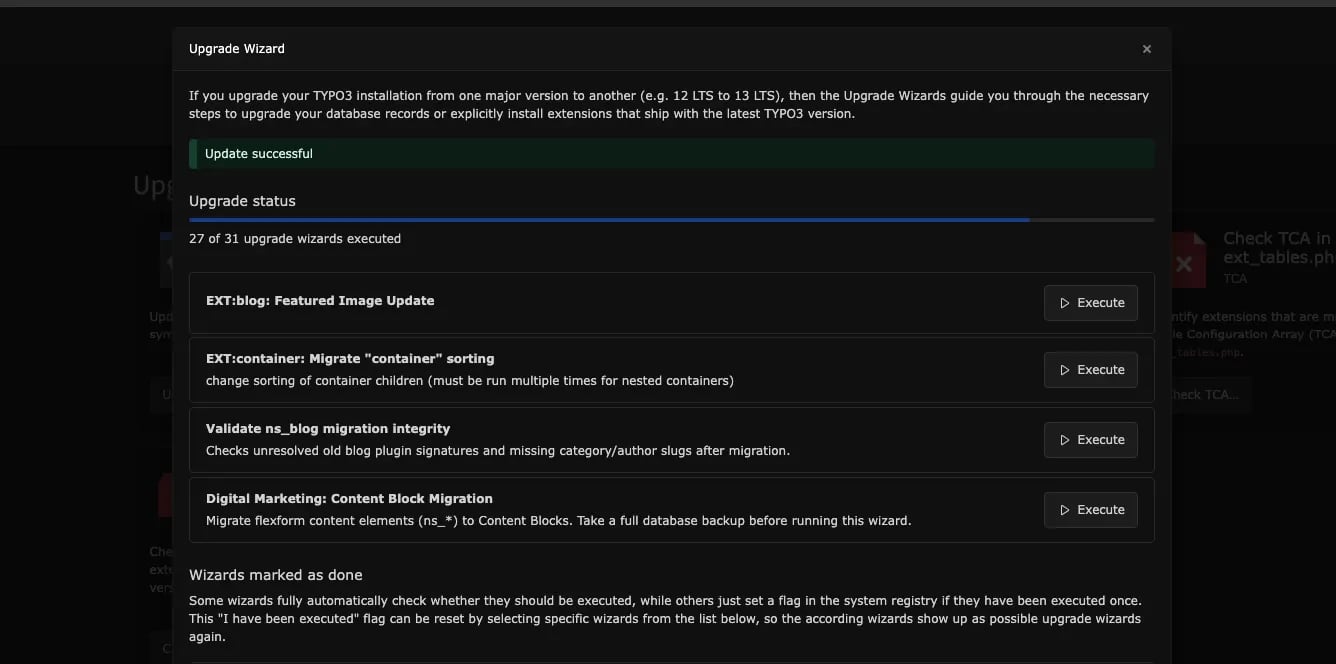 From version **13.1.0** onwards, this product introduces major changes by migrating from outdated **FlexForm-based elements** to modern **Content Blocks (EXT)**. Please follow the step-by-step migration guide below.
1. Go to **Admin Tools → T3planet License** and update **Theme (EXT)** to the latest version.
2. Make sure the **Content Blocks extension (EXT)** is installed, as it is required for this migration.
3. Go to **Admin Tools → Maintenance** module and clear the cache. Also, click on the **Dump Autoload** button.
For composer-based TYPO3 installations, run the following command:
```bash theme={"theme":{"light":"github-light","dark":"github-dark"}}
composer dump-autoload
```
Before running the **Upgrade Wizard**, please ensure that you create a **backup of your database**.
1. Go to **Admin Tools → Upgrade** and click **Run Upgrade Wizard**.
2. Click the **Execute** button for **theme: Content Block Migration**.
After completing these steps, all **Custom Elements (structure and data)** will be successfully migrated from **FlexForm Elements** to **Content Blocks (EXT)**.
From version **13.1.0** onwards, this product introduces major changes by migrating from outdated **FlexForm-based elements** to modern **Content Blocks (EXT)**. Please follow the step-by-step migration guide below.
1. Go to **Admin Tools → T3planet License** and update **Theme (EXT)** to the latest version.
2. Make sure the **Content Blocks extension (EXT)** is installed, as it is required for this migration.
3. Go to **Admin Tools → Maintenance** module and clear the cache. Also, click on the **Dump Autoload** button.
For composer-based TYPO3 installations, run the following command:
```bash theme={"theme":{"light":"github-light","dark":"github-dark"}}
composer dump-autoload
```
Before running the **Upgrade Wizard**, please ensure that you create a **backup of your database**.
1. Go to **Admin Tools → Upgrade** and click **Run Upgrade Wizard**.
2. Click the **Execute** button for **theme: Content Block Migration**.
After completing these steps, all **Custom Elements (structure and data)** will be successfully migrated from **FlexForm Elements** to **Content Blocks (EXT)**.