AI Providers
Providers represent connections to AI services. Each provider stores an adapter type, optional endpoint, encrypted credentials, models, and capability flags.
Path: AI Foundation > AI Providers
Follow this interactive walkthrough, then continue with the details below.
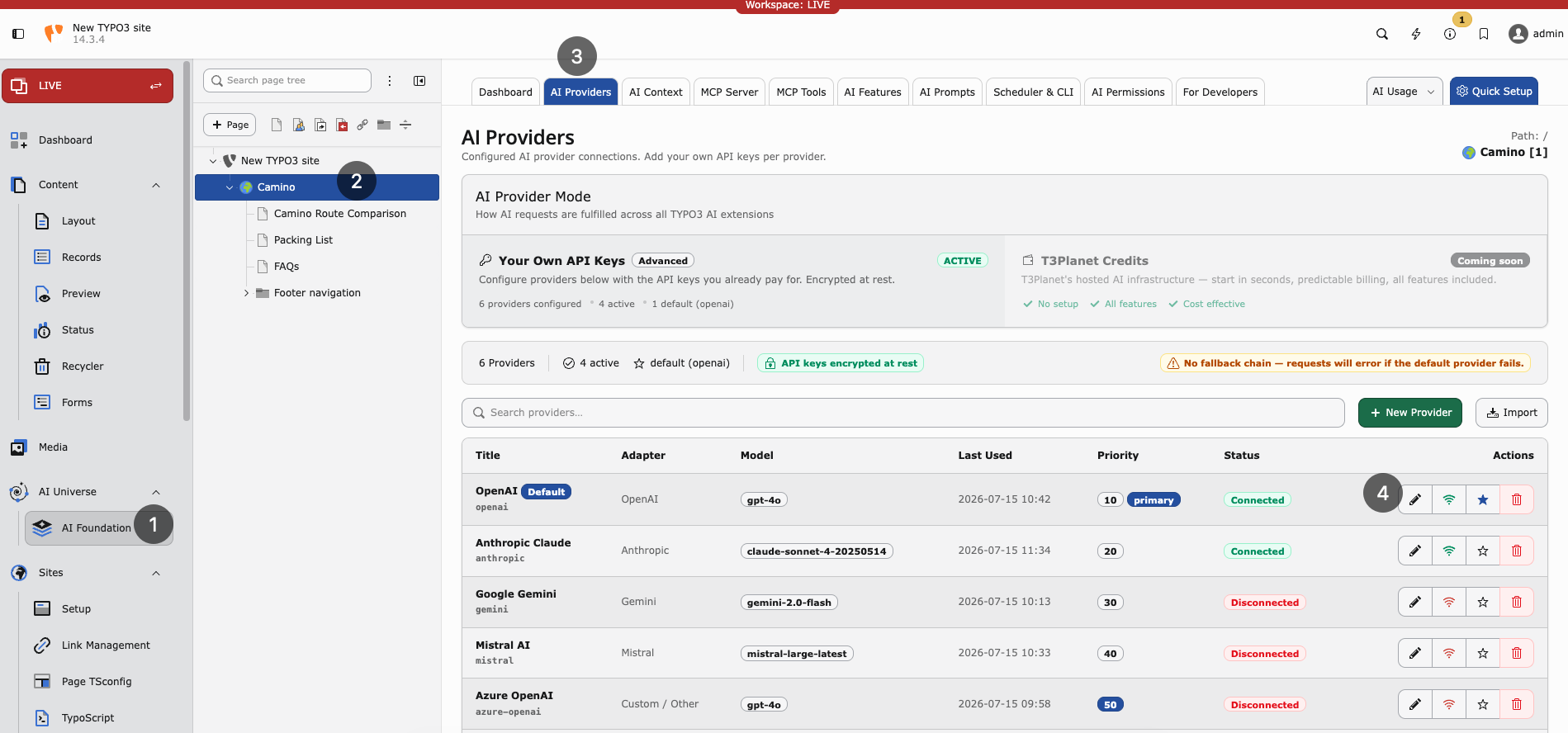
AI Providers list — configured adapters, models, connection status, and default provider.
Without at least one working provider, no AI feature runs.
Adding a provider
Open AI Foundation > AI Providers.
Click Add provider.
Fill in the required fields:
Display name — Friendly label for your team (for example
OpenAI production).Adapter type — Vendor protocol (OpenAI, Anthropic, Gemini, Azure, Mistral, DeepSeek, xAI, Ollama, or custom OpenAI-compatible).
API key — Cloud vendors need a key. Leave empty for local Ollama.
Model ID — Completion model (for example
gpt-4o-mini).
Optionally set the endpoint URL, embedding model, capabilities, temperature, and pricing fields.
Click Save.
Enable Default on exactly one provider.
Tip
For first-time setup, use Quick Setup in the AI Foundation module header. It walks through provider creation with fewer decisions.
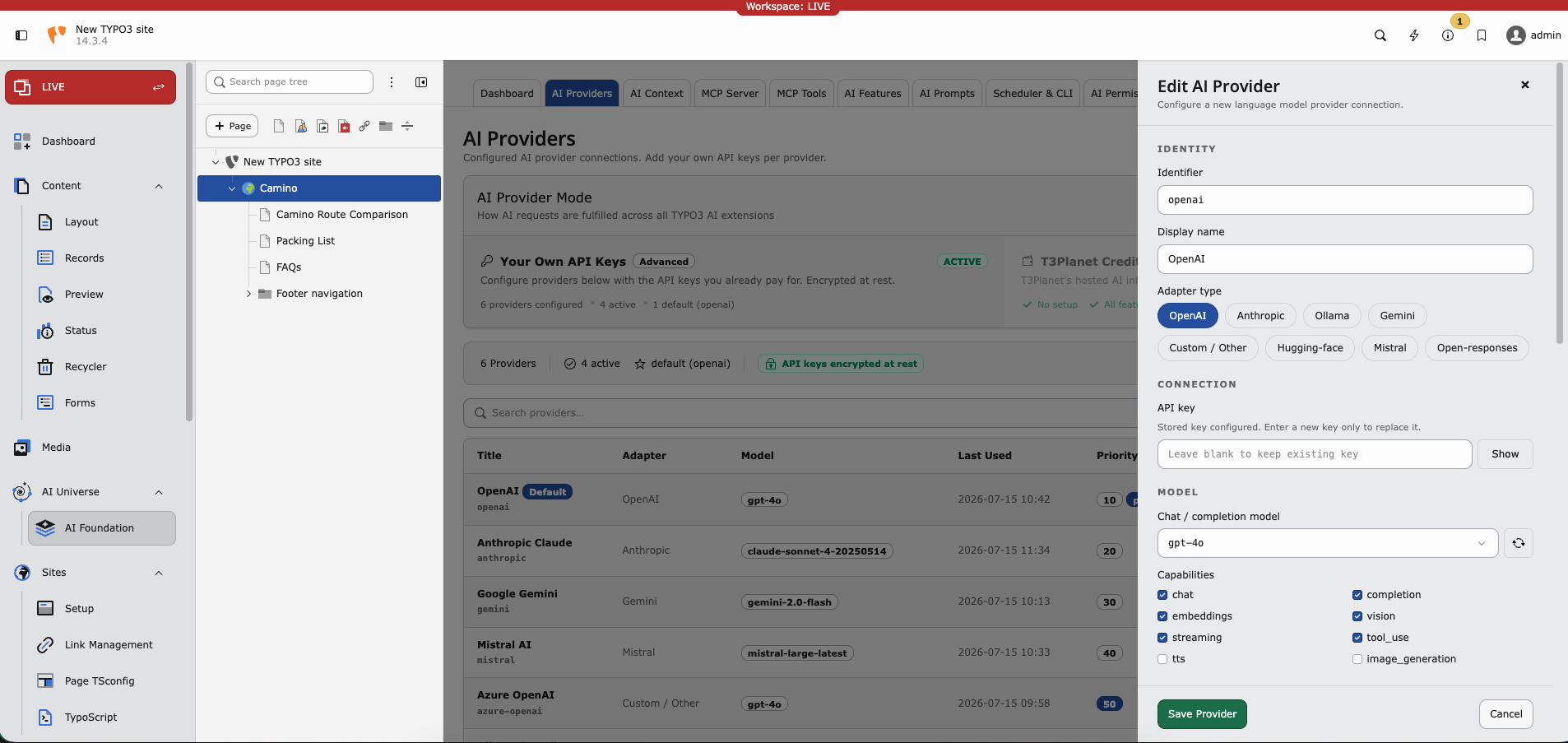
Edit AI Provider — adapter type, API key, chat model, and capability flags.
Testing a connection
After saving a provider, click Test connection to verify the setup. The test calls the provider API and reports:
Connection status (success or failure)
Error details on failure
Model / capability hints when the adapter can list them
Note
Self-hosted endpoints (such as Ollama) must be reachable from the TYPO3 server. Typical causes of a failed test:
Wrong host or port in Endpoint URL (default
http://localhost:11434for Ollama)Docker/network isolation between PHP and the model host
Outbound HTTPS blocked for cloud vendors
Local adapters usually do not need an API key. Cloud adapters do.
If your server reaches the internet only through a corporate proxy, configure TYPO3 HTTP settings:
$GLOBALS['TYPO3_CONF_VARS']['HTTP']['proxy'] = 'http://proxy.example.com:8080';
Editing and deleting providers
Click a provider row to edit its settings in the drawer.
Use Test connection after rotating an API key or changing the model.
Use Delete to remove a provider. Features that pointed at that provider fall back to the global default (or fail until another provider is assigned).
Warning
Deleting the only default provider leaves child extensions without a global fallback. Set another provider as Default first.
Supported adapters
Built-in and discovered adapters include:
symfony.openai— OpenAIsymfony.anthropic— Anthropic Claudesymfony.gemini— Google Geminisymfony.mistral— Mistral AIsymfony.ollama— Local Ollamasymfony.openrouter— OpenRouternst3af.openai_compatible— Custom / OpenAI-compatible endpointsAdditional Symfony AI bridges when their Composer packages are installed (for example Azure, DeepSeek, xAI)
Custom adapters: Custom AI Providers.
Capabilities
Pick a model that supports what you need. Test connection helps validate the choice.
Chat — Text generation
Streaming — Live response display in the backend
Embeddings — Search and similarity features
Vision — Image analysis
Tool use — MCP agent workflows
Multiple providers — when and why
Dev and live — Separate rows with different API keys per environment.
Cost saving — Cheap model as global default; premium model assigned in AI Features for important tasks.
EU hosting — Mistral or Azure in an EU region for data residency requirements.
Provider fields
Fields below map to the AI Providers drawer and the
tx_nst3af_provider table.
Required
Connection
Optional configuration
Governance and status
Optional pricing (pricing_input_per_1m, pricing_output_per_1m,
pricing_currency, cost_center), retention overrides, dashboard analytics
flags, and read-only status fields (last_status, last_status_at,
last_status_message, last_used_at) support monitoring and cost tracking.
Status fields update after Test connection and live requests.
Troubleshooting
Test fails — Check the API key, model ID, endpoint URL, and outbound HTTPS/firewall rules.
Rate limit — Wait or upgrade the vendor plan.
Vision returns empty — Use a vision-capable model (for example GPT-4o with vision).
Module works but child extension fails — Check AI Features for per-task overrides.
Security
Rotate keys every 90 days
Use one key per environment (dev, staging, live)
Restrict access via AI Permissions
Never commit API keys to Git
Where to get API keys
Note
Anthropic: https://console.anthropic.com/
Google Gemini: https://aistudio.google.com/apikey
Mistral: https://console.mistral.ai/
Azure OpenAI: https://portal.azure.com/
More links: Helpful Links