

How to open Fix Hub
- Open AI Accessibility.
- Select a page in the page tree.
- Open the Fix Hub tab.
Filters
Use the toolbar to show only what you need:- All, Needs Review
- Critical / Serious / Moderate / Minor
- Passes
- WCAG A / AA / AAA, Best Practice, WCAG 4.1.2
Issue detail
Click a card to open the detail panel. Typical content:- Description, WCAG / guideline tags, impact
- Source label (Scanner)
- How to fix and related guidance
- Occurrences with target selectors and HTML snippets
- Status (New / In Progress / Completed) with Update
Color contrast checker
Color contrast checker is a built-in Fix Hub tool for checking text and background colour pairs against WCAG contrast rules — without running a scan and without an AI provider or API key. Open it from the Fix Hub toolbar (also available from the empty-state actions when the board has no findings yet).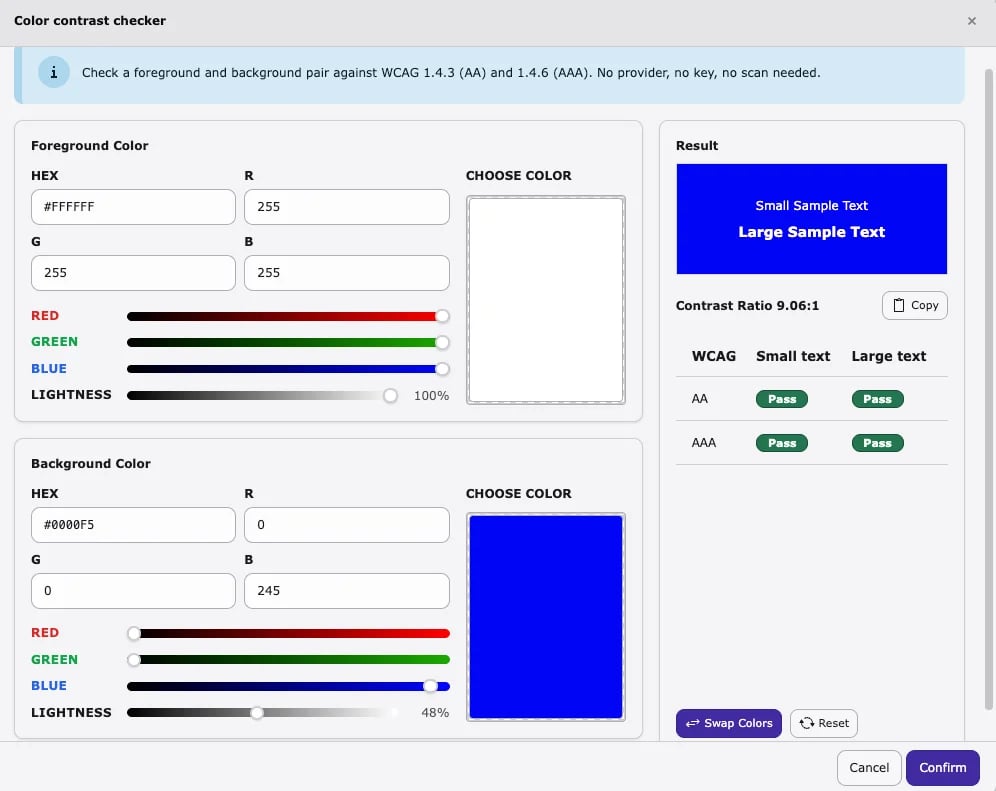
What you can do
- Set Foreground and Background colours (HEX, RGB, sliders, or colour picker)
- Preview small and large sample text on the chosen background
- Read the live contrast ratio (with copy)
- See Pass / Fail for WCAG 1.4.3 (AA) and 1.4.6 (AAA) on small and large text
- Swap colours or Reset the pair, then Confirm or Cancel