

Non-Composer Update Guide
Minor Version Update
What’s minor version update? It means, if you want to update product with security update or minor bug fixing; Example 1.1.0 to 1.2.0Step 1. Update New Version
- Open System → T3Planet Shop (TYPO3 v12/v13: Admin Tools → T3Planet Shop; older versions: NITSAN → T3Planet License)
- Click the “Get Updates” button
- If new version available then click on “Update to X.X.X” button of your particular product.
Step 2. System Update & Flush Cache
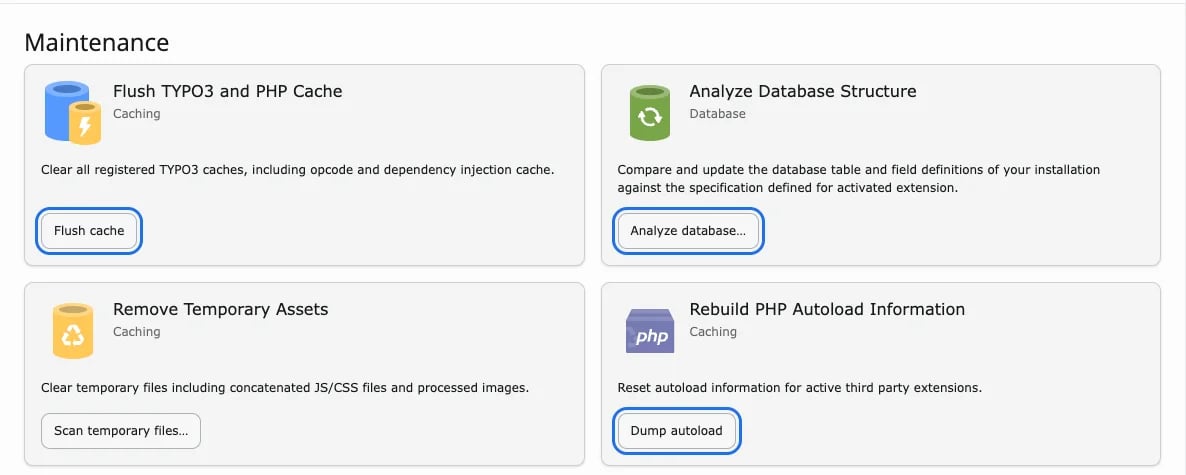
Open System → Maintenance (TYPO3 v12/v13: Admin Tools → Maintenance):- Analyze database (if any changes are listed)
- Dump autoload
- Flush cache
Major Version Updates
What’s major version update? It means, if you want to update product with major branch version; Example 1.1.0 to 2.0.0Step 1. Temporary De-Activate Extension
Go to System → Extensions (TYPO3 v12/v13: Admin Tools → Extensions) and deactivate the extension.Step 2. Update New Version
- Open System → T3Planet Shop (TYPO3 v12/v13: Admin Tools → T3Planet Shop)
- Click the “Get Updates” button
- If new version available then click on “Update to X.X.X” button of your particular product.
Step 3. Update Dependent TYPO3 Extensions
Go to Extensions Manager and Update all third party dependent TYPO3 extensions to your purchased TYPO3 extension.Step 4. Activate Extension
Go to System → Extensions (TYPO3 v12/v13: Admin Tools → Extensions) and activate the extension.Step 5. System Update & Flush Cache
Open System → Maintenance (TYPO3 v12/v13: Admin Tools → Maintenance):- Analyze database (if any changes are listed)
- Dump autoload
- Flush cache