Installation
License Activation & Installation
To activate license and install this premium TYPO3 product, Please refer this documentation License documentationInclude the TypoScript
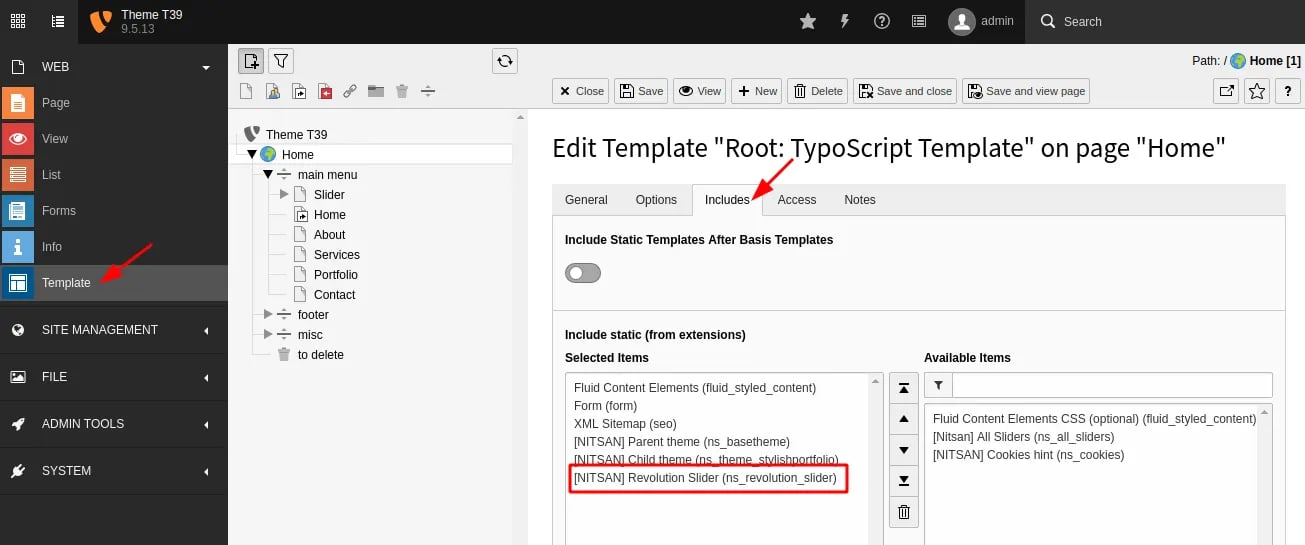
The extension ships some static TypoScript code which needs to be included.
- Switch to the root page of your site.
- Switch to the Template module and select Info/Modify.
- Click the link Edit the whole template record and switch to the tab Includes.
- Select [NITSAN] Slider Revolution (ns_revolution_slider) at the field Include static (from extensions):
-
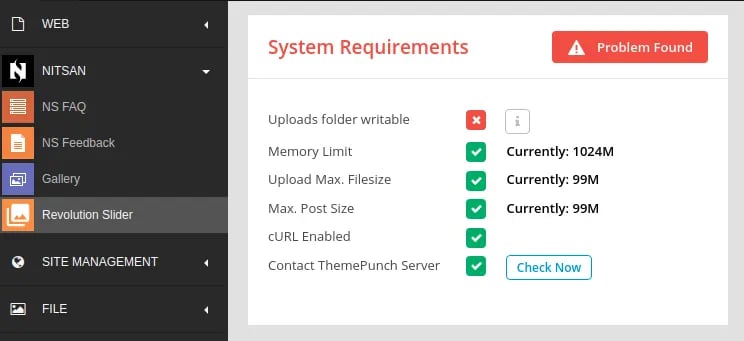
Check System Requirements of Slider Revolution
- Switch to NITSAN > Slider Revolution
- Check “System Requirements” section at Dashboard, Please make sure to have all green-signals ;)
How to Install TYPO3 Extension ns_revoltionslider
Extension Installation Via without Composer mode https://www.youtube.com/watch?v=SN5HoFQcDM4 Extension Via Composer https://www.youtube.com/watch?v=_7ILu4lwU-kFigures