

- Only administrators can change these settings.
- The settings apply to the whole installation and to every backend user who works with the AI agent.
- Nothing is stored until you click Save Changes.
Open the settings
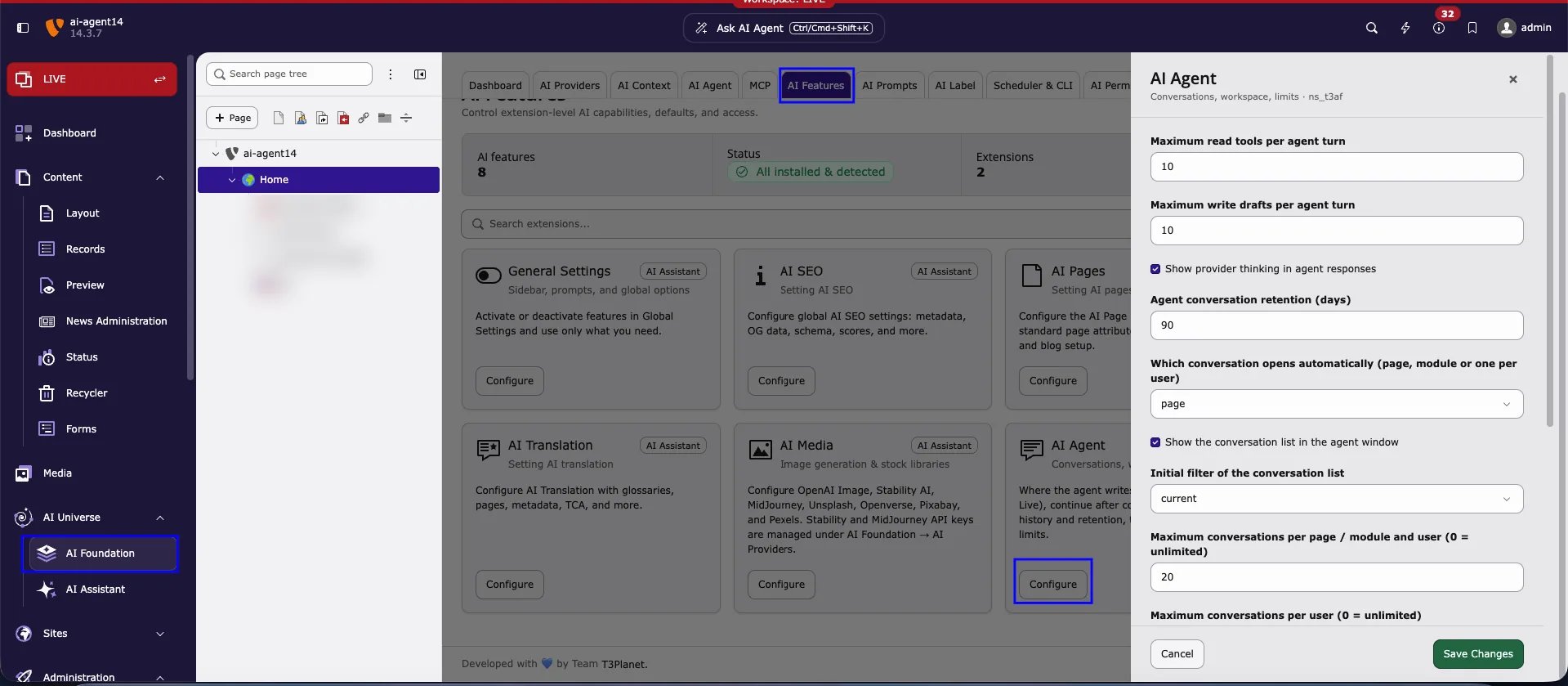
1
Open AI Foundation
In the module menu, click AI Universe > AI Foundation.
2
Select AI Features
Click the AI Features tab in the module navigation.
3
Find the AI Agent card
Scroll to the AI Agent card (subtitle Conversations, workspace, limits). You can also type agent in the search field above the cards.
4
Click Configure
The AI Agent settings drawer opens on the right side.
5
Change the fields and save
Adjust the fields described below, then click Save Changes. Click Cancel to close the drawer without saving.
All settings at a glance
The numbers follow the order of the fields in the drawer, from top to bottom.Limits per turn (1–2)
A turn is one request of the editor and the AI agent’s answer to it.Maximum read tools per agent turn
Type: integer · Default:10
How many read tools the AI agent may call in one turn, for example to load the page, list its content elements, or search the page tree. The minimum is 1.
When the limit is reached, the AI agent stops and shows Read tool budget reached (10 per turn). Send another message to continue. Send a new message to let it continue.
Maximum write drafts per agent turn
Type: integer · Default:10
How many change drafts (change cards) the AI agent may prepare in one turn. Drafts are only proposals: nothing is saved until the editor clicks Apply. Set 0 to stop the AI agent from preparing any change.
When the limit is reached, the AI agent shows Write draft budget reached (10 per turn). Apply or discard drafts, then continue.
Lower limits reduce AI usage and credits per request. Higher limits help with larger tasks, for example “Add a header and a text element to each subpage”.
Answers and history (3–4)
Show provider thinking in agent responses
Type: boolean · Default: on Some AI providers return their reasoning (“thinking”) together with the answer. When enabled, the AI agent shows this reasoning in its response so editors can follow how it reached the result. Disable it for shorter, cleaner answers.Agent conversation retention (days)
Type: integer · Default:90
Conversations without activity for this number of days are moved to the trash and removed 7 days later. The clean-up runs with the console command t3af:agent:conversations:cleanup; schedule it in the Scheduler module (task Execute console commands).
Run the clean-up manually
Conversations (5–9)
These settings control the conversation list in the AI agent window. See also Conversations.Which conversation opens automatically (page, module or one per user)
Type: string · Default:page
Decides which conversation the AI agent shows when an editor opens it:
page— The latest conversation of this page in this module. Each page has its own conversations. Recommended, because the AI agent works on the page you are editing.module— The latest conversation of this backend module, for every page.user— One conversation per user: the latest conversation, wherever it was started.
Show the conversation list in the agent window
Type: boolean · Default: on Shows the conversation list in the AI agent window, so editors can switch, rename, and delete conversations. When disabled, editors only see the conversation that opens automatically.Initial filter of the conversation list
Type: string · Default:current
The filter that is active when the conversation list opens:
current— Only the conversations of this page (This page).all— The conversations of all pages (All pages).
Maximum conversations per page / module and user (0 = unlimited)
Type: integer · Default:20
How many conversations one user keeps for one page or module (depending on setting 5). When a user starts a new conversation beyond this limit, the oldest conversations are moved to the trash. 0 means no limit.
Maximum conversations per user (0 = unlimited)
Type: integer · Default:200
How many conversations one user keeps in total, across all pages and modules. Beyond this limit, the oldest conversations are moved to the trash. 0 means no limit.
More settings (10–14)
Scroll down in the drawer to see these settings.Continue the task after the editor confirms or declines a card
Type: boolean · Default: on After the editor clicks Apply or Cancel on a change card, the AI agent continues with the next step of the request without a new message. This makes multi-step requests work, for example “Create the page, then add two headers”. When disabled, the editor must send a new message for each step.Earlier messages sent to the AI per turn, in tokens
Type: integer · Default:6000
How much of the earlier conversation is sent to the AI provider with each turn (1 token is about 4 characters). Older messages are left out. A higher value gives the AI agent more memory of the conversation but uses more credits. Allowed range: 500 to 100000.
Tool search for the AI Agent
Type: string · Default:auto
How the AI agent finds the right tool for a request:
auto— Uses embeddings of the AI provider when available, otherwise keyword search.provider— Always uses embeddings of the AI provider.none— Keyword search only, no embedding requests.
Embedding provider identifier
Type: string · Default: (empty) The AI provider used for tool search embeddings. Leave empty to use the default provider from AI Foundation > AI Providers.Minimum embedding similarity for tool search results
Type: float · Default:0.0
Tools with a lower similarity score (0.0 to 1.0) are not offered to the AI agent. 0.0 keeps all results. Raise it carefully: a high value can hide tools the AI agent needs.
Related
- Conversations — start, switch, rename, and delete conversations.
- AI Agent module tabs — status, tools, and governance of the AI agent.
- Where the AI agent opens — where the AI agent opens.