

On AI Providers you choose between Your Own API Keys (the default) and T3Planet Credits.
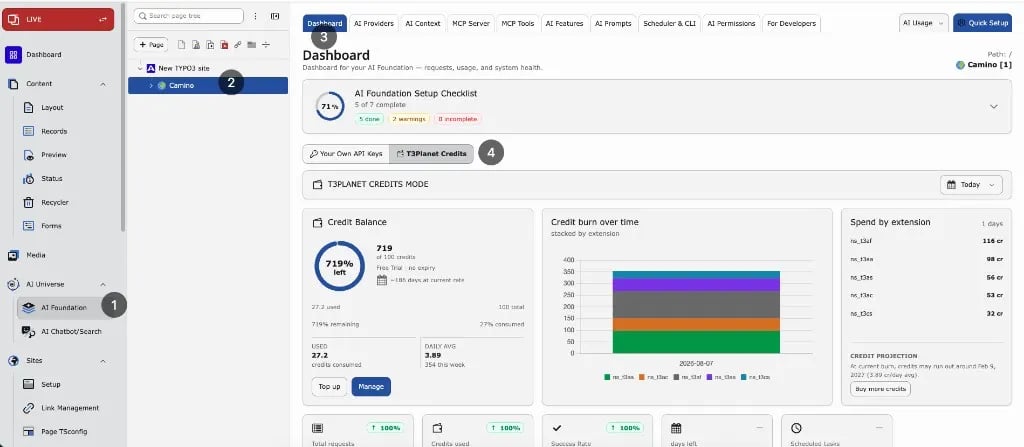
Where to configure it
- Go to AI Universe → AI Foundation → AI Providers.
- Choose T3Planet Credits.
- Click Activate if it is shown.
What it is
- An optional add-on for AI Foundation. It pays for AI use only.
- You get 50 credits once when you sign up.
- One shared credit balance for this TYPO3 installation.
- You see the balance on the Dashboard and in the Credits panel on AI Providers.
- Credits are only used when an AI request runs through T3Planet.
- Each request is listed in AI Usage (provider
t3planet_credits).
What it is not
- Not the default setup mode
- Not required when you use your own API keys
- Not a license for AI Foundation
BYOK vs T3Planet Credits
- Your Own API Keys (BYOK, “bring your own key” – the default) – your server sends requests directly to the AI service you set up.
- T3Planet Credits (optional) – T3Planet sends your requests to AI services for you. Credits pay for the use.
Licensing and billing
- AI Foundation is 100% OSS (GPL-2.0-or-later)
- Activate the OSS license key via T3Planet Shop > AI Universe > AI Foundation > Start
- T3Planet Credits covers AI usage only
- Credits never replace the OSS license key
- Plan credits never roll over
What’s covered
When Credits is active:- Text completion
- Streaming
- Embeddings
- Text-to-speech (TTS)
- Image generation
When to use it
- Credits – editors need AI quickly, without setting up API keys.
- Your Own API Keys – you already have accounts and keys with AI services.