

Purpose
The Training Center shows every piece of content the AI has learned or still needs to learn. Use it to check progress, fix failed items and start the training by hand. You find it in AI Universe → AI Chatbot/Search → Training Center. View the training queue (items collected from all data sources) and control training and cleanup.What you see
- Counts at the top: Total, Pending, Processing, Completed, Failed and Tokens (how much AI was used).
- All Sources – your data sources and how many items each has.
- Training Queue – a list of all items with Item, Status, Tokens, Created and Actions.
- Filters – by data source, by status (All Statuses) or by search text.
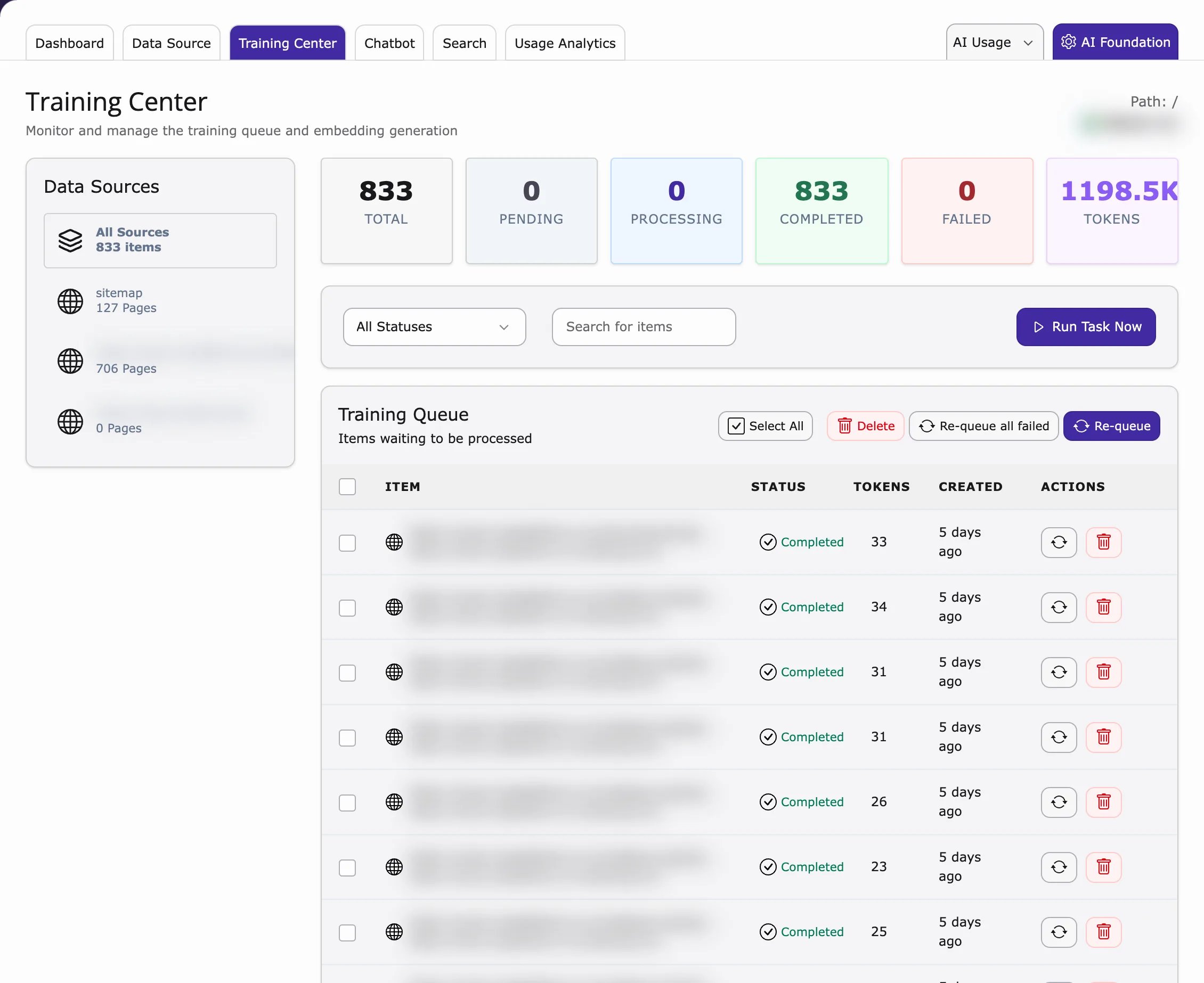
- Pending – waiting to be learned.
- Processing / Embedding – being learned right now.
- Completed – learned. The chatbot can use it.
- Failed – something went wrong. Try Re-queue.
Actions
Sync
Reads the content of the data source again (same as on the Data Source tab).Reset (Re-queue)
- Select a Failed (or Completed) item.
- Click Re-queue.
- It goes back to Pending and is learned again at the next training run.
Delete
- Select the items.
- Click Delete.
Deleted items will not be trained again unless they are added again by a new sync.
Run training
- Click Run Task Now. The Scheduler opens.
- Run the task T3CS Training (Site N) for your website.
Training behaviour (simple terms)
- Only Pending items are learned.
- Learning means your text is sent to your AI service and the result is saved for the chatbot and AI Search.
- Afterwards the item is Completed, or Failed if there was an error.
- How often training runs depends on the Sync Interval of your data sources – and the Scheduler must be running on your server.
Training settings
How content is split, embedded and cached is set on the shared Training card (AI Universe → AI Foundation → AI Features → Training, badge AI Chatbot/Search). The card is shared: the same values apply to AI Chatbot and AI Search. Most websites can keep the defaults. Click Configure on the card to open the settings drawer, change a value and click Save.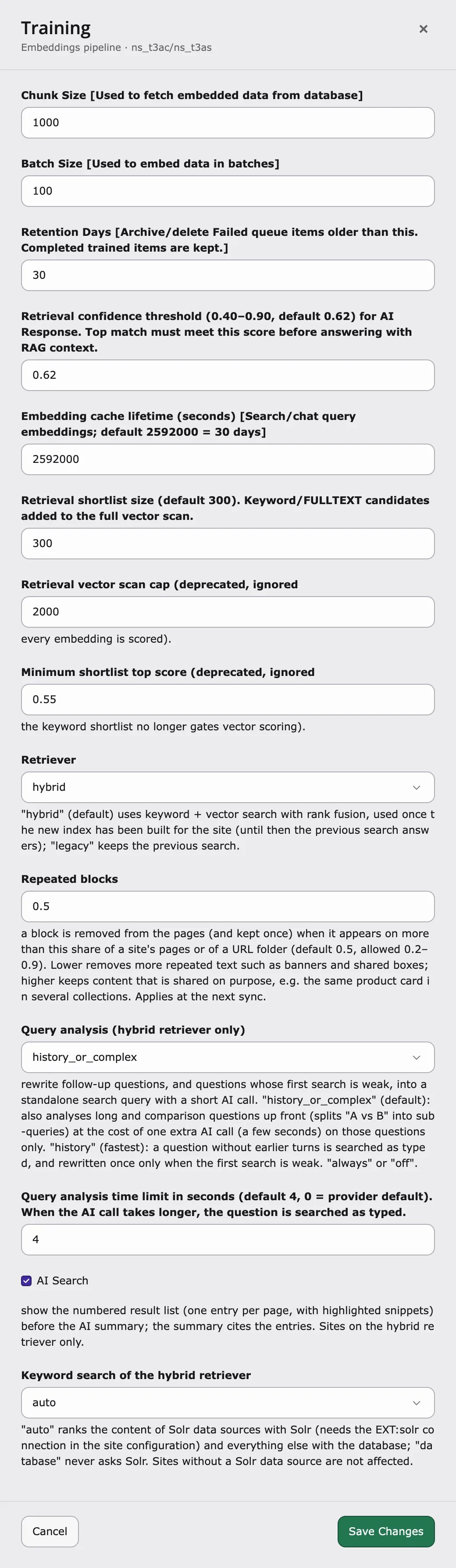
Training options explained
Chunk Size – default:1000
How many records are read from the database at a time while the content is prepared for training. When to change: lower it if the training stops because the server runs out of memory; raise it on strong servers to train large sites faster.
Batch Size – default: 100
How many items are sent to the AI provider in one request when the embeddings are created. Also used by the --batch-size option of the training command. When to change: lower it if your AI provider reports rate limits or time-outs; raise it to train faster when your provider allows larger requests.
Retention Days – default: 30
After how many days old Failed queue items are archived (CSV in var/log/t3cs) or deleted by the cleanup step. Completed (trained) items are always kept. When to change: raise it if you want to look into failed items for longer; lower it to keep the queue table small.
Embedding cache lifetime (seconds) – default: 2592000 (30 days)
How long the embeddings of visitor questions in search and chat are cached. A question that was asked before is answered without a new embedding call, which is faster and saves AI credits. When to change: lower it if you often switch the embedding provider or model; shorter values mean more AI calls.
Repeated blocks – default: 0.5 (allowed 0.2–0.9)
Removes text that repeats on many pages, such as promo banners, “shop the video” boxes, call-to-action boxes or legal notes. Such a block is kept once instead of on every page, so it does not push real content out of answers. A block counts as repeated when it appears on more than this share of the pages – across the whole site or within one URL folder (for example all /products/ pages). Empty or invalid values use 0.5.
- Lower (for example
0.3) – removes more repeated text. - Higher (for example
0.7) – keeps content that is shared on purpose, for example the same product card in several collections.
4 seconds
Follow-up questions (for example “and how much is it?”) are turned into a standalone search query with a short AI call. This setting is how long that call may take. If it takes longer, the question is searched as typed, so a slow AI service cannot block the answer. 0 uses the time limit of the AI provider. When to change: raise it if your AI provider is often slow and follow-up answers miss; lower it if answers must start faster.
AI Search (result list) – default: on
AI Search shows a numbered result list – one entry per page, with highlighted snippets – before the AI summary. The summary refers to these entries. Switch it off to show only the AI summary. It does not affect the chatbot.
All training settings and their defaults
All training settings and their defaults
Command line
The same commands are described for AI Search.For developers: run training on the command line
For developers: run training on the command line
You can start the training yourself on the command line instead of waiting for the Scheduler, for example to test it or to train everything again. The commands come from the shared AI Chatbot/Search core and work the same for AI Chatbot and AI Search.Run them with Run the Scheduler task – Compound words – See all options with
vendor/bin/typo3 (Composer), php typo3/sysext/core/bin/typo3 (non-Composer) or ddev typo3 (DDEV).Training – nst3af:training [rootPageId]Syncs the data sources of a site, trains all Pending items (creates the embeddings) and cleans up old Failed items. rootPageId is the ID of the site root page. The aliases t3cs:training and aiuniverse:training run the same command.scheduler:run --task=<taskUid> -fRuns the site’s T3CS Training (Site N) task directly, with the options saved on the task. The task UID is shown in the Scheduler module.t3cs:keyword:compoundsAdds the parts of compound words (for example “Sonnen” and “schutz” from “Sonnenschutz”) to the keyword index of already trained content, so the keyword search also finds the single words. No AI calls, no new embeddings. Run it after a training on sites with compound words, for example German.vendor/bin/typo3 nst3af:training --help.Related
- Data Source – add or sync the content that is trained
- Scheduler – the task T3CS Training (Site N)
- Dashboard – training status and Run All