

Purpose
Usage Analytics shows what visitors asked the chatbot (and AI Search) and how they rated the answers. Use it to see which questions come up often and where answers can be improved. You find it in AI Universe → AI Chatbot/Search → Usage Analytics.What you see
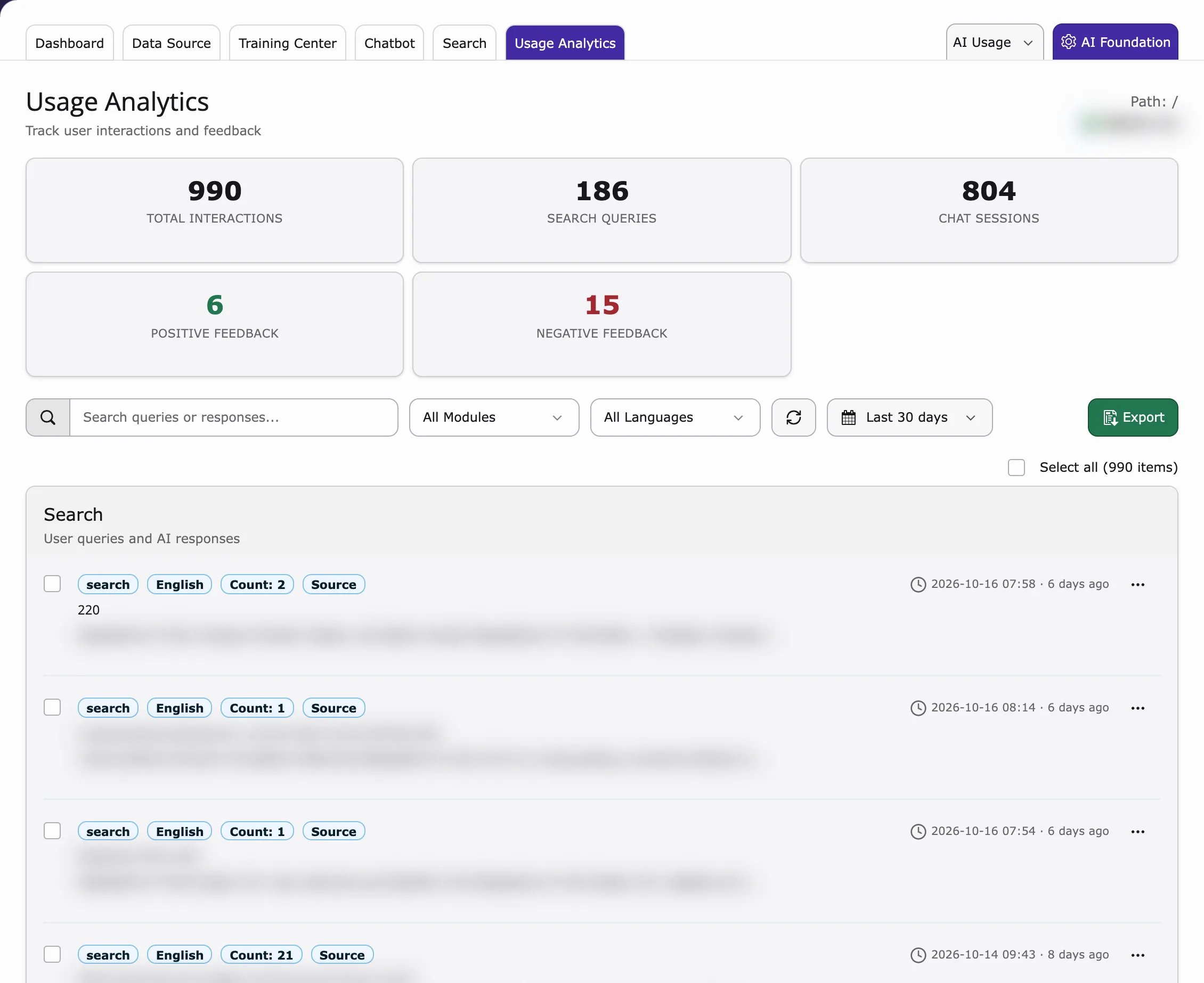
- Total Interactions, Search Queries, Chat Sessions, Positive Feedback and Negative Feedback
- Interaction Logs – a list of conversations and searches with the question, the answer and the time
- Click View Details to read the whole conversation, the feedback and the reference sources
The visitor’s IP address is not stored in plain text. It is saved as a hash (a one-way code), so you cannot read the real IP.
Conversations only appear here if Save chatbot history is on (Chatbot → General → Visitor features). Searches only appear if Save search history is on (Search → Settings).
Filtering and export
- Search queries or responses – search in the list.
- All Modules / All Languages – show only chatbot or search, or one language.
- Export – download the data.
Deletion / cleanup
You can delete single entries, for example when a visitor asks you to:- Deleting a search entry removes it from the search history.
- Deleting a chatbot entry can remove all conversations from the same visitor.
Related
- AI Usage & Logs in AI Foundation – AI requests, tokens and log messages
- AI Search Usage Analytics – the same tab for search
- DPA & GDPR – what is stored and for how long