

Frontend capabilities
- llms.txt – a short “table of contents” of your site for AI tools, at
/llms.txt. - llms-full.txt – the text of your pages in one file.
- Markdown pages – a clean text-only version of each page, easy for AI to read.
- Activity – a list of which AI bots visited which pages.
- Control – allow or block each AI bot.
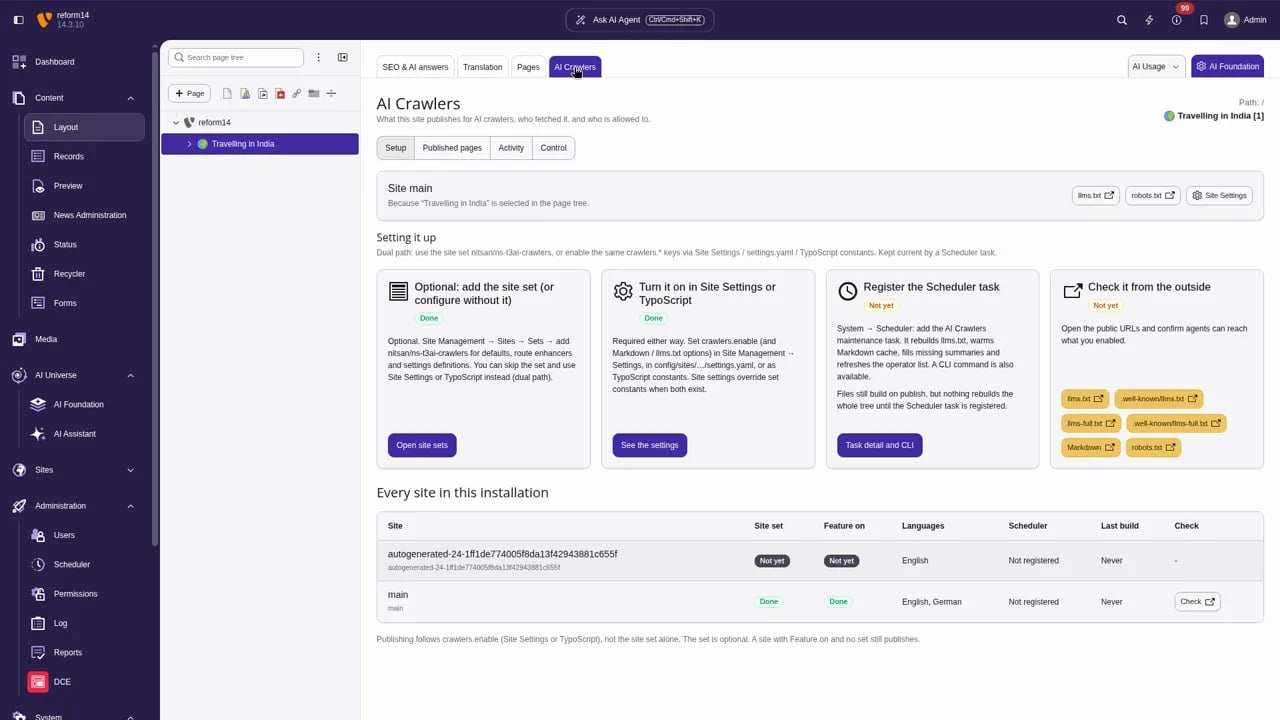
Setup
Setup is a checklist. Each step says Not yet until it is done:- Add the site set – a ready-made settings package for AI Crawlers.
- Turn it on in the site settings.
- Check it from the outside – open
/llms.txtin your browser. - Register the maintenance Scheduler task (recommended) – schedule automatic cleanup of old crawler logs and updates to activity aggregates. Click Open Scheduler. This task is not required for the frontend features below to work.
Turn it on
- On Setup, click the button to edit the site sets.
- Add AI Crawlers (llms.txt / Markdown). Click Save.
- Open the site Settings, category AI Crawlers.
- Turn on the settings you want (see the table).
- Click Save. Then clear the cache (lightning icon at the top > Flush all caches).
Frontend output and published pages
- Click Published pages. You see which pages are included and which are not.
- Click llms.txt to open the file.
- In a page row, click Open to see the text-only version, or Edit to change the page.
Activity
- Click Activity. You see which AI bots visited which pages, and when.
- Choose From and To dates.
- Click Export CSV to download the list as a spreadsheet.
Test that Activity records bot visits
You can pretend to be an AI bot to check that visits are recorded.- Make sure llms.txt and Crawler request logging are on (see Turn it on).
- Open a terminal (command window) on your computer or the server.
-
Type this command. Replace the address with your own site address:
On a local DDEV test site, the address looks like
https://your-project.ddev.site/ai/llms.txt. - Go back to AI Crawlers > Activity and reload the page. You see a visit from GPTBot.
-A 'GPTBot' makes the visit look like it comes from GPTBot (ChatGPT’s bot). Try ClaudeBot or PerplexityBot too. -sI only asks for a short reply, so nothing is downloaded. No entry? Check that both settings are on, clear the cache and try again.Control
- Click Control. Each AI bot company is listed.
- For each one, choose allow or deny (block).
- Click Write robots.txt.
robots.txtis the file that tells bots what they may read. - Changed your mind? Click Restore previous to go back to the last saved version.
Good to know
- 14.6.1 had a setting Block AI Scraping/Crawling. It is replaced by Control.
- The SEO report checks AI crawler access and llms.txt. Turning on AI Crawlers helps you pass these checks.
- Basic AI Crawlers features do not require a Scheduler task. Schedule AI Crawlers maintenance to clean up old visit logs and refresh activity aggregates automatically.
For developers / admins
For developers / admins
- Instead of Site Settings you can use the TypoScript constants of the same name.
- Text-only (Markdown) pages need the PHP package
league/html-to-markdown(installed with Composer). - Files are served at
/llms.txtand/.well-known/llms.txt. The Markdown suffix is set withcrawlers.markdown.suffix(default.md); clients can also sendAccept: text/markdown. - Log retention:
crawlers.log.retentionDays(default 7). Optional bot list URL:crawlers.operatorListUrl.
Settings card: AI Crawlers card.