

Requirements
Step 1: Install EXT:ns_license and activate your license
Install EXT:ns_license and add your license key in the T3Planet Shop module (TYPO3 14: System › T3Planet Shop; TYPO3 12 and 13: Admin Tools › T3Planet Shop). For a trial or purchase, see License Activation. Register every domain you work on (production, staging, local). See Register and manage domains.Step 2: Install EXT:ns_googledocs
- Composer
- Non-Composer
Use the Composer credentials (username and license key) from your license email.Optional: install
netresearch/rte-ckeditor-image for inline image editing in imported text. Google Docs detects it and uses a matching RTE preset.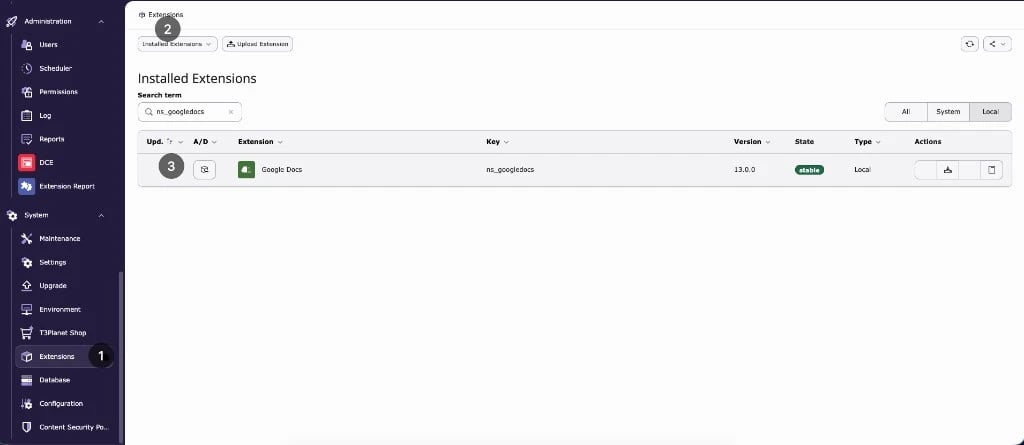
Step 3: Update the database
Open Analyze Database Structure and apply all changes:- TYPO3 14: System › Maintenance
- TYPO3 12 and 13: Admin Tools › Maintenance
vendor/bin/typo3 extension:setup instead.
Step 4: Include the TypoScript
Include one of the following on your root page:- Site set (TYPO3 13 and 14): in Site Management › Sites, edit your site and add the set EXT:GoogleDocs :: Basic Setup (
nitsan/ns-googledocs). - Static template (TYPO3 12, or sites without site sets): in your TypoScript record, add Google Docs (ns_googledocs) under Include TypoScript sets / static templates.
Step 5: Check the extension configuration
The setting googleDocsContentElementType sets the default content element for imported sections (default Text & Image). You can still change the type per section in the import dialog.- TYPO3 14: System › Settings › Extension Configuration › ns_googledocs
- TYPO3 12 and 13: Admin Tools › Settings › Extension Configuration › ns_googledocs