

T3AA tools are missing
AI Foundation > AI Agent > Overview does not list AI Accessibility /ns_t3aa under tools by extension, or the agent never uses T3AA tools.
- Check that
ns_t3aaandns_t3afare installed and active, then clear all caches. - T3AA registers MCP tools only when AI Foundation’s MCP interfaces are present. Without
ns_t3af, the tools do not appear. - Compare Executable and Locked for T3AA on the Overview tab. Check that the T3AA license is active.
- Check AI Foundation > AI Agent > Severity policy. Tools listed as Unclassified are locked.
- Check that the backend user group has AI agent access in AI Permissions.
No AI provider / empty provider list
The agent footer has no usable provider, or turns fail before a T3AA tool runs.- Configure at least one provider in AI Foundation (for example OpenAI).
- Select the provider in the agent footer before the first message of the conversation.
- After the first answer, the provider is fixed for that conversation — start a New conversation to switch.
PageSpeed: Unable to resolve
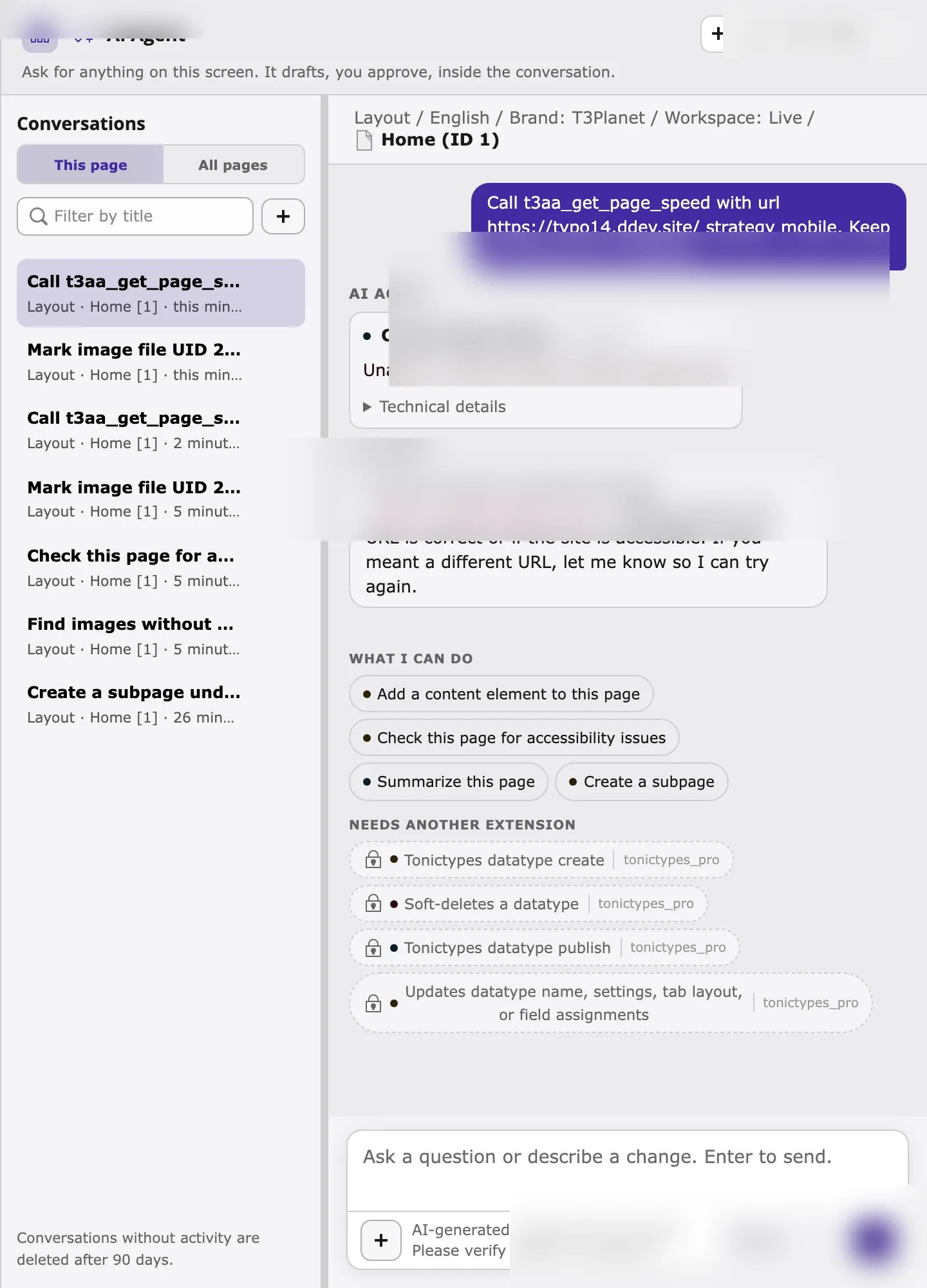
t3aa_get_page_speed calls Google PageSpeed Insights. Google must reach the page URL from the public internet.
- Local DDEV hosts (
*.ddev.site) are not resolvable by Google — this failure is expected on local projects. - Backend Lighthouse / scan jobs that refuse local or private hosts behave the same way for
*.ddev.site. - Use a publicly reachable staging or production URL, or run PageSpeed from an environment Google can fetch.
- This is a read-only tool: the error does not change any TYPO3 data.
- The agent’s PageSpeed result is not written to the T3AA Lighthouse report tab in the backend. Use the module Lighthouse workflow when you need a stored report.
The missing-alt list looks too noisy
Which images have no alt text? can still include manyfileadmin assets (for example PWA icons or upload leftovers) even though decorative images and extension public assets under typo3conf/ext, typo3/sysext, _assets, and _processed_ are excluded.
- Ask a narrower follow-up, for example “Only list images in fileadmin/user_upload” or name a folder.
- For MCP clients, pass
storageUid=1(or the correct fileadmin storage) and a smallerlimit. - Mark true icons and logos as decorative when that is correct for your site.
Permissions or “No file found”
Write tools and some reads fail when the backend user cannot access the file or page.- Confirm the file UID exists and is readable for your user.
- Confirm the page is in a site the user may edit.
- The agent never exceeds your backend permissions.
I asked for issues, but expected a new scan
You asked “What accessibility issues does this page have?” (or a similar issues question) and only got the last scan result — or you expected a scan preview and did not get one.- Showing issues from the last scan is a read (
t3aa_accessibility_issues). It never starts a new scan. - Running a new scan is a write (
t3aa_accessibility_scan_run) and uses scan quota. - Ask to scan, for example “Scan this page for accessibility problems” or “Run a WCAG scan on this page”, then click Apply on the scan preview.
- “Check this page for accessibility problems” / “What accessibility issues…” only read the last result — they do not start a scan.
The agent keeps asking to continue
The agent replies with I am not finished yet… Say “continue” (or similar) before the preview or next card appears.- Type
continue, or click a suggested action, so the turn can finish the remaining steps (for example attaching a file or opening the next image-text card). - Start a New conversation if the chat history is long or mixed with unrelated requests.
- If it loops after every Keep / Apply on named files, pull the latest
ns_t3afand clear caches — multi-file alt-text Keep should continue to the next named file in the same flow.
Delete images without alt text did nothing
You asked to delete images that have no alt text.- The agent lists those images and does not delete files. Deletion is blocked for safety; remove files yourself in the File List module if needed.