

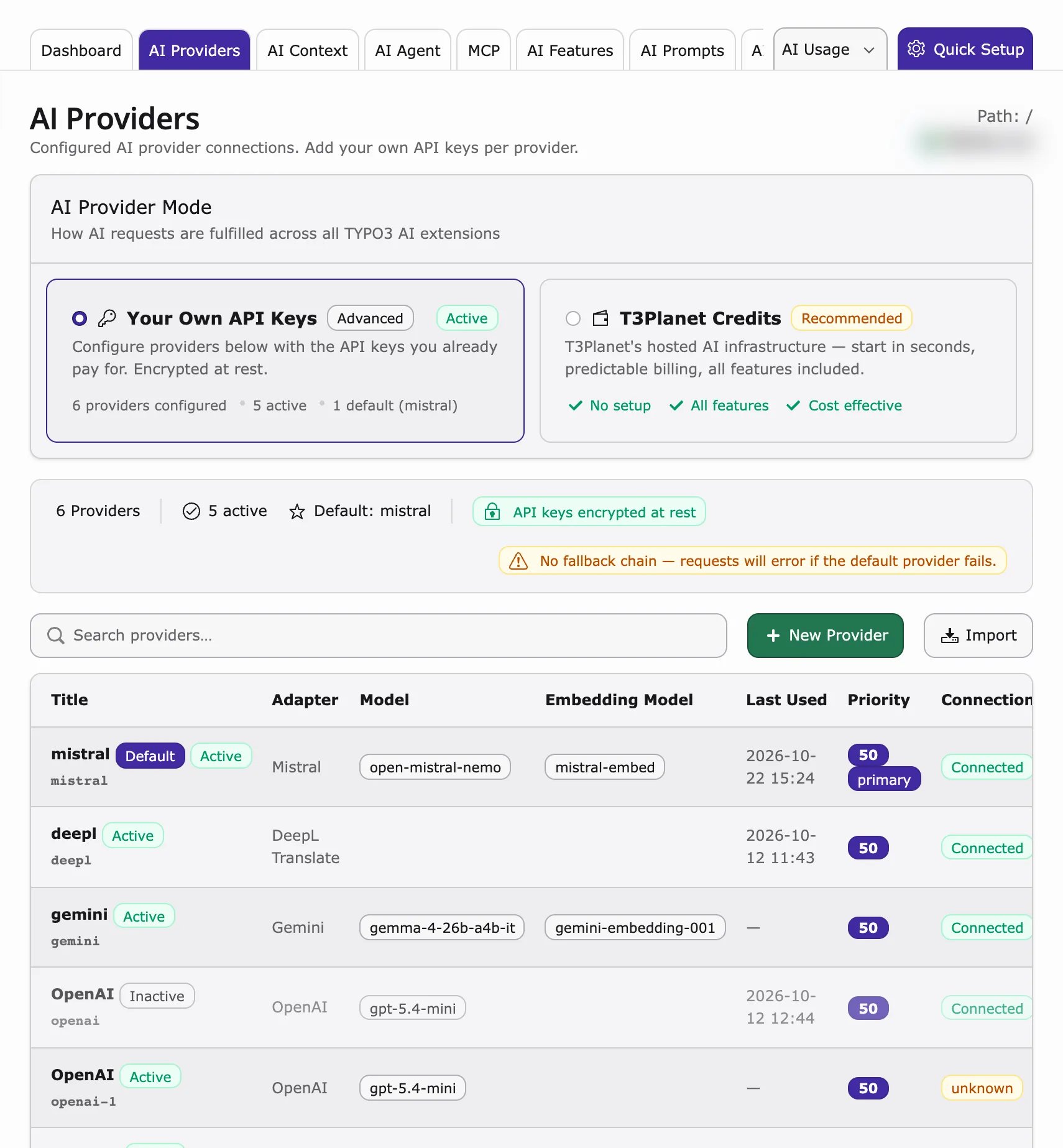
Adding a provider
Before you start, get an API key (a secret password for the AI service) from your AI service account. See Where to get API keys.- Go to AI Universe → AI Foundation.
- Click the AI Providers tab.
- Click New Provider. The Add AI Provider panel opens.
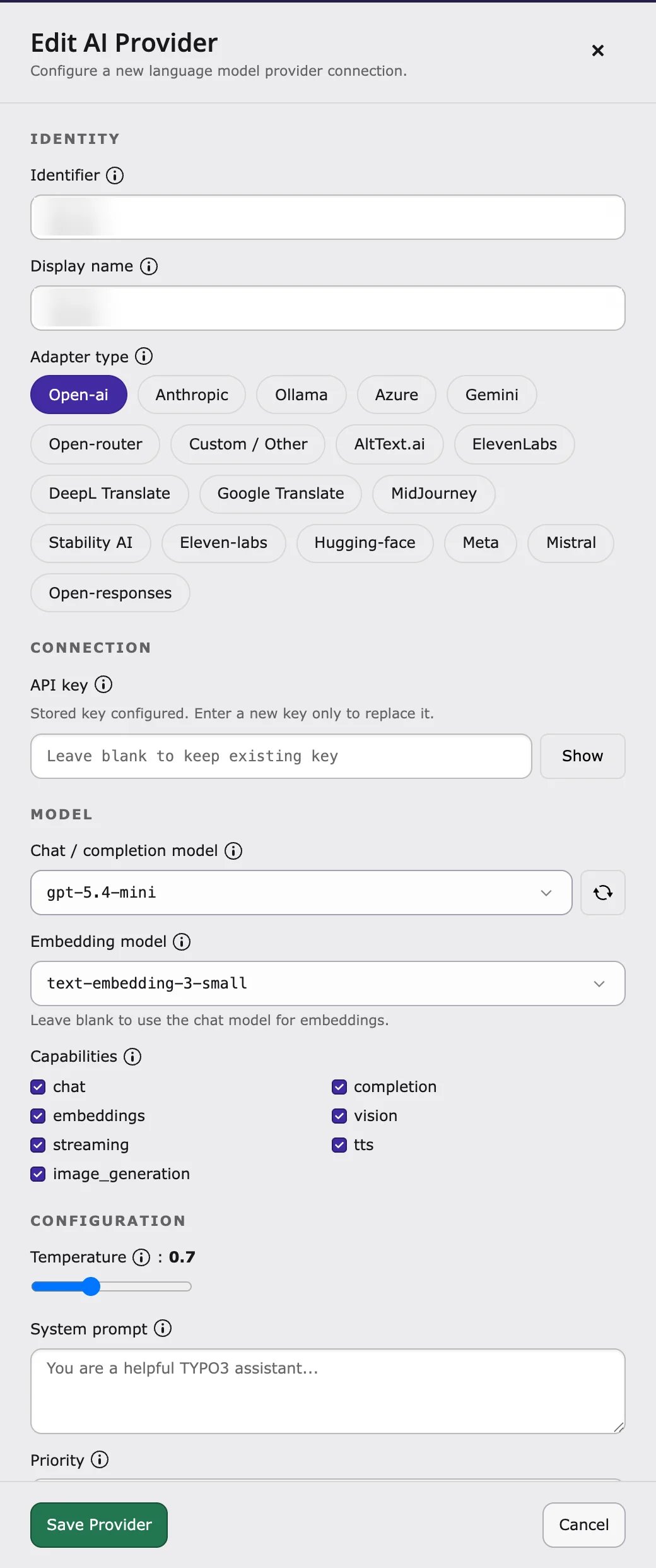
- In Adapter type, choose your AI service (for example OpenAI, Anthropic, Gemini, Azure, Mistral, Ollama, or Custom / Other).
- Enter an Identifier (an internal name, for example
openai-prod) and a Display name (what editors see, for exampleOpenAI production). - Paste your API key.
- Choose the Chat / completion model (the AI model that writes text).
- Optional: choose an Embedding model (used for search). Leave it empty to use the chat model.
- Turn on Provider enabled.
- Turn on Set as Default Provider (for exactly one provider).
- Click Save.
Endpoint URL is only needed for Custom / Other, Ollama and Azure. A local Ollama usually needs no API key.
Optional fields
Optional fields
You can also set Capabilities, Temperature (how creative the answers are), System prompt, Priority, prices (Input price / 1M tokens, Output price / 1M tokens, Currency, Cost center), Allowed BE groups, Logging privacy and Prevent rerouting. Click the help icon next to a field for an explanation.
Testing a connection
- Save the provider.
- Click Test connection.
- Read the result: success, or an error message that tells you what is wrong.
- the API key (copied completely?)
- the model name
- the Endpoint URL (for Ollama by default
http://localhost:11434) - whether your server may connect to the internet – ask your hosting provider.
For developers: proxy and self-hosted models
For developers: proxy and self-hosted models
Self-hosted endpoints (such as Ollama) must be reachable from the TYPO3 server. Typical causes of a failed test: wrong host or port, Docker/network isolation between PHP and the model host, or blocked outbound HTTPS.If the server reaches the internet only through a proxy, set it in
config/system/additional.php:Editing and deleting providers
- Edit: click a provider in the list. Click Test connection again after changing the API key or model.
- Delete: click Delete. Features that used this provider then use the default provider.
Importing providers from another site
Have several websites in one TYPO3? Copy the providers from one website to another, so you don’t need to enter the API keys again.- Go to AI Universe > AI Foundation and open the AI Providers tab.
- In the page tree, select the site that should receive the providers (the target site).
- Click Import next to New Provider, above the provider list.
- The Import providers from another site panel opens. Under Source
site, select the site you want to copy providers from. Each site is listed
with its number of providers, for example
Home (2). - All providers of the source site are listed and selected. Clear the checkbox of any provider you don’t want to import.
- Click Import selected.
2 provider(s) imported.), and the imported providers
appear in the provider list of the target site.
- Only sites that already have at least one provider appear under Source site. If no other site has providers, clicking Import shows No other sites with providers are available to import from.
- Importing makes a copy. The adapter, API key (still encrypted), models, capabilities, priority, and other settings are copied into the target site. Later changes on one site don’t affect the other.
- If the target site already has a provider with the same identifier, the
imported copy gets a numbered identifier (for example
openai-2). - An imported Default provider only stays the default if the target site doesn’t have a default provider yet.
- Only backend users who are allowed to edit providers can import them.
Capabilities
Choose a model that can do what you need:- Chat – write text.
- Streaming – show the answer while it is being written.
- Embeddings – needed for search, AI Chatbot and AI Search.
- Vision – understand images.
- Tool use – needed for AI assistants (MCP).
Multiple providers — when and why
- Test and live website – use separate providers with separate API keys.
- Save money – use a cheap model as default and a better model only for important tasks in AI Features.
- Data in the EU – use Mistral or Azure in an EU region.
Troubleshooting
- Test fails – check the API key, model, Endpoint URL and the internet connection of your server.
- Rate limit – too many requests. Wait, or upgrade your plan with the AI service.
- Image analysis returns nothing – choose a model that supports Vision.
- AI Foundation works but an AI extension doesn’t – check the overrides in AI Features.
Security
- Rotate keys every 90 days
- Use one key per environment (dev, staging, live)
- Restrict access via AI Permissions
- Never commit API keys to Git
Where to get API keys
- OpenAI: https://platform.openai.com/api-keys
- Anthropic: https://console.anthropic.com/
- Google Gemini: https://aistudio.google.com/apikey
- Mistral: https://console.mistral.ai/
- Azure OpenAI: https://portal.azure.com/
For developers
Developers can connect more AI services than the ones in the list.- Built in: OpenAI, Anthropic Claude, Google Gemini, Mistral AI, Ollama (local), OpenRouter and any OpenAI-compatible endpoint.
- More services (for example Azure, DeepSeek, xAI) work when their Symfony AI Composer package is installed.
- Your own adapter: see Custom AI Providers.
- API keys are stored encrypted, never as plain text.
Related
- AI Search installation, Step 6 and AI Chatbot installation, Step 6
- AI Features – use a different provider for one feature